Comments
from Hacker News https://ift.tt/2jWKGMF
Thursday, March 30, 2023

Cosine Implementation in C
Permalink
Go to file
A tag already exists with the provided branch name. Many Git commands accept both tag and branch names, so creating this branch may cause unexpected behavior. Are you sure you want to create this branch?
This file contains bidirectional Unicode text that may be interpreted or compiled differently than what appears below. To review, open the file in an editor that reveals hidden Unicode characters. Learn more about bidirectional Unicode characters
| /* origin: FreeBSD /usr/src/lib/msun/src/k_cos.c */ | |
| /* | |
| * ==================================================== | |
| * Copyright (C) 1993 by Sun Microsystems, Inc. All rights reserved. | |
| * | |
| * Developed at SunSoft, a Sun Microsystems, Inc. business. | |
| * Permission to use, copy, modify, and distribute this | |
| * software is freely granted, provided that this notice | |
| * is preserved. | |
| * ==================================================== | |
| */ | |
| /* | |
| * __cos( x, y ) | |
| * kernel cos function on [-pi/4, pi/4], pi/4 ~ 0.785398164 | |
| * Input x is assumed to be bounded by ~pi/4 in magnitude. | |
| * Input y is the tail of x. | |
| * | |
| * Algorithm | |
| * 1. Since cos(-x) = cos(x), we need only to consider positive x. | |
| * 2. if x < 2^-27 (hx<0x3e400000 0), return 1 with inexact if x!=0. | |
| * 3. cos(x) is approximated by a polynomial of degree 14 on | |
| * [0,pi/4] | |
| * 4 14 | |
| * cos(x) ~ 1 - x*x/2 + C1*x + ... + C6*x | |
| * where the remez error is | |
| * | |
| * | 2 4 6 8 10 12 14 | -58 | |
| * |cos(x)-(1-.5*x +C1*x +C2*x +C3*x +C4*x +C5*x +C6*x )| <= 2 | |
| * | | | |
| * | |
| * 4 6 8 10 12 14 | |
| * 4. let r = C1*x +C2*x +C3*x +C4*x +C5*x +C6*x , then | |
| * cos(x) ~ 1 - x*x/2 + r | |
| * since cos(x+y) ~ cos(x) - sin(x)*y | |
| * ~ cos(x) - x*y, | |
| * a correction term is necessary in cos(x) and hence | |
| * cos(x+y) = 1 - (x*x/2 - (r - x*y)) | |
| * For better accuracy, rearrange to | |
| * cos(x+y) ~ w + (tmp + (r-x*y)) | |
| * where w = 1 - x*x/2 and tmp is a tiny correction term | |
| * (1 - x*x/2 == w + tmp exactly in infinite precision). | |
| * The exactness of w + tmp in infinite precision depends on w | |
| * and tmp having the same precision as x. If they have extra | |
| * precision due to compiler bugs, then the extra precision is | |
| * only good provided it is retained in all terms of the final | |
| * expression for cos(). Retention happens in all cases tested | |
| * under FreeBSD, so don't pessimize things by forcibly clipping | |
| * any extra precision in w. | |
| */ | |
| #include "libm.h" | |
| static const double | |
| C1 = 4.16666666666666019037e-02, /* 0x3FA55555, 0x5555554C */ | |
| C2 = -1.38888888888741095749e-03, /* 0xBF56C16C, 0x16C15177 */ | |
| C3 = 2.48015872894767294178e-05, /* 0x3EFA01A0, 0x19CB1590 */ | |
| C4 = -2.75573143513906633035e-07, /* 0xBE927E4F, 0x809C52AD */ | |
| C5 = 2.08757232129817482790e-09, /* 0x3E21EE9E, 0xBDB4B1C4 */ | |
| C6 = -1.13596475577881948265e-11; /* 0xBDA8FAE9, 0xBE8838D4 */ | |
| double __cos(double x, double y) | |
| { | |
| double_t hz,z,r,w; | |
| z = x*x; | |
| w = z*z; | |
| r = z*(C1+z*(C2+z*C3)) + w*w*(C4+z*(C5+z*C6)); | |
| hz = 0.5*z; | |
| w = 1.0-hz; | |
| return w + (((1.0-w)-hz) + (z*r-x*y)); | |
| } |
You can’t perform that action at this time.
from Hacker News https://ift.tt/wjhKVNE
The 'Insanely Broad' Restrict Act Could Ban Much More Than Just TikTok
Image: NurPhoto/Contributor
Hacking. Disinformation. Surveillance. CYBER is Motherboard's podcast and reporting on the dark underbelly of the internet.
The RESTRICT Act, a proposed piece of legislation which provides one way the government might ban TikTok, contains “insanely broad” language and could lead to other apps or communications services with connections to foreign countries being banned in the U.S., multiple digital rights experts told Motherboard.
The bill could have implications not just for social networks, but potentially security tools such as virtual private networks (VPNs) that consumers use to encrypt and route their traffic, one said. Although the intention of the bill is to target apps or services that pose a threat to national security, these critics worry it may have much wider implications for the First Amendment.
“The RESTRICT Act is a concerning distraction with insanely broad language that raises serious human and civil rights concerns," Willmary Escoto, U.S. policy analyst for digital rights organization Access Now told Motherboard in an emailed statement.
Do you know anything else about the RESTRICT Act? We'd love to hear from you. Using a non-work phone or computer, you can contact Joseph Cox securely on Signal on +44 20 8133 5190, Wickr on josephcox, or email joseph.cox@vice.com.
The Restricting the Emergence of Security Threats that Risk Information and Communications Technology (RESTRICT) Act is led by Senators Mark Warner (D-VA) and John Thune (R-SD). The pair introduced the bill earlier this month, which is deliberately not limited to just TikTok.
Under the RESTRICT Act, the Department of Commerce would identify information and communications technology products that a foreign adversary has any interest in, or poses an unacceptable risk to national security, the announcement reads. The bill only applies to technology linked to a “foreign adversary.” Those countries include China (as well as Hong Kong); Cuba; Iran; North Korea; Russia, and Venezuela.
The bill’s language includes vague terms such as “desktop applications,” “mobile applications,” “gaming applications,” “payment applications,” and “web-based applications.” It also targets applicable software that has more than 1 million users in the U.S.
“The RESTRICT Act could lead to apps and other ICT services with connections to certain foreign countries being banned in the United States. Any bill that would allow the US government to ban an online service that facilitates Americans' speech raises serious First Amendment concerns,” Caitlin Vogus, deputy director of the Center for Democracy & Technology’s Free Expression Project, told Motherboard in an emailed statement. “In addition, while bills like the RESTRICT Act may be motivated by legitimate privacy concerns, banning ICT services with connections to foreign countries would not necessarily help protect Americans' privacy. Those countries may still obtain data through other means, like by purchasing it from private data brokers.”
Escoto from Access Now added, “As written, the broad language in the RESTRICT Act could criminalize the use of a VPN, significantly impacting access to security tools and other applications that vulnerable people rely on for privacy and security.”
“Many individuals and organizations, including journalists, activists, and human rights defenders, use VPNs to protect their online activity from surveillance and censorship. The RESTRICT Act would expose these groups to monitoring and repression, which could have a chilling effect on free speech and expression,” Escoto wrote.
(Many VPN companies engage in misleading marketing practices which exaggerate their importance and alleged security benefits. Used correctly, and with a provider that does not introduce its own issues such as logging users’ traffic, VPNs can be a useful tool for digital security).
Rachel Cohen, communications director for Senator Warner, responded by telling Motherboard in an email “This legislation is aimed squarely at companies like Kaspersky, Huawei and TikTok that create systemic risks to the United States’ national security—not at individual users.” She added “The threshold for criminal penalty in this bill is incredibly high—too high to ever be concerned with the actions of someone an individual user of TikTok or a VPN.”
With the bill’s introduction, Warner and Thune instead pointed to other foreign-linked companies that may pose their own security and privacy issues.
“Before TikTok, however, it was Huawei and ZTE, which threatened our nation’s telecommunications networks. And before that, it was Russia’s Kaspersky Lab, which threatened the security of government and corporate devices,” Warner said in a statement at the time. “We need a comprehensive, risk-based approach that proactively tackles sources of potentially dangerous technology before they gain a foothold in America, so we aren’t playing Whac-A-Mole and scrambling to catch up once they’re already ubiquitous.”
Sens. Tammy Baldwin (D-WI), Deb Fischer (R-NE), Joe Manchin (D-WV), Jerry Moran (R-KS), Michael Bennet (D-CO), Dan Sullivan (R-AK), Kirsten Gillibrand (D-NY), Susan Collins (R-ME), Martin Heinrich (D-NM), and Mitt Romney (R-UT) are co-sponsors of the proposed legislation
Both Vogus and Escoto pointed to another potential solution: the U.S. passing a more fundamental privacy law.
“If Congress is serious about addressing risks to Americans’ privacy, it could accomplish far more by focusing its efforts on passing comprehensive privacy legislation like the American Data Privacy and Protection Act,” Vogus said.
Update: This piece has been updated to include comment from Senator Warner’s office.
Subscribe to our cybersecurity podcast, CYBER. Subscribe to our new Twitch channel.
from Hacker News https://ift.tt/ahDCHtw
Open source espresso machine is one delicious rabbit hole inside another
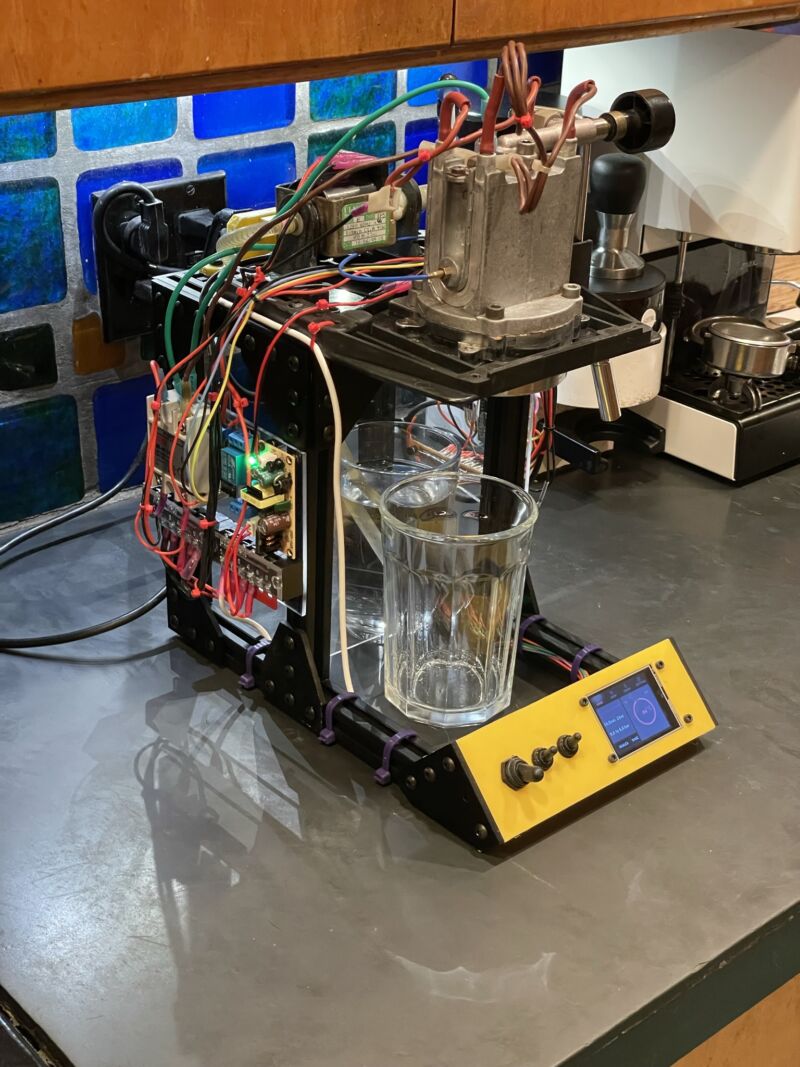
Enlarge / How far is too far to go for the perfect shot of espresso? Here's at least one trail marker for you.
Norm Sohl
Making espresso at home involves a conundrum familiar to many activities: It can be great, cheap, or easy to figure out, but you can only pick, at most, two of those. You can spend an infinite amount of time and money tweaking and upgrading your gear, chasing shots that taste like the best café offerings, always wondering what else you could modify.
Or you could do what Norm Sohl did and build a highly configurable machine out of open source hardware plans and the thermal guts of an Espresso Gaggia. Here's what Sohl did, and some further responses from the retired programmer and technical writer, now that his project has circulated in both open hardware and espresso-head circles.
Like many home espresso enthusiasts, Sohl had seen that his preferred machine, the Gaggia Classic Pro, could be modified in several ways, including adding a proportional–integral–derivative (PID) controller and other modifications to better control temperature, pressure, and shot volumes. Most intriguing to Sohl was Gaggiuino, a project that adds those things with the help of an Arduino Nano or STM32 Blackpill, a good deal of electrical work, and open software.
It looked neat to Sohl, but, as he told Ars in an email, he was pretty happy with the espresso he had dialed in on his Classic Pro. "[S]o I decided to build a new machine to experiment with. I didn't want to risk not having coffee while experimenting on a new machine." Luckily, he had an older machine, an Espresso Gaggia, and Gaggia's home espresso machine designs have been fairly consistent for decades. After descaling the boiler, he had a pump, a boiler, and, as he writes, "a platform for experimentation, to try out some of the crazy things I was seeing on YouTube and online."
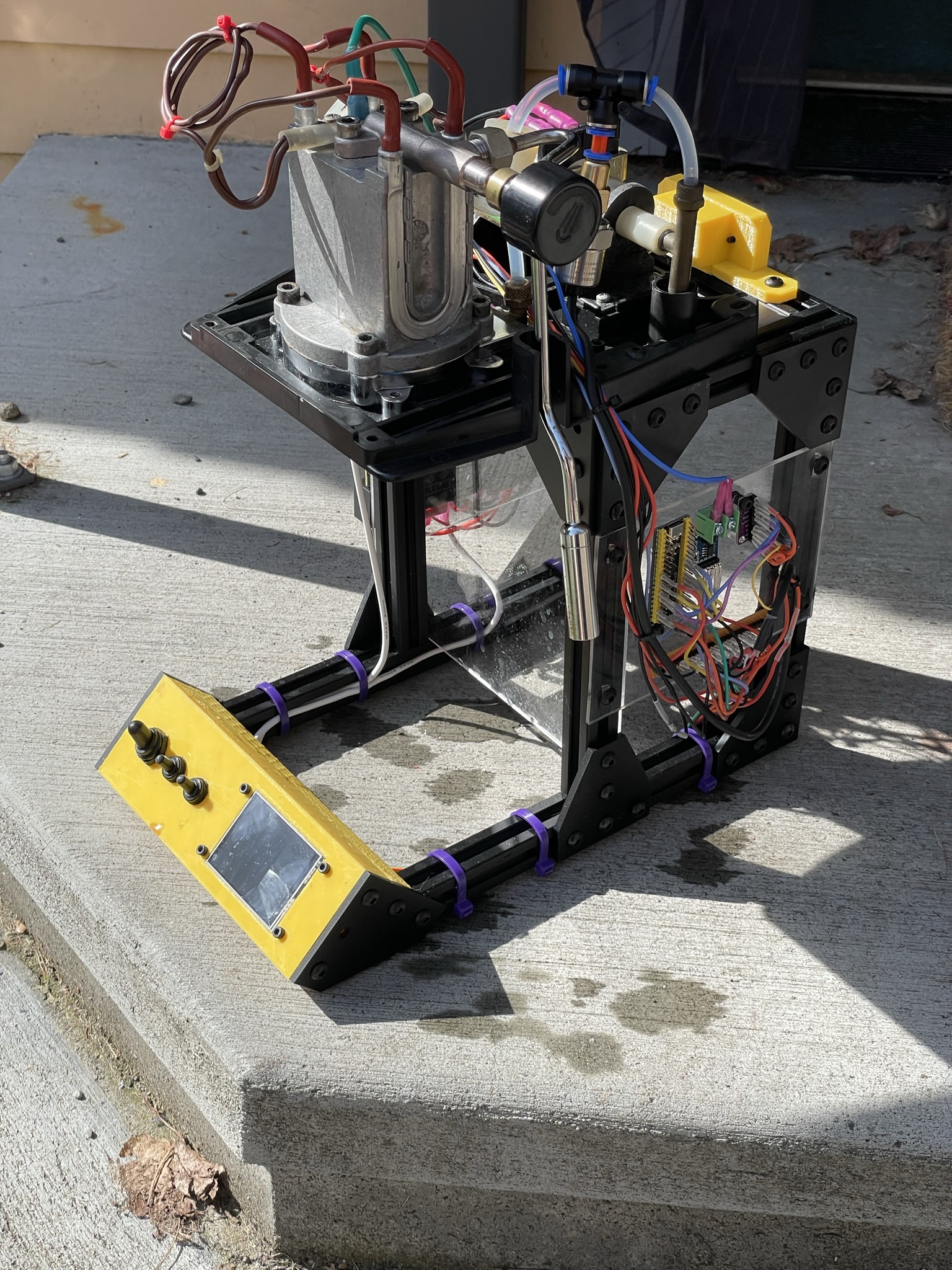
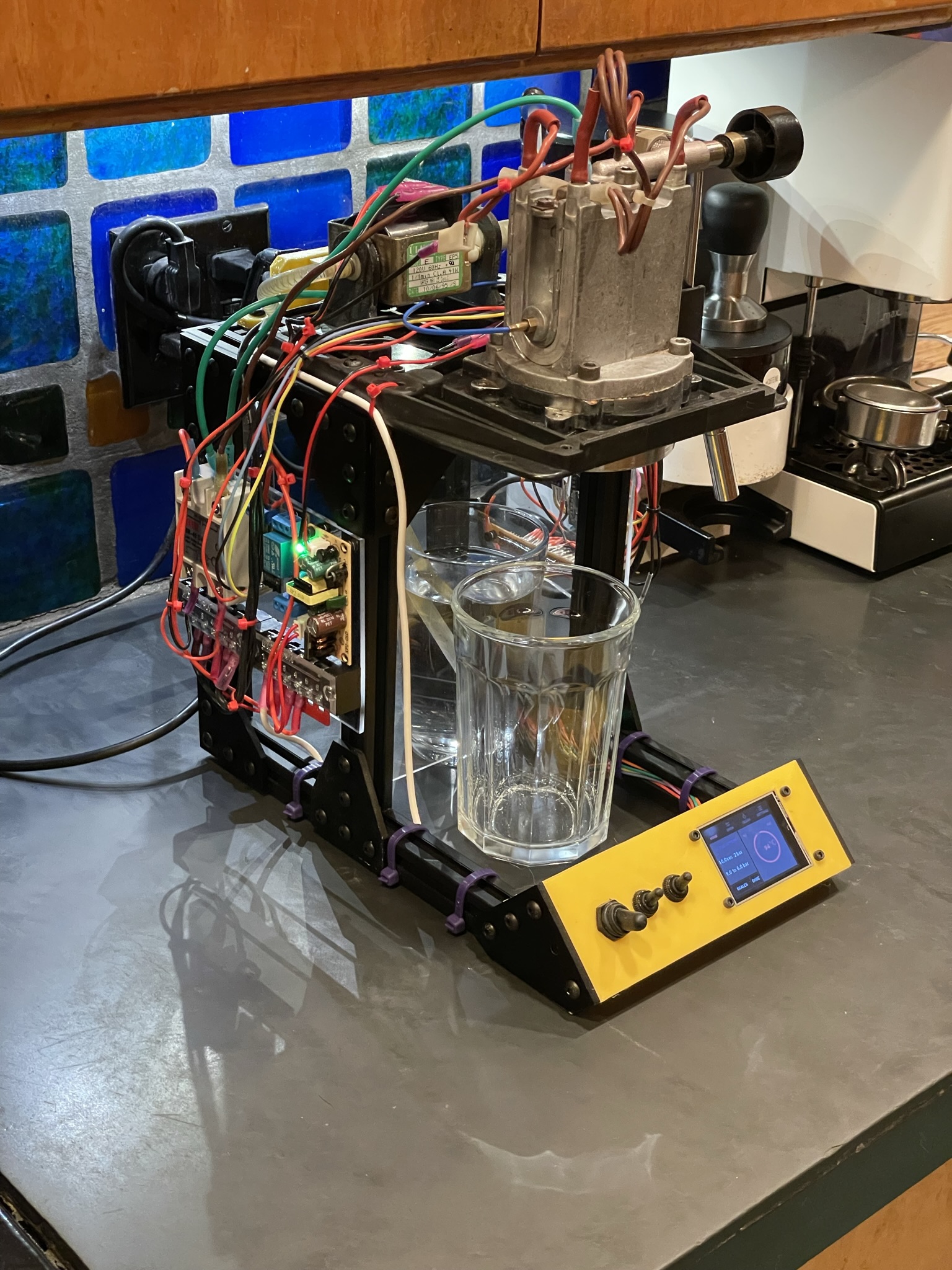
Enlarge / Norm Sohl's DIY open source espresso maker. There's no drip tray yet, and a bit too much wiring and heat exposed, but it pulls shots.
Norm Sohl
Sohl ended up creating a loose guide to making your own highly configurable machine out of common espresso machine parts and the Gaggiuino software. From his own machine, he salvaged a pump with a pressure sensor, a boiler with a temperature sensor, an overpressure valve, and brew head. Sohl made a chassis for his new machine out of extrusion rails and stiffening plates.
The high-voltage boards and components were assembled breadboard style onto acrylic panels, held up by poster-tack adhesive. A 120-volt power connector was salvaged from a PC power supply, then mounted with a 3D-printed bracket. The low-voltage wires and parts were also tacked onto acrylic, individually crimped, and heat shrink-wrapped. And the control panel was 3D-printed, allowing for toggle switches and a touch-panel screen.
There's more work to be done on Sohl's unit; the exposed boiler and 120-volt wiring need to be hidden, and a drip tray would be nice. But it works. The first shot was fast and under-extracted, suggesting a finer grind and settings changes. Then again, that describes almost every first-time home espresso setup. Sohl writes that he hopes future versions of his project will make use of the Gaggiuino project's own circuit board design and that he'll have his 3D project files posted for sharing.
In an email interview, Sohl wrote that he has received friendly and encouraging responses to his project.
Mostly people are plotting their own path and wondering how deep they want to get into the weeds with extra control. My advice (if they ask!) is to get an ok machine and grinder (The Gaggia Classic and perhaps the Baratza Encore ESP grinder work for me) and then spend some quality time getting to know how to use them. For example, my grinder is old and it took me forever to figure out how fine I really had to go to get the kind of espresso I wanted.
Asked if he was intimidated by the amount of control he now had over each shot, Sohl responded, "Yes, but that's a good thing?"
The level of control is amazing, and I am only beginning to dial in a shot that is as good as the one I get every morning from my stock machine. The machine itself still needs work before it goes into daily use - I want to add a decent drip tray before it will be really practical, and digital scales are another thing I... want to try. Honestly I think it may be overkill for my espresso needs, but I really enjoy the detailed work that goes into building and learning to use something like this. I think the satisfaction I get from building and experimenting is probably as important as the end product.
I asked Sohl which aspect was the most difficult: hardware, software/firmware, or getting the espresso dialed in. "It's all pretty complicated, hard to pick just one thing," he wrote. The software flashing worked without any programming on his part. The hardware required new skills, like crimping connectors, but he went slow and learned from small mistakes. Getting the espresso dialed in will probably be hardest, Sohl wrote. "I think I'll buy a bag of fresh dark roast and spend a couple of afternoons pulling shots and changing parameters."
Overall, "This is one of the most satisfying builds I've done—the mix of mechanical work, electronics, water and steam are challenging," Sohl wrote. You can see many more shots of the DIY machine and its details at Sohl's Substack, which we first saw via the Hackaday blog.
from Hacker News https://ift.tt/wOhXLI0
Wednesday, March 29, 2023
Judge finds Google destroyed evidence and repeatedly gave false info to court

Getty Images | Hup
A federal judge yesterday ruled that Google intentionally destroyed evidence and must be sanctioned, rejecting the company's argument that it didn't need to automatically preserve internal chats involving employees subject to a legal hold.
"After substantial briefing by both sides, and an evidentiary hearing that featured witness testimony and other evidence, the Court concludes that sanctions are warranted," US District Judge James Donato wrote. Later in the ruling, he wrote that evidence shows that "Google intended to subvert the discovery process, and that Chat evidence was 'lost with the intent to prevent its use in litigation' and 'with the intent to deprive another party of the information's use in the litigation.'"
He said that chats produced by Google last month in response to a court order "provided additional evidence of highly spotty practices in response to the litigation hold notices." For example, Donato quoted one newly produced chat in which "an employee said he or she was 'on legal hold' but that they preferred to keep chat history off."
Donato's ruling was made in a multi-district antitrust case bringing together lawsuits filed by Epic Games, the attorneys general of 38 states and the District of Columbia, the Match Group, and a class of consumers. It's being heard in US District Court for the Northern District of California. The case is over the Google Play Store app distribution model, with plaintiffs alleging that "Google illegally monopolized the Android app distribution market by engaging in exclusionary conduct, which has harmed the different plaintiff groups in various ways," Donato noted.
Donato's ruling said that Google provided false information to the court and plaintiffs about the auto-deletion practices it uses for internal chats. Google deletes chat messages every 24 hours unless the "history-on" setting is enabled by individual document custodians.
Judge: Google repeatedly gave false info
There are 383 Google employees who are subject to the legal hold in this case, and about 40 of those are designated as custodians. Google could have set the chat history to "on" as the default for all those employees but chose not to, the judge wrote.
"Google falsely assured the Court in a case management statement in October 2020 that it had 'taken appropriate steps to preserve all evidence relevant to the issues reasonably evident in this action,' without saying a word about Chats or its decision not to pause the 24-hour default deletion," Donato wrote. "Google did not reveal the Chat practices to plaintiffs until October 2021, many months after plaintiffs first asked about them."
The judge then chided Google at greater length:
The Court has since had to spend a substantial amount of resources to get to the truth of the matter, including several hearings, a two-day evidentiary proceeding, and countless hours reviewing voluminous briefs. All the while, Google has tried to downplay the problem and displayed a dismissive attitude ill tuned to the gravity of its conduct. Its initial defense was that it had no 'ability to change default settings for individual custodians with respect to the chat history setting,' but evidence at the hearing plainly established that this representation was not truthful.
Why this situation has come to pass is a mystery. From the start of this case, Google has had every opportunity to flag the handling of Chat and air concerns about potential burden, costs, and related factors. At the very least, Google should have advised plaintiffs about its preservation and related approach early in the litigation, and engaged in a discussion with them. It chose to stay silent until compelled to speak by the filing of the Rule 37 motion and the Court's intervention. The Court has repeatedly asked Google why it never mentioned Chat until the issue became a substantial problem. It has not provided an explanation, which is worrisome, especially in light of its unlimited access to accomplished legal counsel, and its long experience with the duty of evidence preservation.
Donato said another "major concern is the intentionality manifested at every level within Google to hide at the ball with respect to Chat. As discussed, individual users were conscious of litigation risks and valued the 'off the record' functionality of Chat. Google as an enterprise had the capacity of preserving all Chat communications systemwide once litigation had commenced but elected not [to] do so, without any assessment of financial costs or other factors that might help to justify that decision."
from Hacker News https://ift.tt/pr35KED
Making Python 100x faster with less than 100 lines of Rust
A while ago at $work, we had a performance issue with one of our core Python libraries.
This particular library forms the backbone of our 3D processing pipeline. It’s a rather big and complex library which uses NumPy and other scientific Python packages to do a wide range of mathematical and geometrical operations.
Our system also has to work on-prem with limited CPU resources, and while at first it performed well, as the number of concurrent physical users grew we started running into problems and our system struggled to keep up with the load.
We came to the conclusion that we had to make our system at least 50 times faster to handle the increased workload, and we figured that Rust could help us achieve that.
Because the performance problems we encountered are pretty common, we can recreate & solve them right here, in a (not-so-short) article.
So grab a cup of tea (or coffee) and I’ll walk you through (a) the basic underlying problem and (b) a few iterations of optimizations we can apply to solve this problem.
If you want to jump straight to the final code, just to go to the summary.
Our running example
Let’s create a small library, which will exhibit our original performance issues (but does completely arbitrary work).
Imagine you have a list of polygons and a of list points, all in 2D. For business reasons, we want to “match” each point to a single polygon.
Our imaginary library is going to:
- Start with an initial list of points and polygons (all in 2D).
- For each point, find a much smaller subset of polygons that are closest to it, based on distance from the center.
- Out of those polygons, select the “best” one (we are going to use “smallest area” as “best”).
In code, that’s going to look like this (The full code can be found here):
from typing import List, Tuple
import numpy as np
from dataclasses import dataclass
from functools import cached_property

Point = np.array

@dataclass
class Polygon:
    x: np.array
    y: np.array

    @cached_property
    def center(self) -> Point: ...
    def area(self) -> float: ...

def find_close_polygons(polygon_subset: List[Polygon], point: Point, max_dist: float) -> List[Polygon]:
    ...

def select_best_polygon(polygon_sets: List[Tuple[Point, List[Polygon]]]) -> List[Tuple[Point, Polygon]]:
    ...

def main(polygons: List[Polygon], points: np.ndarray) -> List[Tuple[Point, Polygon]]:
    ...
The key difficulty (performance wise) is this mix of Python objects and numpy arrays.
We are going to analyze this in depth in a minute.
It’s worth noting that converting parts of / everything to vectorized numpy might be possible for this toy library, but will be nearly impossible for the real library while making the code much less readable and modifiable, and the gains are going to be limited (here’s a partially vertorized version, which is faster but far from the results we are going to achieve).
Also, using any JIT-based tricks (PyPy / numba) results in very small gains (as we will measure, just to make sure).
Why not just Rewrite It (all) In Rust™?
As compelling as a complete rewrite was, it had a few problems:
- The library was already using numpy for a lot of its calculations, so why should we expect Rust to be better?
- It is big and complex and very business critical and highly algorithmic, so that would take ~months of work, and our poor on-prem server is dying today.
- A bunch of friendly researchers are actively working on said library, implementing better algorithms and doing a lot of experiments. They aren’t going to be very happy to learn a new programming language, waiting for things to compile and fighting with the borrow checker. They would appreciate us not moving their cheese too far.
Dipping our toes
It is time to introduce our friend the profiler.
Python has a built in Profiler (cProfile), but in this case it’s not really the right tool for the job:
- It’ll introduce a lot of overhead to all the Python code, and non for native code, so our results might be biased.
- We won’t be able to see into native frames, meaning we aren’t going to be able to see into our Rust code.
We are going to use py-spy (GitHub).
py-spy is a sampling profiler which can see into native frames.
They also mercifully publish pre-built wheels to pypi, so we can just pip install py-spy and get to work.
We also need something to measure.
# measure.py
import time
import poly_match
import os

# Reduce noise, actually improve perf in our case.
os.environ["OPENBLAS_NUM_THREADS"] = "1"

polygons, points = poly_match.generate_example()

# We are going to increase this as the code gets faster and faster.
NUM_ITER = 10

t0 = time.perf_counter()
for _ in range(NUM_ITER):
    poly_match.main(polygons, points)
t1 = time.perf_counter()

took = (t1 - t0) / NUM_ITER
print(f"Took and avg of {took * 1000:.2f}ms per iteration")
It’s not very scientific, but it’s going to take us very far.
“Good benchmarking is hard. Having said that, do not stress too much about having a perfect benchmarking setup, particularly when you start optimizing a program.”
~ Nicholas Nethercote, in “The Rust Performance Book”
Running this script will give us our baseline:
$ python measure.py
Took an avg of 293.41ms per iteration
For the original library, we used 50 different examples to make sure all cases are covered.
This matched the overall system perf, meaning we can start working on crushing this number.
Side note: We can also measure using PyPy (we’ll also add a warmup to allow the JIT to do its magic).
$ conda create -n pypyenv -c conda-forge pypy numpy && conda activate pypyenv
$ pypy measure_with_warmup.py
Took an avg of 1495.81ms per iteration
Measure first
So, let’s find out what is so slow here.
$ py-spy record --native -o profile.svg -- python measure.py
py-spy> Sampling process 100 times a second. Press Control-C to exit.

Took an avg of 365.43ms per iteration

py-spy> Stopped sampling because process exited
py-spy> Wrote flamegraph data to 'profile.svg'. Samples: 391 Errors: 0
Already, we can see that the overhead is pretty small. Just for comparison, using cProfile we get this:
$ python -m cProfile measure.py
Took an avg of 546.47ms per iteration
         7551778 function calls (7409483 primitive calls) in 7.806 seconds
         ...
We get this nice, reddish graph called a flamegraph:

Each box is a function, and we can see the relative time we spend in each function, including the functions it is calling to (going down the graph/stack). Try clicking on a the norm box to zoom into it.
Here, the main takeaways are:
- The vast majority of time is spent in
find_close_polygons. - Most of that time is spend doing
norm, which is a numpy function.
So, let’s have a look at find_close_polygons:
def find_close_polygons(
    polygon_subset: List[Polygon], point: np.array, max_dist: float
) -> List[Polygon]:
    close_polygons = []
    for poly in polygon_subset:
        if np.linalg.norm(poly.center - point) < max_dist:
            close_polygons.append(poly)

    return close_polygons
We are going to rewrite this function in Rust.
Before diving into the details, it’s important to notice a few things here:
- This function accepts & returns complex objects (
Polygon,np.array). - The size of the objects is non-trivial (so copying stuff might cost us).
- This function is called “a lot” (so overhead we introduce is probably going to matter).
My first Rust module
pyo3 is a crate for interacting between Python and Rust. It has exceptionally good documentation, and they explain the basic setup here.
We are going to call our crate poly_match_rs, and add function called find_close_polygons.
mkdir poly_match_rs && cd "$_"
pip install maturin
maturin init --bindings pyo3
maturin develop
Starting out, our crate is going to look like this:
use pyo3::prelude::*;

#[pyfunction]
fn find_close_polygons() -> PyResult<()> {
    Ok(())
}

#[pymodule]
fn poly_match_rs(_py: Python, m: &PyModule) -> PyResult<()> {
    m.add_function(wrap_pyfunction!(find_close_polygons, m)?)?;
    Ok(())
}
We also need to remember to execute maturin develop every time we change the Rust library.
And thats it! Let’s call our new function and see what happens.
>>> poly_match_rs.find_close_polygons(polygons, point, max_dist)
E TypeError: poly_match_rs.poly_match_rs.find_close_polygons() takes no arguments (3 given)
v1 - A naive Rust translation
We’ll start with matching the expected API.
PyO3 is pretty smart about Python to Rust conversions, so that’s going to be pretty easy:
#[pyfunction]
fn find_close_polygons(polygons: Vec<PyObject>, point: PyObject, max_dist: f64) -> PyResult<Vec<PyObject>> {
    Ok(vec![])
}
PyObject is (as the name suggest) a generic “anything goes” Python object. We’ll try to interact with it in a bit.
This should make the program run (albite incorrectly).
I’m going to just copy and paste the original Python function, and fix the syntax.
#[pyfunction]
fn find_close_polygons(polygons: Vec<PyObject>, point: PyObject, max_dist: f64) -> PyResult<Vec<PyObject>> {
    let mut close_polygons = vec![];

    for poly in polygons {
        if norm(poly.center - point) < max_dist {
            close_polygons.push(poly)
        }
    }

    Ok(close_polygons)
}
Cool, but this won’t compile:
% maturin develop
...

error[E0609]: no field `center` on type `Py<PyAny>`
 --> src/lib.rs:8:22
  |
8 |         if norm(poly.center - point) < max_dist {
  |                      ^^^^^^ unknown field


error[E0425]: cannot find function `norm` in this scope
 --> src/lib.rs:8:12
  |
8 |         if norm(poly.center - point) < max_dist {
  |            ^^^^ not found in this scope


error: aborting due to 2 previous errors ] 58/59: poly_match_rs
We need three crates to implement our function:
# For Rust-native array operations.
ndarray = "0.15"

# For a `norm` function for arrays.
ndarray-linalg = "0.16"

# For accessing numpy-created objects, based on `ndarray`.
numpy = "0.18"
First, lets turn the opaque and generic point: PyObject into something we can work with.
Just like we asked PyO3 for a “Vec of PyObjects”, we can ask for a numpy-array, and it’ll auto-convert the argument for us.
use numpy::PyReadonlyArray1;

#[pyfunction]
fn find_close_polygons(
    // An object which says "I have the GIL", so we can access Python-managed memory.
    py: Python<'_>,
    polygons: Vec<PyObject>,
    // A reference to a numpy array we will be able to access.
    point: PyReadonlyArray1<f64>,
    max_dist: f64,
) -> PyResult<Vec<PyObject>> {
    // Convert to `ndarray::ArrayView1`, a fully operational native array.
    let point = point.as_array();
    ...
}
Because point is now an ArrayView1, we can actually use it. For example:
// Make the `norm` function available.
use ndarray_linalg::Norm;

assert_eq!((point.to_owned() - point).norm(), 0.);
Now we just need to get the center of each polygon, and “cast” it to an ArrayView1.
In PyO3, this looks like this:
let center = poly
  .getattr(py, "center")?                 // Python-style getattr, requires a GIL token (`py`).
  .extract::<PyReadonlyArray1<f64>>(py)?  // Tell PyO3 what to convert the result to.
  .as_array()                             // Like `point` before.
  .to_owned();                            // We need one of the sides of the `-` to be "owned".
It’s a bit of a mouthful, but overall the result is a pretty clear line-to-line translation of the original code:
 1use pyo3::prelude::*;
 2
 3use ndarray_linalg::Norm;
 4use numpy::PyReadonlyArray1;
 5
 6#[pyfunction]
 7fn find_close_polygons(
 8    py: Python<'_>,
 9    polygons: Vec<PyObject>,
10    point: PyReadonlyArray1<f64>,
11    max_dist: f64,
12) -> PyResult<Vec<PyObject>> {
13    let mut close_polygons = vec![];
14    let point = point.as_array();
15    for poly in polygons {
16        let center = poly
17            .getattr(py, "center")?
18            .extract::<PyReadonlyArray1<f64>>(py)?
19            .as_array()
20            .to_owned();
21
22        if (center - point).norm() < max_dist {
23            close_polygons.push(poly)
24        }
25    }
26
27    Ok(close_polygons)
28}
vs the original:
def find_close_polygons(
    polygon_subset: List[Polygon], point: np.array, max_dist: float
) -> List[Polygon]:
    close_polygons = []
    for poly in polygon_subset:
        if np.linalg.norm(poly.center - point) < max_dist:
            close_polygons.append(poly)

    return close_polygons
We expect this version to have some advantage over the original function, but how much?
$ (cd ./poly_match_rs/ && maturin develop)
$ python measure.py
Took an avg of 609.46ms per iteration
So.. Is Rust just super slow? No! We just forgot to ask for speed! If we run with maturin develop --release we get much better results:
$ (cd ./poly_match_rs/ && maturin develop --release)
$ python measure.py
Took an avg of 23.44ms per iteration
Now that is a nice speedup!
We also want to see into our native code, so we are going to enable debug symbols in release. While we are at it, we might as well ask for maximum speed.
# added to Cargo.toml
[profile.release]
debug = true       # Debug symbols for our profiler.
lto = true         # Link-time optimization.
codegen-units = 1  # Slower compilation but faster code.
v2 - Rewrite even more in Rust
Now, using the --native flag in py-spy is going to show us both Python and our new native code.
Running py-spy again
$ py-spy record --native -o profile.svg -- python measure.py
py-spy> Sampling process 100 times a second. Press Control-C to exit.
we get this flamegraph (non-red colors are added to so we can refer to them):

Looking at the profiler output, we can see a few interesting things:
- The relative size of
find_close_polygons::...::trampoline(the symbol Python directly calls) and__pyfunction_find_close_polygons(our actual implementation).- Hovering, they are 95% vs 88% of samples, so the overhead is pretty small.
- The actual logic (
if (center - point).norm() < max_dist { ... }) which islib_v1.rs:22(very small box on the right), is about 9% of the total runtime.- So x10 improvement should still be possible!
- Most of the time is spent in
lib_v1.rs:16, which ispoly.getattr(...).extract(...)and if we zoom in we can see is really justgetattrand getting the underlying array usingas_array.
The conclusion here is that we need to focus on solving the 3rd point, and the way to do that is to Rewrite Polygon in Rust.
Let’s look at our target:
@dataclass
class Polygon:
    x: np.array
    y: np.array
    _area: float = None

    @cached_property
    def center(self) -> np.array:
        centroid = np.array([self.x, self.y]).mean(axis=1)
        return centroid

    def area(self) -> float:
        if self._area is None:
            self._area = 0.5 * np.abs(
                np.dot(self.x, np.roll(self.y, 1)) - np.dot(self.y, np.roll(self.x, 1))
            )
        return self._area
We’ll want to keep the existing API as much as possible, but we don’t really need area to be that fast (for now).
The actual class might have additional complex stuff, like a merge method which uses ConvexHull from scipy.spatial.
To cut costs (and limit the scope of this already long article), we will only move the “core” functionality of Polygon to Rust, and subclass that from Python to implement the rest of the API.
Our struct is going to look like this:
// `Array1` is a 1d array, and the `numpy` crate will play nicely with it.
use ndarray::Array1;

// `subclass` tells PyO3 to allow subclassing this in Python.
#[pyclass(subclass)]
struct Polygon {
    x: Array1<f64>,
    y: Array1<f64>,
    center: Array1<f64>,
}
Now we need to actually implement it. We want to expose poly.{x, y, center} as:
- Properties.
- numpy Arrays.
We also need a constructor so Python can create new Polygons.
use numpy::{PyArray1, PyReadonlyArray1, ToPyArray};

#[pymethods]
impl Polygon {
    #[new]
    fn new(x: PyReadonlyArray1<f64>, y: PyReadonlyArray1<f64>) -> Polygon {
        let x = x.as_array();
        let y = y.as_array();
        let center = Array1::from_vec(vec![x.mean().unwrap(), y.mean().unwrap()]);

        Polygon {
            x: x.to_owned(),
            y: y.to_owned(),
            center,
        }
    }

    // the `Py<..>` in the return type is a way of saying "an Object owned by Python".
    #[getter]
    fn x(&self, py: Python<'_>) -> PyResult<Py<PyArray1<f64>>> {
        Ok(self.x.to_pyarray(py).to_owned()) // Create a Python-owned, numpy version of `x`.
    }

    // Same for `y` and `center`.
}
We need to add our new struct as a class to the module:
#[pymodule]
fn poly_match_rs(_py: Python, m: &PyModule) -> PyResult<()> {
    m.add_class::<Polygon>()?; // new.
    m.add_function(wrap_pyfunction!(find_close_polygons, m)?)?;
    Ok(())
}
And now we can update the Python code to use it:
class Polygon(poly_match_rs.Polygon):
    _area: float = None

    def area(self) -> float:
        ...
We can compile it and it’ll actually work, but it’ll be much slower! (Remember that x, y, and center will now need to create a new numpy array on each access).
To actually improve performance, we need to extract our original Rust-based Polygon from the list of Python-Polygons.
PyO3 is very flexible with this type of operation, so there are a few ways we could do it. One limit we have is that we also need to return Python-Polygons, and we don’t want to do any cloning of the actual data.
It’s possible to manually call .extract::<Polygon>(py)? on each PyObjects, but we ask PyO3 to give us Py<Polygon> directly.
This is a reference to a Python-owned object, which we expect to contain an instance (or a subclass, in our case) of a native pyclass struct.
45#[pyfunction]
46fn find_close_polygons(
47    py: Python<'_>,
48    polygons: Vec<Py<Polygon>>,             // References to Python-owned objects.
49    point: PyReadonlyArray1<f64>,
50    max_dist: f64,
51) -> PyResult<Vec<Py<Polygon>>> {           // Return the same `Py` references, unmodified.
52    let mut close_polygons = vec![];
53    let point = point.as_array();
54    for poly in polygons {
55        let center = poly.borrow(py).center // Need to use the GIL (`py`) to borrow the underlying `Polygon`.
56            .to_owned();
57
58        if (center - point).norm() < max_dist {
59            close_polygons.push(poly)
60        }
61    }
62
63    Ok(close_polygons)
64}
Let’s see what we get using this code:
$ python measure.py
Took an avg of 6.29ms per iteration
We are nearly there! Just x2 to go!
v3 - Avoid allocations
Let’s fire up the profiler one more time.

- We start to see
select_best_polygon, which now calls some Rust code (when it gets thex&yvectors)- We could fix that, but that’s a very small potential improvement (maybe 10%)
- We see we spend about 20% the time on
extract_argument(underlib_v2.rs:48), so we are still paying quite a lot on overhead!- But most of the time is in
PyIterator::nextandPyTypeInfo::is_type_of, which aren’t easy to fix.
- But most of the time is in
- We see a bunch of time spent allocating stuff!
lib_v2.rs:58is ourif, and we seedrop_in_placeandto_owned.- The actual line is about 35% of the overall time, which is a lot more than we expect: this should be the “fast bit” with all the data in place.
Let’s tackle the last point.
This our problematic snippet:
let center = poly.borrow(py).center
    .to_owned();

if (center - point).norm() < max_dist { ... }
What we want is to avoid that to_owned. But we need an owned object for norm, so we’ll have to implement that manually.
(The reason we can improve on ndarray here is that we know that our array is actually just 2 f32s).
This would look like this:
use ndarray_linalg::Scalar;

let center = &poly.as_ref(py).borrow().center;

if ((center[0] - point[0]).square() + (center[1] - point[1]).square()).sqrt() < max_dist {
    close_polygons.push(poly)
}
But, alas, the borrow checker is unhappy with us:
error[E0505]: cannot move out of `poly` because it is borrowed
  --> src/lib.rs:58:33
   |
55 |         let center = &poly.as_ref(py).borrow().center;
   |                       ------------------------
   |                       |
   |                       borrow of `poly` occurs here
   |                       a temporary with access to the borrow is created here ...
...
58 |             close_polygons.push(poly);
   |                                 ^^^^ move out of `poly` occurs here
59 |         }
60 |     }
   |     - ... and the borrow might be used here, when that temporary is dropped and runs the `Drop` code for type `PyRef`
As usual, the borrow checker is correct: we are doing memory crimes.
The simpler fix is to Just Clone, and close_polygons.push(poly.clone()) compiles.
This is actually a very cheap clone, because we only incr the reference count of the Python object.
However, in this case we can also shorten the borrow by doing a classic Rust trick:
let norm = {
    let center = &poly.as_ref(py).borrow().center;

    ((center[0] - point[0]).square() + (center[1] - point[1]).square()).sqrt()
};

if norm < max_dist {
    close_polygons.push(poly)
}
Because poly is only borrowed in the inner scope, once we reach close_polygons.push the compiler can know that we no longer hold that reference, and will happily compile the new version.
And finally, we have
$ python measure.py
Took an avg of 2.90ms per iteration
Which is 100x improvement over the original code.
Summary
We started out with this Python code:
@dataclass
class Polygon:
    x: np.array
    y: np.array
    _area: float = None

    @cached_property
    def center(self) -> np.array:
        centroid = np.array([self.x, self.y]).mean(axis=1)
        return centroid

    def area(self) -> float:
        ...

def find_close_polygons(
    polygon_subset: List[Polygon], point: np.array, max_dist: float
) -> List[Polygon]:
    close_polygons = []
    for poly in polygon_subset:
        if np.linalg.norm(poly.center - point) < max_dist:
            close_polygons.append(poly)

    return close_polygons

# Rest of file (main, select_best_polygon).
We profiled it using py-spy, and even our most naive, line-to-line translation of find_close_polygons resulted in more than a x10 improvement.
We did a few additional iterations of profile-write-measure iterations until we finally we gained a x100 improvement in runtime, while keeping the same API as the original library.
| Version | Avg time per iteration (ms) | Multiplier |
|---|---|---|
| Baseline implementation (Python) | 293.41 | 1x |
Naive line-to-line Rust translation of find_close_polygons |
23.44 | 12.50x |
Polygon implementation in Rust |
6.29 | 46.53x |
| Optimized allocation implementation in Rust | 2.90 | 101.16x |
The final python code looks like this
import poly_match_rs
from poly_match_rs import find_close_polygons

class Polygon(poly_match_rs.Polygon):
    _area: float = None

    def area(self) -> float:
        ...

# Rest of file unchanged (main, select_best_polygon).
which calls this Rust code:
use pyo3::prelude::*;

use ndarray::Array1;
use ndarray_linalg::Scalar;
use numpy::{PyArray1, PyReadonlyArray1, ToPyArray};

#[pyclass(subclass)]
struct Polygon {
    x: Array1<f64>,
    y: Array1<f64>,
    center: Array1<f64>,
}

#[pymethods]
impl Polygon {
    #[new]
    fn new(x: PyReadonlyArray1<f64>, y: PyReadonlyArray1<f64>) -> Polygon {
        let x = x.as_array();
        let y = y.as_array();
        let center = Array1::from_vec(vec![x.mean().unwrap(), y.mean().unwrap()]);

        Polygon {
            x: x.to_owned(),
            y: y.to_owned(),
            center,
        }
    }

    #[getter]
    fn x(&self, py: Python<'_>) -> PyResult<Py<PyArray1<f64>>> {
        Ok(self.x.to_pyarray(py).to_owned())
    }

    // Same for `y` and `center`.
}

#[pyfunction]
fn find_close_polygons(
    py: Python<'_>,
    polygons: Vec<Py<Polygon>>,
    point: PyReadonlyArray1<f64>,
    max_dist: f64,
) -> PyResult<Vec<Py<Polygon>>> {
    let mut close_polygons = vec![];
    let point = point.as_array();
    for poly in polygons {
        let norm = {
            let center = &poly.as_ref(py).borrow().center;

            ((center[0] - point[0]).square() + (center[1] - point[1]).square()).sqrt()
        };

        if norm < max_dist {
            close_polygons.push(poly)
        }
    }

    Ok(close_polygons)
}

#[pymodule]
fn poly_match_rs(_py: Python, m: &PyModule) -> PyResult<()> {
    m.add_class::<Polygon>()?;
    m.add_function(wrap_pyfunction!(find_close_polygons, m)?)?;
    Ok(())
}
Takeaways
-
Rust (with the help of pyo3) unlocks true native performance for everyday Python code, with minimal compromises.
-
Python is a superb API for researchers, and crafting fast building blocks with Rust is an extremely powerful combination.
-
Profiling is super interesting, and it pushes you to truly understand everything that’s happening in your code.
And finally: computers are crazy fast. The next time you wait for something to complete, consider firing up a profiler, you might learn something new 🚀
from Hacker News https://ift.tt/1ngHkwY
Subscribe to:
Posts (Atom)