People sometimes ask me for robotics resources. There aren’t many high quality internet-first lists available on this topic, so I made one I can link to. I’ll continually update this list so feel free to give suggestions if things are missing or you have better links.
General Advice
Robotics can be overwhelming from the sheer number of fields involved (everything from mathematics to physics to computer science to mechanical engineering enters in). Remember: you won’t start as an expert in anything; you can’t end up as an expert in everything. Also learning will not be a linear path; outside of courses, acquire knowledge as you need it in projects.
Try as much as possible to avoid this antipattern (I still struggle)…
Communities
Instead of attempting to pre-load your head with maximum theory, try to get as much practical experience as possible (see below), whether that be joining a club, lab, or if you’re lucky in an internship or job.
It is incredibly hard to do something on your own without some kind of environmental forcing function. If at all possible, embed yourself in a community of people working on problems of interest to you.
FIRST robotics competition - Simply put, FRC was the awesomest thing ever for me. If you can find a team, beg them to let you participate…
If you are a student at a university - try joining a lab!
Unfortunately outside of these robotics is currently not an easy field to break into. The sheer number of ‘moving parts’ to a (useful) robotic system - from hardware to drivers to algorithms to user interfaces - means it’s tough to hack together a demo in a few weeks, get users, and bootstrap / apply to some accelerator like in many software projects. Making the jump from “hacker” to “career”, even with all the knowledge in the world is hard. If you know solutions to this, let me know.
Prerequisites
Computer programming - this is essential if you want to do basically anything in robotics. Python and C++ are the most important languages to know - learn both. Familiarity with basic data-structures and algorithms concepts is helpful for problem solving and in some fields like motion planning but initially less vital than you may think - it’s not necessary to be a master leetcoder.
Maths
Linear algebra - vital in most topics beyond basic basic control. If you want to become an expert, Axler’s book is good (though I didn’t make it through the whole thing 😳).
Calculus - fundamental differential calculus and partial derivatives is required to understand optimisation algorithms which are everywhere in robo.
Wiki’s PID controller isn’t bad if you want to learn the basics (95% of controllers used in industry are PID). Ben Recht’s blog post is also decent.
These course slides are good for basics and more advanced concepts like MPC .
Control challenges is a set of (very fun) challenges that will allow you to test your ability to write basic controllers.
This talk from FIRST Robotics team 254 is great for going over the basics of robot control and showing how we can improve on basic PID using simple interpolation.
Mathematics and Mechanics of Robotics & Manipulation - This set of notes by Nathan Ratliff provides a great overview of many topics. These notes on robot dynamics from ETH are also great.
Filtering - Kalman and Bayesian Filters in Python is a great read with interactive notebook examples throughout. Good for building intuition on both Bayesian statistics as well as how filters for linear and nonlinear dynamical systems work. The wiki article on the Kalman Filter and this blog post is also well written if you want a shorter overview.
Machine Learning & Neural Networks - Focus less on the basics of machine learning than the application of neural networks as function approximators, which is their primary utility as perception and decision making modules in robotics. Michael Nielsen’s book is my favourite resource in this regard. The canonical deep learning book is good reference but you don’t need to read the whole thing - pick out specific topics as required.
Path and motion planning - I haven’t read a ton in this field; wiki has a decent overview and details some basicalgorithms.
Reinforcement Learning & more on controllers - Ben Recht’s “outsider’s tour of RL” provides a nice concise overview of many relevant concepts and ties them to classical control. Spinning up in Deep Reinforcement Learning is another great reference on the topic and exhibits many of the most important algorithms for research in the field.
Software
The space of software is so vast I couldn’t fit it all here… this list provides a much more comprehensive overview in this regard. Some utilities I’ve found useful are:
ROS is very widely used many projects, worth picking up the basics.
RLLib has implementations of many reinforcement learning algorithms and support for distributed training.
Simulators
Robosuite is great for robot learning and has many richly-designed built-in environments.
Isaac Gym is recently released and provides extremely fast samples for reinforcement learning. It does this by running thousands of environments in parallel on the GPU (in almost all other sims physics is run on the CPU meaning you can only run one environment at once). You can train tasks in minutes that previously took hours.
Other Topics & Resources
Convex Optimisation is used in everything from simulators to controllers and beyond. I intend to read the canonical book (free) at some point.
The Berkley Advanced Robotics course provides relatively self contained expositions of many topics in lecture format (don’t be scared off by the ‘advanced' moniker, it’s not that incomprehensible 😅.)
Russ Tedrake’s courses on Underactuated Robotics and Manipulation seem really high quality (I haven’t gotten around to doing them myself yet).
Interesting Lines of Work
Domain Randomisation is highly underrated, and will likely get more important as we get faster simulators which are able to generalize better. Learning Dexterity from OpenAI is a very interesting paper, and the line of work around improving simulator parameter show two different and interesting takes on this powerful approach.
Hierarchy in reinforcement learning has shown promising results in getting behaviour that generalises, the DeepGait and UniCon paper being two interesting examples.
Probably my weakest area… up for recommendations about specific great resources. OnShape is a great resource for designing things and is great even with minimal CAD experience (even I am able to use it!) Open Dynamic Robot initiative has many robots that you can build with off-the-shelf components.
Business of Robotics
Very interesting side of things, however there is somewhat of a paucity of resources (I’m pretty sure many in the space refrain from publishing their theses.) Please send if you have others I have missed!
It’s been kind of a different year, but it was the first year and pretty amazing for Excalidraw.
Excalidraw started as a way to procrastinate on January 1st, 2020, and ended up being a fully fledged whiteboard product only one year later! In this post, we’ll go over the most important features that made Excalidraw great at being a virtual whiteboard for sketching hand-drawn like diagrams.
We are so incredibly proud to have built something that is being used by 20k weekly active people.
Tech Stack
Excalidraw is fully open source, but it also stands on the shoulders of many other projects. We couldn’t do it without Rough.js, the library that gives Excalidraw its unique look; FG_Virgil, the hand-written font designed by Ellinor Rapp; TypeScript, to tame the complexity of our codebase, giving a helping hand to new contributors (and old ones alike); and last but not least, React. Our full list of dependencies is listed on GitHub.
In addition, Excalidraw is depending on many awesome services such as Vercel for hosting and pull request previews, Crowdin for managing dozens of translations, CodeSandbox for easy hacking on the project, Sentry for error reporting, and Dependabot to keep our dependencies up to date.
Finally, this success wouldn’t be possible without you, the over 100 contributors who helped us ship new features, improvements, and fixes right to production.
Many of Excalidraw use cases involve drawing sensitive data. As such, we architected our system so that our servers never see the content of your drawings, using end-to-end encryption. The backend support for storing data was implemented by lipis, while the client-side encryption itself was added by vjeux. Read how we are doing it in our article on end-to-end encryption.
Touch support and mobile-optimized layout wasfirstadded by j-f1. This includes the creation of a toolbar for mobile devices that displays relevant controls while still leaving most of the screen free for the canvas.
📚 Library
The library was first implemented by petehunt. After adding support for exporting/importing the library, we eventually introduced a public directory where you can share yours. Visit libraries.excalidraw.com for more.
📊 Excalicharts
While we aim to keep Excalidraw simple to use, sometimes we hide little easter eggs that you need to find out for yourself (or find some hints by following our Twitter account). For example, you can copy any two-column dataset from a spreadsheet, or comma separated values (CSV) from a text file, and paste them into Excalidraw to quickly produce a chart. The first implementation was done by petehunt and several improvements were made by lipis.
🏹 Lines and Arrows
Possibly the single most complex feature in Excalidraw, lines/arrows have come a long way since the beginning. Initially, we’ve only had two-point lines. Multi-point support was added by gasimgasimzada, with improvements by dai-shi, line editing by dwelle, arrowheads by steveruizok, and by popular demand the arrow binding by xixixao.
We must give a shout-out to dai-shi for continuous implementations of seemingly simple, but in fact pretty hard problems such as rotation and resizing, especially in combination of editing multiple elements at once.
#️⃣ Grid and Stats
From early on, people were asking for more precision in their hand drawn diagrams. We complied by adding the grid support implemented by dai-shi, and—inspired by YouTube’s stats for nerds—our own version of stats implemented by lipis. Both features could be found under the context menu by right-clicking on the canvas.
💾 File system integration and file handling
In Excalidraw, we use the browser-nativefs library to integrate with the file system of the operating system. This allows us to support a true open→edit→save workflow with proper over-saving and save-as on supported browsers, with a fallback to file uploads and downloads on other browsers. Read more about this feature in tomayac’s earlier article on this blog. We also have experimental support for file type association, so that when you double-click an .excalidraw file in your file explorer, the Excalidraw PWA opens.
⚙️ Gatsby plugin
We also have a plugin for Gatsby that automatically converts links to saved Excalidraw drawings to inline SVG at build time. We are actually using it in this post for our charts. Implemented by trevorblades and j-f1. You can find it under @excalidraw/gatsby-embedder-excalidraw.
🌒 Dark Mode
To help protect your eyes, @xixixao added dark mode, effectively turning Excalidraw into an actual blackboard.
📦 npm package
One of the last things we’ve introduced this year was a completely new npm package, available at @excalidraw/excalidraw. A long time in the making (thanks to @aakansha1216 for most of the work), this package allows you to easily embed Excalidraw as a React component into your apps.
Excalidraw in the news
Get involved
Excalidraw wouldn’t have become what it is today without all the wonderful contributions. If you haven’t already, you can start today! And remember, it’s not just code that makes Excalidraw better. Every bit helps, be it bug reports, translations, suggestions for improvements, or just hanging out on our Discord chat. Don’t forget to follow us on Twitter @excalidraw for all the latest news and announcements.
What’s next
We will continue working hard on improving the performance, adding features where it makes sense, fixing bugs, working with designers to make Excalidraw look better, and more. But whatever we do, we’ll try our best to ensure we don’t lose the simplicity and charm that makes Excalidraw the product you love. 💕
Some cool drawings
The best part of this project is to see a constant stream of awesome public drawings that people are making with Excalidraw. Here are some of our favorites from 2020.
"It's certainly, 'work harder to make less,'"Ayers tells The Hollywood Reporter. "At the end of the day it's a little disappointing, but there's nothing normal about this."
In March, when COVID-19 hit the comic industry in earnest, many retailers and publishers feared it would be an apocalyptic event for the business. Stay-at-home orders shuttered stores, and shipments of new product ceased for several months when Diamond Comics Distributors hit pause. Stores have struggled to survive, and some have shuttered permanently.
However, months after the comic book industry restarted — accompanied by a publicity campaign proclaiming that the industry’s “comeback will be bigger than [the] setback” — there are multiple signs that comics has proven to be far stronger than anyone, including those inside the industry, expected in the face of an uncertain year.
“The biggest surprise started during May and June, as we were allowed to reopen, comics started shipping again, and customers were slowly starting to come back to the shop. Customers were buying comics. A lot of comics,” California retailer Ryan Higgins tells THR.
With comic conventions canceled and people not taking vacations, many fans concentrated on making their collections more complete.
"Comic supplies sales skyrocketed right away as people took this time to clean up their collection," says Higgins. "New titles were selling better than we ever expected, graphic novel sales spiked, and back issues jumped dramatically in price and flew out the door just as fast. Sales during the summer and early fall months were just unbelievable.”
That was a pattern repeated across the country, according to Diamond Comics Distributors, which handles the majority of comic shipments in the North American market. (DC, the second biggest publisher in the U.S., left Diamond entirely in June, ending an association that had lasted decades.) In a statement to press earlier this month, Tim Lenaghan, chief purchasing officer of Diamond’s parent company Geppi Family Enterprises, said that the company has, in the last financial quarter of the year, “seen a lot of stabilization in ordering patterns and, in many cases, these baseline numbers have exceeded our expectations."
It appears that sales patterns have stayed relatively consistent, with X-Men and Batman remaining the most valuable franchises at Marvel and DC, respectively.
A key metric for the health of the industry is how many comics stores are ordering. Those numbers are moving in the right direction.
“March 2020 saw Diamond ship 5.9 million comics; September and October were both over 7 million copies each," writes analyst John Jackson Miller in an email to THR. "Those are both behind the equivalent months in 2019; October 2019, with the X-Men relaunch, was the fourth best month of the decade of the 2010s. But per release, the sales levels are improved, and as the number of releases continues to build back, you can see it fully catching up.”
As Higgins suggests, it’s not just new titles that are seeing a bump; multiple publishers told THR that back orders for already released material still available directly from the publisher scaled up in the latter half of the year, as well.
"We believe that the market is strong — the world is unpredictable and often dangerous, and being able to look at not only storytelling, but comics and graphic novels, is a wonderful thing, now more than ever," IDW publisher Nachie Marsham says. "We've found that both personally and professionally being able to be inspired and challenged and excited and comforted and amused by stories are things that readers of all ages are into right now."
For decades, monthly comics have been the life force of the industry, getting readers to come back to stores again and again. Miller says that 2020 has underscored that these monthly titles are "irreplaceable to the business."
“A hundred new issues a week means people into the store every week; those people then buy other things," says Miller, who likens these comics to subscription services, such as Disney+ or Netflix, which produce dependable monthly income for companies.
"That’s exactly what comic shops, keepers of customers’ ‘pull-and-hold’ orders for issues of Detective Comics and Amazing Spider-Man, have been doing for nearly 50 years. Periodical comics are the streaming service with staples," Miller says.
2020 was also a year in which crowdfunding became even more important in the comics space. Forbidden Planet raised $75,000 via a campaign launched in April, which the store used to stay afloat as it transitioned to the new normal of COVID-19. Industry figures such as DC's Jim Lee and writer-artist Rob Liefeld auctioned art and raised hundreds of thousands for stores to stay open.
For Aspen Comics, the publisher founded by the late Fathom artist Michael Turner, the crowdfunding model proved fruitful this year with a 600-page Kickstarter project collecting Turner's works raising more than $275,000. The company sees these Kickstarter offerings as an additional way to reach fans, particularly in a time when comic book shops are not at 100 percent due to the novel coronavirus.
"It gives everyone an equal footing," says David Maisel, a co-owner of Aspen who is also known as the founding chairman of Marvel Studios. "It gives a company like Aspen or individual artists a huge amount of direct distribution possibilities."
Another company that has explored a direct-to-consumer offering in the face of 2020’s challenges is indie publisher Vault Comics; it’s part of a significant reevaluation of operating practices at the company, according to CEO Damian Wassel.
“If there is one specific lesson that is worth sharing, it's this: This kind of ongoing, widespread crisis will systematically break down everyone on your team,” Wassel writes in email. “Right now, everyone is cut off from their ordinary personal support structures. To get through anything like this you have to rethink how you operate, building in new relief valves and support systems. And you constantly have to reevaluate them for effectiveness. You have to make sure that you’re taking steps to keep everyone from breaking at once."
Beyond offering work directly to readers, Vault has additionally shifted its work practices in response to the pandemic, moving to a four-day work week and instituting an unlimited paid-time-off policy. "You have to try to be good to the people you work with, or there's neither a reason nor a path to keep moving forward," Wassel explains.
"I think the biggest takeaway for us as a whole is the need to look to the future and to really actively engage with the changes coming to the larger industry," agrees IDW’s Marsham. "This past year has helped to create an internal environment where it's hopefully easier to question our reality and direction and to make sure we know exactly why we're making what we're making. There's little value in just doing what's been done before on autopilot."
Comics also provided relief for fans itching for new stories. 2020 was the first year in more than a decade without a Marvel Studios release, while films such as Wonder Woman 1984 were delayed for months.
"As movies got taken off the schedule and put into limbo, comics surged forward," says Liefeld, best known for Deadpool. He reports being busier than ever on new projects this year. "You can pick them up from the curb at your retail outlet. You can get the mail order. We, as an industry, continued to rise up and give you your comic books."
Though COVID-19 vaccines will roll out into 2021, it's too early to predict when comic shops will return to normal. Forbidden Planet's Ayers loves forming a personal connection with customers, opening up a comic and pointing out his favorite panels. That is a thing of the past in this era of social distancing. He looks forward to doing it again.
"I can be optimistic for a 2022 and beyond," says Ayers. "If you live long enough, you see recessions, and then we'll have booms. This boom is going to be phenomenal."
All of these latter technologies are useful incremental improvements on top of the foundational technologies that came before. For example Rails was a great improvement in web application productivity, achieved by gluing together a bunch of existing technologies in a nicely structured way. But it didn’t invent anything fundamentally new. Likewise V8 made new applications possible by speeding up JavaScript, extending techniques invented in Smalltalk and Java. Since 1996 almost everything has been cleverly repackaging and re-engineering prior inventions. All we’re doing is remixing the old hits. (Except Machine Learning, which is maybe the sole example of real progress, but is also arguably an entirely different kind of software. I am talking here about human programming. )
It’s as if we we hit a wall: progress abruptly stopped in 1996. What the hell happened in 1996? I think what happened was the internet boom. Suddenly, for the first time ever, programmers could get rich quick. The smart ambitious people flooded into Silicon Valley. But you can’t do research at a startup (I have the scars from trying). New technology takes a long time and is very risky. The sound business plan is to lever up with VC money, throw it at elite programmers who can wrangle the crappy current tech, then cash out. There is no room for technology invention in startups.
Today only megacorps like Google/Facebook/Amazon/Microsoft have the money and time horizons to create new technology. But they only seem to be interested in solving their own problems in the least disruptive way possible.
Don’t look to Computer Science for help. First of all, most of our software technology was built in companies (or corporate labs) outside of academic Computer Science. Secondly, Computer Science strongly disincentivizes risky long-range research. That’s not how you get tenure.
The risk-aversion and hyper-professionalization of Computer Science is part of a larger worrisome trend throughout Science and indeed all of Western Civilization that is the subject of much recent discussion (see The Great Stagnation, ProgressStudies, It’s Time to Build). Ironically, a number of highly successful software entrepreneurs are involved in this movement, and are quite proud of the the progress wrought from their commercialization of the internet, yet seem oblivious to the stagnation and rot within software itself.
But maybe I’m imaging things. Maybe the reason progress stopped in 1996 is that we invented everything. Maybe there are no more radical breakthroughs possible, and all that’s left is to tinker around the edges. This is as good as it gets: a 50 year old OS, 30 year old text editors, and 25 year old languages. Bullshit. No technology has ever been permanent. We’ve just lost the will to improve.
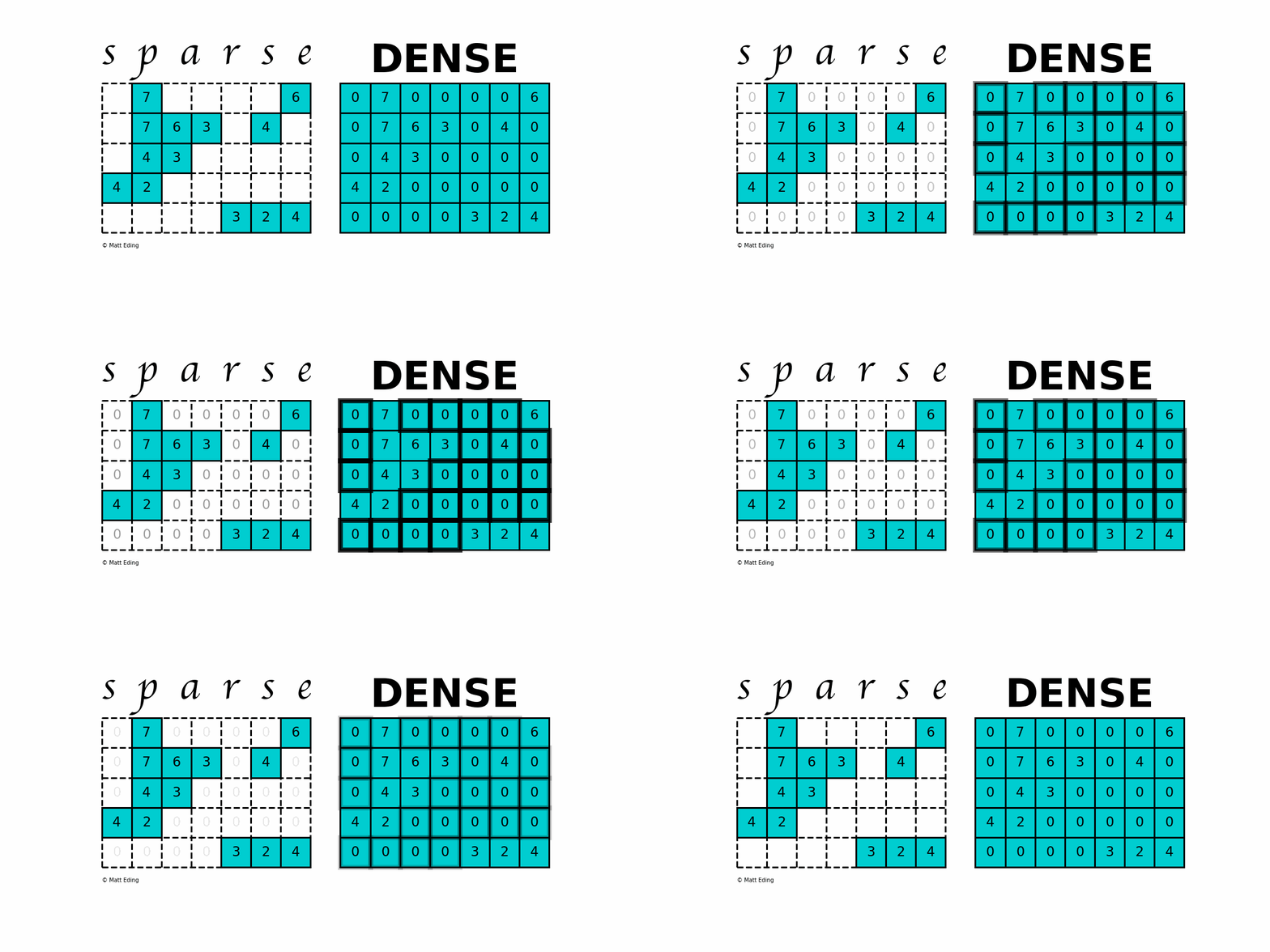
A sparse matrix is a matrix that has a value of 0 for most elements. If the ratio of Number of Non-Zero (NNZ) elements to the size is less than 0.5, the matrix is sparse. While this is the mathematical definition, I will be using the term sparse for matrices with only NNZ elements and dense for matrices with all elements.
Storing information about all the 0 elements is inefficient, so we will assume unspecified elements to be 0. Using this scheme, sparse matrices can perform faster operations and use less memory than its corresponding dense matrix representation, which is especially important when working with large data sets in data science.
Today we will investigate all of the different implementations provided by the SciPy sparse package. This implementation is modeled after np.matrix opposed to np.ndarray, thus is restricted to 2-D arrays and having quirks like A * B doing matrix multiplication instead of element-wise multiplication.
Different sparse formats have their strengths and weaknesses. A good starting point is looking at formats that are efficient for constructing these matrices. Typically you would start with one of these forms and then convert to another when ready to do calculations.
Coordinate Matrix
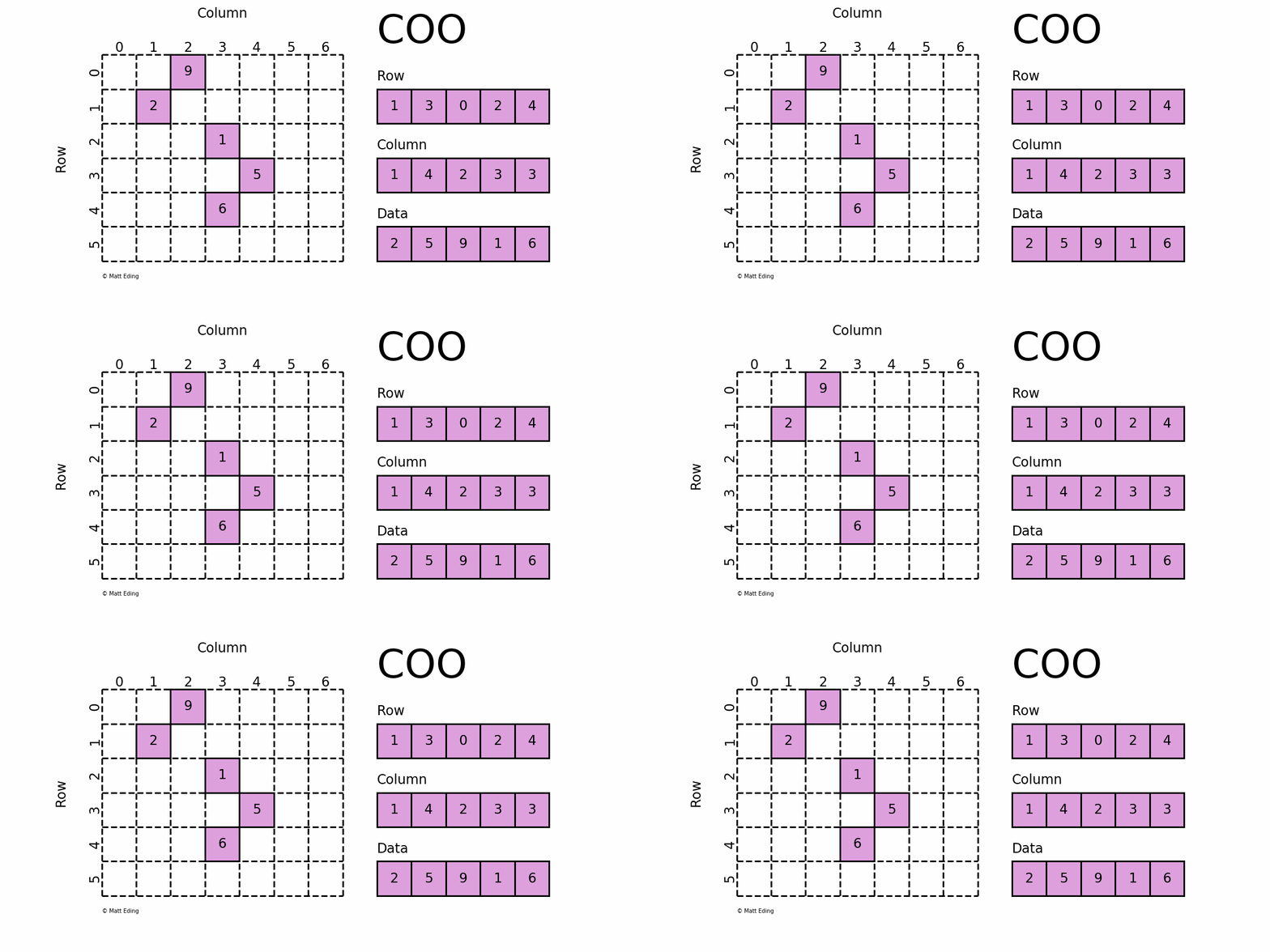
Perhaps the simplest sparse format to understand is the COOrdinate (COO) format. This variant uses three subarrays to store the element values and their coordinate positions.
The savings on memory consumption is quite substantial as the matrix size increases. Managing data in a sparse structure is a fixed cost unlike the case for dense matrices. The overhead incurred from needing to manage the subarrays is becomes negligible as data grows making it a great choice for some datasets.
A word of caution: only use sparse arrays if they are sufficiently sparse enough; it would be counterproductive storing a mostly nonzero array using several subarrays to keep track of position and data.
In[11]:defmemory_usage(coo):...:# data memory and overhead memory...:coo_mem=(sum(obj.nbytesforobjin[coo.data,coo.row,coo.col])...:+sum(obj.__sizeof__()forobjin[coo,coo.data,coo.row,coo.col]))...:print(f'Sparse: {coo_mem}')...:mtrx=coo.todense()...:mtrx_mem=mtx.nbytes+mtrx.__sizeof__()...:print(f'Dense: {mtrx_mem}')In[12]:memory_usage(coo)# Sparse: 480# Dense: 448In[13]:coo.resize(100,100)In[14]:memory_usage(coo)# Sparse: 480# Dense: 80112
Dictionary of Keys Matrix
Dictionary Of Keys (DOK) is very much like COO except that it subclasses dict to store coordinate-data information as key-value pairs. Since it uses a hash table as storage, identifying values at any given location has constant lookup time. Use this format if you need the functionality that come with builtin dictionaries, but be mindful that hash tables hog much more memory than arrays.
In[15]:dok=sparse.dok_matrix((10,10))In[16]:dok[(3,7)]=42# store value 42 at coordinate (3, 7)In[17]:dok[(9,5)]# zero elements are accessibleOut[17]:0.0In[18]:dok.keys()|dok.transpose().keys()# union of key viewsOut[18]:{(3,7),(7,3)}In[19]:isinstance(dok,dict)Out[19]:True
Note: be careful of potential problems using the methods inherited from dict; they don’t always behave.
In[20]:out_of_bounds=(999,999)In[21]:dok[out_of_bounds]=1# works as expectedIndexError:Indexoutofbounds.In[22]:dok.setdefault(out_of_bounds)# silently ignored...In[23]:dok.toarray()# ...until nowValueError:rowindexexceedsmatrixdimensionsIn[24]:dok.pop(out_of_bounds)# fix issue by removing bad pointIn[25]:sparse.dok_matrix.fromkeys([...,...,...])# don't get me startedTypeError:__init__()missing1requiredpositionalargument:'arg1'
Linked List Matrix
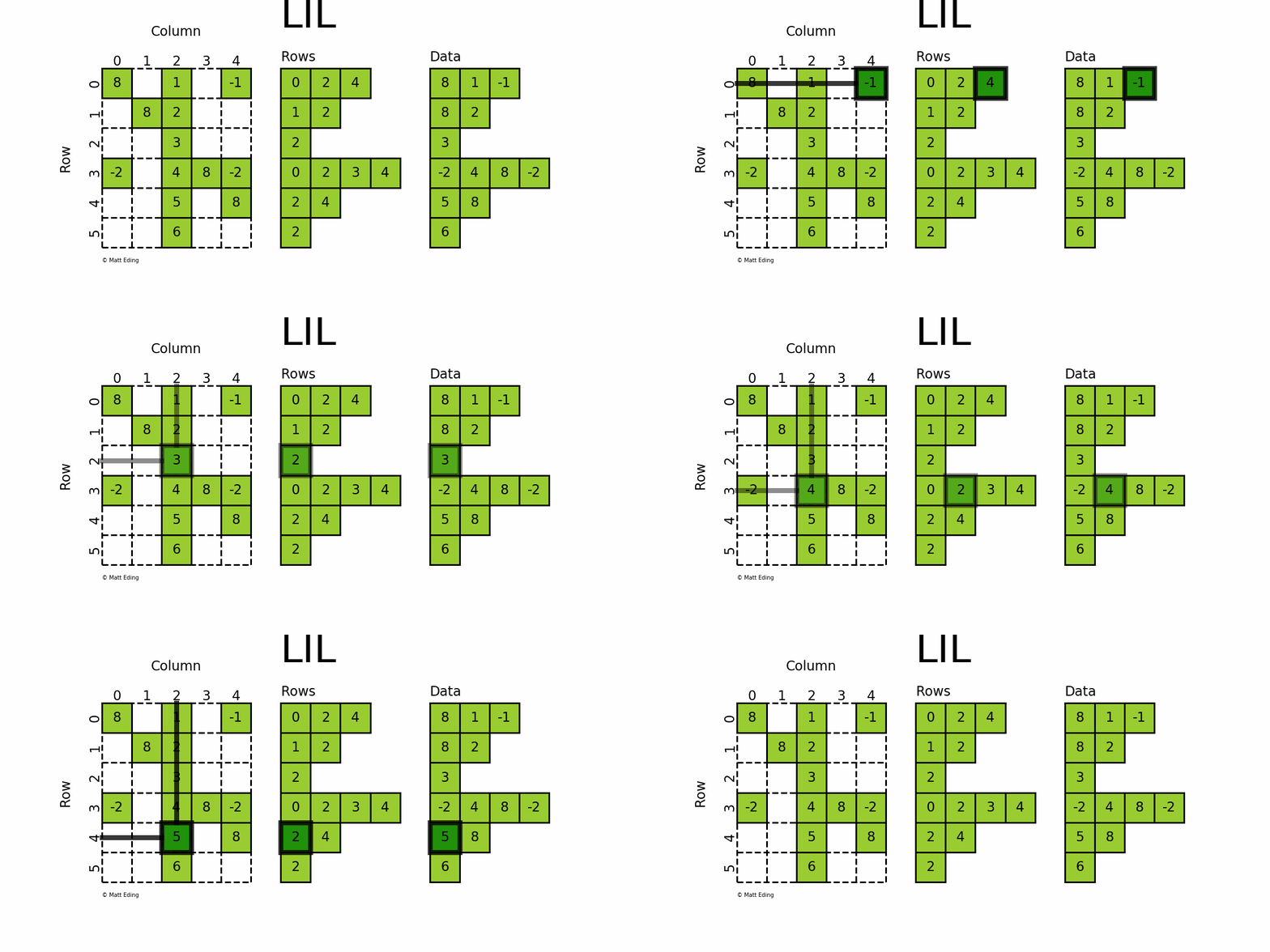
The most flexible format to insert data is through usage of LInked List (LIL) matrices. Data can be set via indexing and slicing syntax of NumPy to quickly populate the matrix. In my opinion, LIL is the coolest sparse format for constructing sparse matrices from scratch.
LIL stores information in lil.rows where each list represents a row index and the elements inside the list match columns. In a parallel array, lil.data, the NNZ values are stored. But unlike other sparse formats, these subarrays cannot be explicitly passed to the constructor; LIL matrices must be made from either an empty state or from existing matrices, dense or sparse. Below is an illustration of various techniques used to build up a LIL matrix.
In[26]:lil=sparse.lil_matrix((6,5),dtype=int)In[27]:lil[(0,-1)]=-1# set individual pointIn[28]:lil[3,(0,4)]=[-2]*2# set two pointsIn[29]:lil.setdiag(8,k=0)# set main diagonalIn[30]:lil[:,2]=np.arange(lil.shape[0]).reshape(-1,1)+1# set entire columnIn[31]:lil.toarray()Out[31]:array([[8,0,1,0,-1],[0,8,2,0,0],[0,0,3,0,0],[-2,0,4,8,-2],[0,0,5,0,8],[0,0,6,0,0]])
So what’s the drawback…? Well, it utilizes jagged arrays under the hood which requires np.dtype(object). This costs a lot more memory than a rectangular array, so if the data is big enough, you may be forced to work with COO instead of LIL. In short, LIL is mostly offered as a convenience, albeit an awesome one at that.
As an aside, Linked List Matrix is a misnomer since it does not use linked lists behind the scenes! LIL actually uses Python’s list which is a dynamic array, so it should really be called a List of Lists Matrix, in spite of what the documentation says. (A missed opportunity to christen it as LOL…)
In[34]:sparse.lil.__doc__# module docstringOut[34]:'LInked List sparse matrix class\n'
Compressed Sparse Matrices
The formats described earlier are great for building sparse matrices, but they aren’t as computationally performant than more specialized forms. The reverse is true for compressed sparse matrix family, which should be treated as read-only rather than write-only. These are more difficult to understand, but with a little patience their structure can be grokked.
Compressed Sparse Row/Column
The Compressed Sparse Row/Column (CSR and CSC) formats are designed for computation in mind.
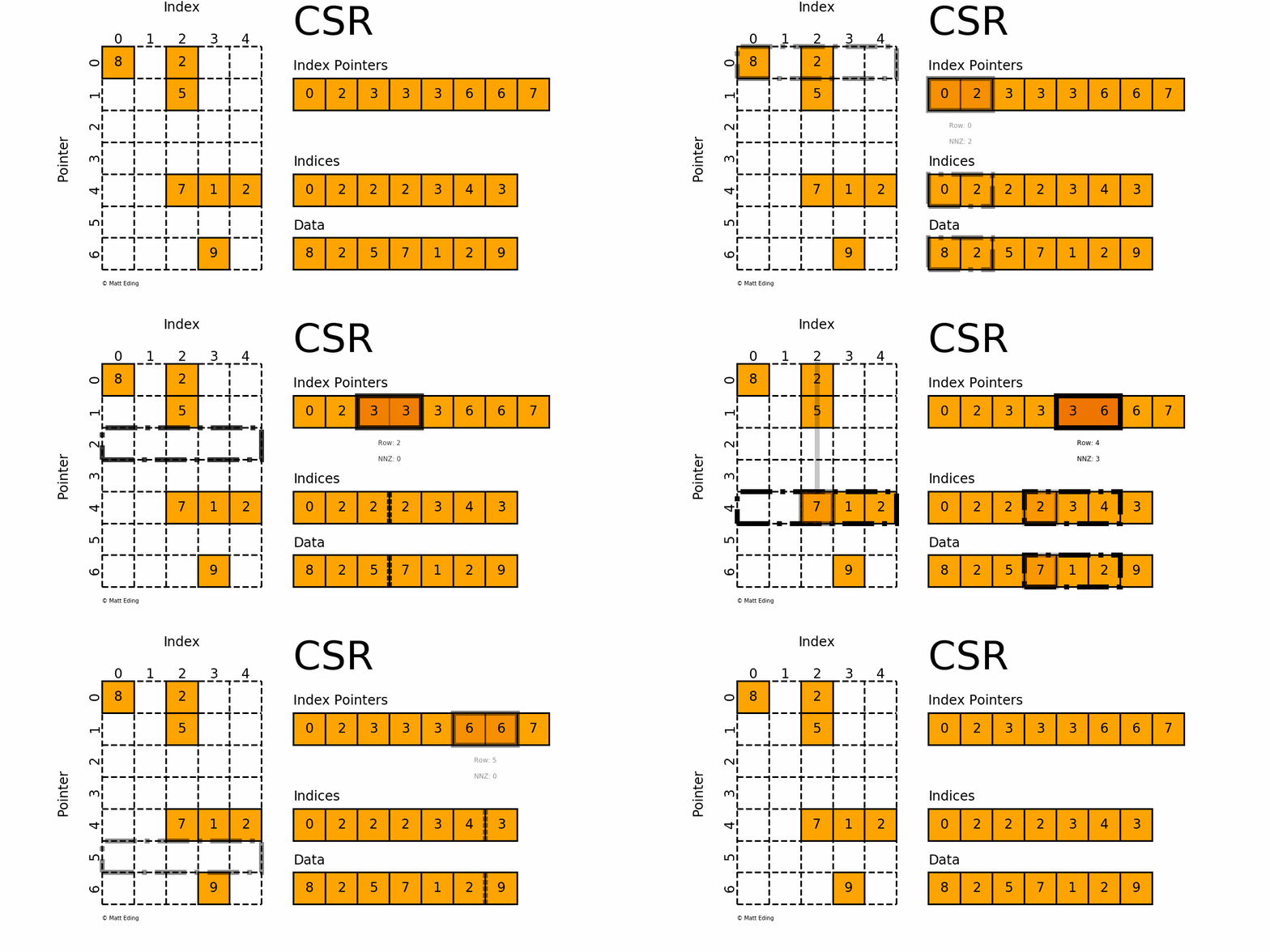
Adjacent pairs of index pointers determine two things. First, their position in the pointer array is the row number. Second, these values represent the [start:stop] slice of the indices array, and their difference is the NNZ elements in each row. Using the pointers, look up the indices to determine the column for each element in the data.
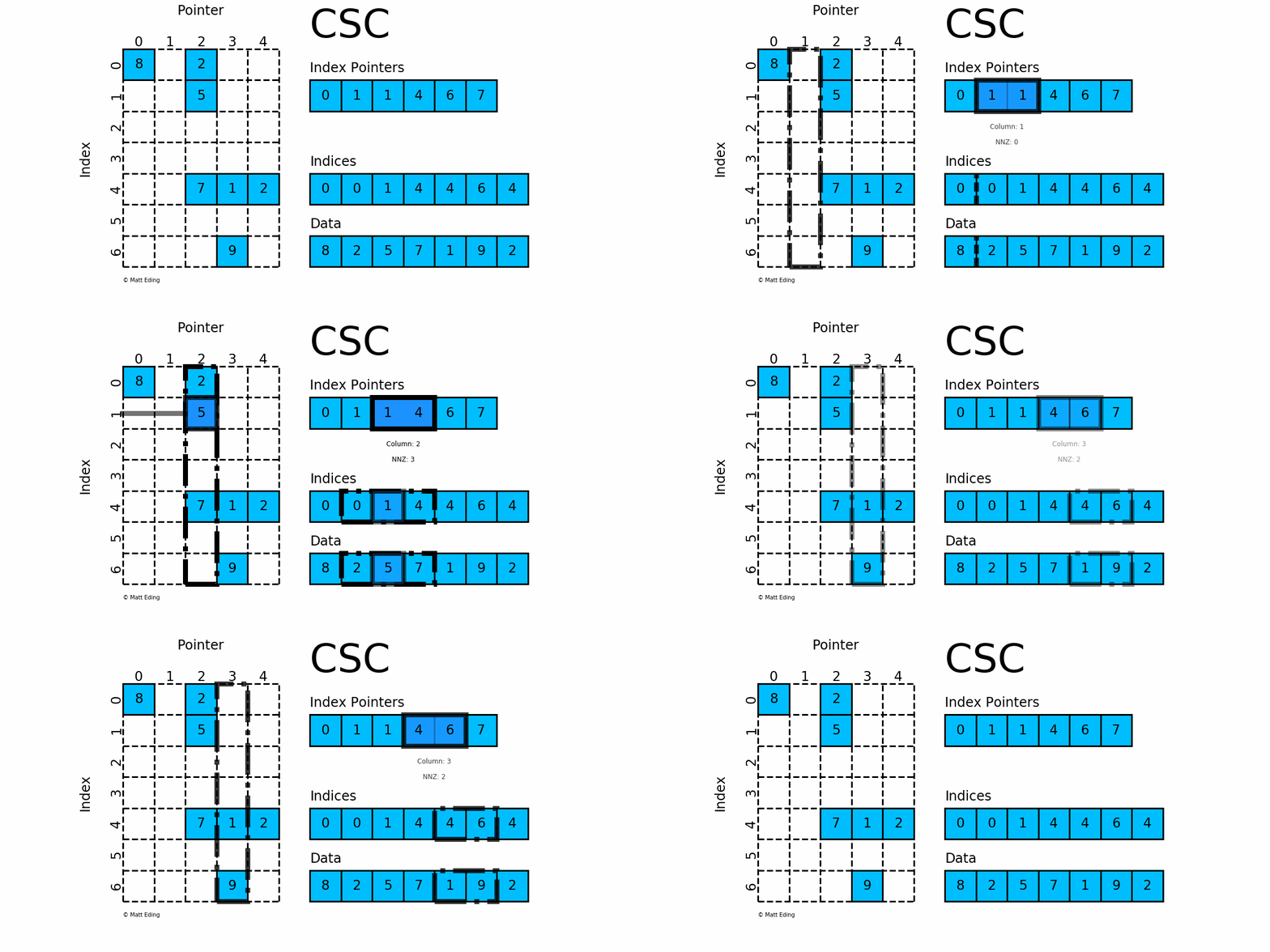
CSC works exactly the same as CSR but has column based index pointers and row indices instead. Below is a diagram of the same data in this format. Notice for this particular case, CSC is slightly more compact with two fewer index pointers.
As promised, the compressed formats are indeed faster than their COO counterpart. For a modest-sized matrix, we see a 2x speed gain vs COO and 60x speedup vs dense!
In[44]:csr.resize(1000,1000)In[45]:%timeitcsr@csr# 111 µs ± 3.66 µs per loop (mean ± std. dev. of 7 runs, 10000 loops each)In[46]:coo=csr.tocoo()# another way to convertIn[47]:%timeitcoo@coo# 251 µs ± 8.06 µs per loop (mean ± std. dev. of 7 runs, 1000 loops each)In[48]:arr=csr.toarray()In[49]:%timeitarr@arr# order of magnitude slower!# 632 ms ± 2.02 ms per loop (mean ± std. dev. of 7 runs, 1 loop each)
Block Sparse Row
Block Sparse Row (BSR) is like CSR but stores sub-matrices rather than scalar values at locations.
This implementation requires all the sub-matrices to have the same shape, but there are more generalized constructs with block matrices that relax this constraint. These matrices do not have their unique data structure in SciPy, but can be indirectly made via the sparse.bmat constructor function.
In[56]:A=np.arange(8).reshape(2,4)# can use dense arraysIn[57]:T=np.tri(5,4)In[58]:L=[[8]*4]*2# can use listsIn[59]:I=sparse.identity(4)# can use sparse arraysIn[60]:Z=sparse.coo_matrix((2,3))# zeros to create column gapIn[61]:sp.bmat([[A,Z,L],...:[None,None,I],...:[T,None,None]],dtype=int)Out[61]:<11x11sparsematrixoftype'<class 'numpy.int64'>'with33storedelementsinCOOrdinateformat>In[62]:_.toarray()# ipython previous outputOut[62]:array([[0,1,2,3,0,0,0,8,8,8,8],[4,5,6,7,0,0,0,8,8,8,8],[0,0,0,0,0,0,0,1,0,0,0],[0,0,0,0,0,0,0,0,1,0,0],[0,0,0,0,0,0,0,0,0,1,0],[0,0,0,0,0,0,0,0,0,0,1],[1,0,0,0,0,0,0,0,0,0,0],[1,1,0,0,0,0,0,0,0,0,0],[1,1,1,0,0,0,0,0,0,0,0],[1,1,1,1,0,0,0,0,0,0,0],[1,1,1,1,0,0,0,0,0,0,0]])
Diagonal Matrix
Perhaps the most specialized of the formats to store sparse data is the DIAgonal (DIA) variant. It is best suited for data that appears along the diagonals of a matrix.
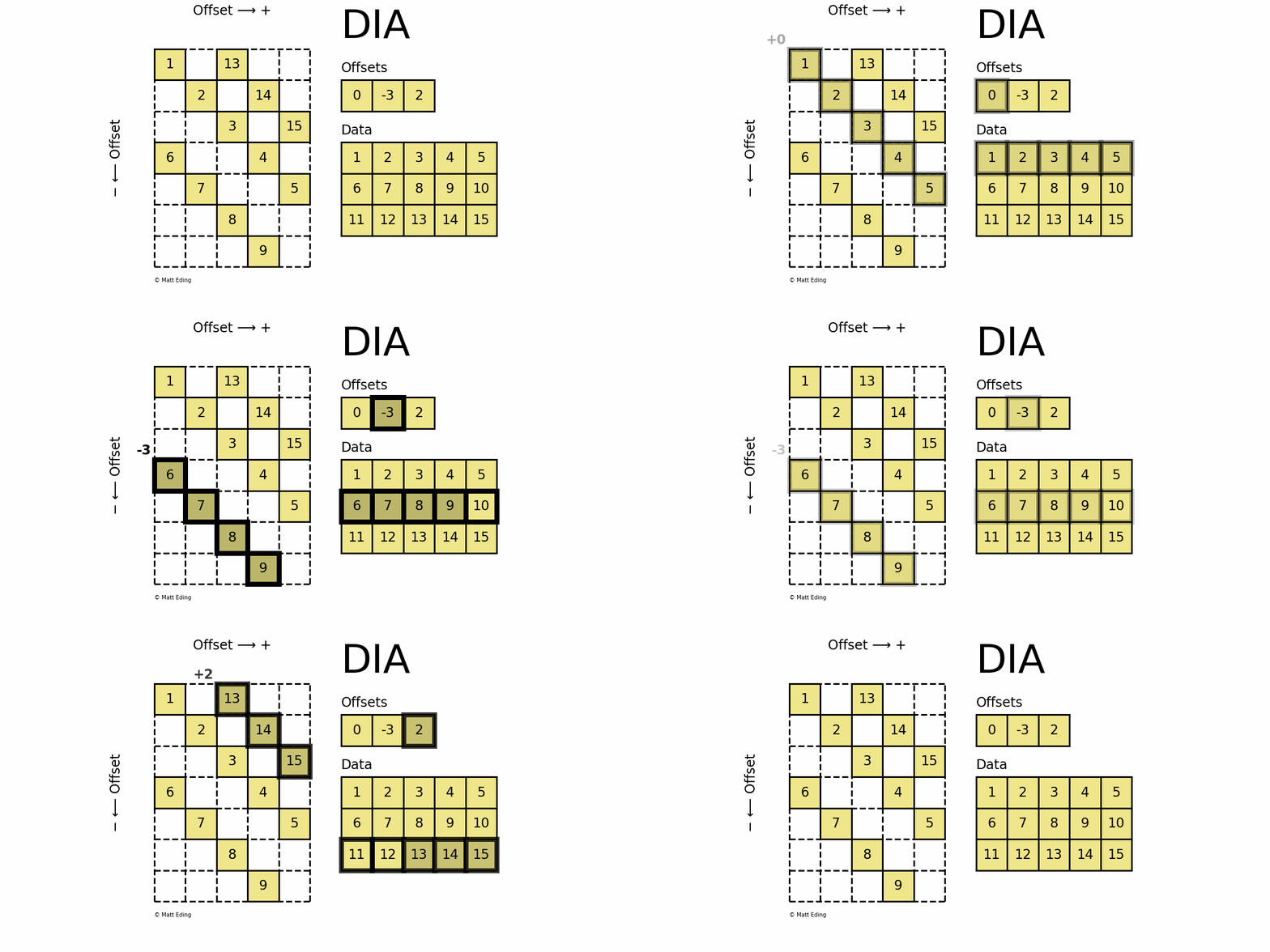
The data is stored in an array of shape (offsets) x (width) where the offsets dictate the location of each row in the data array along diagonal. Offsets are below or above the main diagonal when negative or positive respectively. Note that if a row in the data matrix is cutoff, the excess elements can assume any value (but they must have placeholders).
In[67]:dia.data.ravel()[9:12]=0# replace cutoff dataIn[68]:dia.dataOut[68]:array([[1,2,3,4,5],[6,7,8,9,0],[0,0,13,14,15]])In[69]:dia.toarray()# same array repr as earlierOut[69]:array([[1,0,13,0,0],[0,2,0,14,0],[0,0,3,0,15],[6,0,0,4,0],[0,7,0,0,5],[0,0,8,0,0],[0,0,0,9,0]])
Specialized Functions
In addition to the multitude of formats, there is a plethora of functions specialized just for sparse matrices. Use these functions whenever possible rather than their NumPy counterparts, otherwise speed performances will be compromised. Even worse, the resulting calculations could be incorrect!
Looking into the details of these are left as an exercise to the avid reader.
Other Libraries
SciPy is not the only resource for working with sparse structures in the Python ecosystem. While most appear to use the SciPy package internally, they have all made it their own. I will present several libraries that I find most compelling, but this is not supposed to be the end all be all.
Pandas
Data science today wouldn’t be what it is without Pandas, so it doesn’t come as a surprise that it supports sparse variants of its data structures. A really neat feature is that inferred elements do not have to be forms of 0!
In[70]:importpandasaspdIn[71]:ss=pd.SparseSeries.from_coo(dia.tocoo())In[72]:ss# uses a MultiIndex for the coordinatesOut[72]:0012131123142234153063441745528639dtype:Sparse[int64,0]BlockIndexBlocklocations:array([0],dtype=int32)Blocklengths:array([12],dtype=int32)In[73]:data=dict(A=[np.nan,1,2],B=[np.nan,3,np.nan])In[74]:sdf=pd.DataFrame(data).to_sparse()In[75]:type(sdf).mro()# class inheritance hierarchyOut[75]:[pandas.core.sparse.frame.SparseDataFrame,pandas.core.frame.DataFrame,pandas.core.generic.NDFrame,pandas.core.base.PandasObject,pandas.core.base.StringMixin,pandas.core.accessor.DirNamesMixin,pandas.core.base.SelectionMixin,object]In[76]:sdtype=pd.SparseDtype(object,fill_value='e')# not restricted to null valuesIn[77]:pd.SparseArray(list('abcdeeeeeeee'),dtype=sdtype)Out[77]:[a,b,c,d,e,e,e,e,e,e,e,e]Fill:eIntIndexIndices:array([0,1,2,3],dtype=int32)
Scikit-Learn
The machine learning powerhouse, Scikit-Learn, supports sparse matrices in many areas. This is important since big data thrives on sparse matrices (assuming enough sparsity). After all, who wouldn’t want to have performance gains from these number-crunching algorithms? It hurts having to wait on CPU intensive SVMs, not to mention discovering some data won’t fit into working memory!
Scikit-Learn’s term-document matrices produced by text vectorizers result in CSR matrices. This is crucial for NLP since most words are used sparingly if at all. Naively using a dense format might otherwise cause speed bottlenecks and lots of wasted memory.
In[78]:fromsklearn.feature_extraction.textimportCountVectorizerIn[79]:bow=CountVectorizer().fit_transform(['demo'])In[80]:sparse.isspmatrix(bow)Out[80]:TrueIn[81]:sparse.save_npz('bag_of_words.npz',bow)# store for future use
Other areas where Scikit-Learn has the ability to output sparse matrices include:
sklearn.preprocessing.OneHotEncoder
sklearn.preprocessing.LabelBinarizer
sklearn.feature_extraction.DictVectorizer
Moreover there are utilities that play well with sparse matrices such as scalers, a handful of decompositions, some pairwise distances, train-test-split, and many estimators can predict and/or fit sparse matrices. In short embrace their usage whenever possible to make your machine learning models more efficient.
PyData Sparse
As another implementation, PyData’s sparse library provides an interface like np.ndarray instead of np.matrix, permitting creation of multidimensional sparse arrays. The caveat is that as of the writing of this article, only COO and DOK formats are supported.
In[82]:importsparseassp# avoid name clobbering with scipy.sparseIn[83]:sarr=sp.random((3,4,2),density=0.2)# 3-D sparse arrayIn[84]:sarrOut[84]:<COO:shape=(3,4,2),dtype=float64,nnz=4,fill_value=0.0>In[85]:sarr+=1# not possible in scipy.sparseIn[86]:sarrOut[86]:<COO:shape=(3,4,2),dtype=float64,nnz=4,fill_value=1.0># fill_value updates!In[87]:sarr.todense()Out[87]:array([[[1.,1.],[1.,1.],[1.,1.],[1.,1.]],[[1.,1.],[1.86024163,1.],[1.37233162,1.1114997],[1.,1.]],[[1.,1.],[1.,1.16850612],[1.,1.],[1.,1.]]])
In SciPy, logical operators are not directly implemented, but AND (&) and OR (|) can be emulated by constraining the dtype to bool:
Unfortunately NOT (~) is impossible since it would make a sparse matrix into a dense one (theoretically self - 1). Until now, that is. As seen earlier, sparse will dynamically update the fill value to accommodate current states.
Hopefully this article has enlightened how to use sparse data structures properly so you can go forth and use them with confidence for future projects. Knowing the pros and cons of each format (including dense) will aid in selecting the optimal one for a given task. Be mindful that while sparse matrices are are great tool, they are not necessarily a replacement for arrays. If a matrix is not sufficiently sparse, the multitude of storage arrays behind the scenes will actually take up more resources than a regular dense array would. Furthermore if you need to regularly mutate an array, perform computations in between, and display output, then sparsity simply isn’t worth the trouble. But all these concerns aside, hopefully sparse matrices can help “lighten” your load.
Comparison of Matrix Formats
COO
DOK
LIL
CSR
CSC
BSR
DIA
Dense
indexing
no
yes
yes
yes
yes
no†
no
yes
“write-only”
yes
yes
yes
no
no
no
no
yes
“read-only”
no
no
no
yes
yes
yes
yes
yes
low memory‡
yes
no
no
yes
yes
yes
yes
no
PyData sparse
yes
yes
no
no
no
no
no
n/a
† BSR raises NotImplementedError: rather than explicitly raising TypeError: 'xxx_matrix' object is not subscriptable. So maybe in the future it will support indexing.
‡ Assuming enough NNZ.
In[92]:exit()# the end :D
Code used to create the above animations is located at my GitHub.