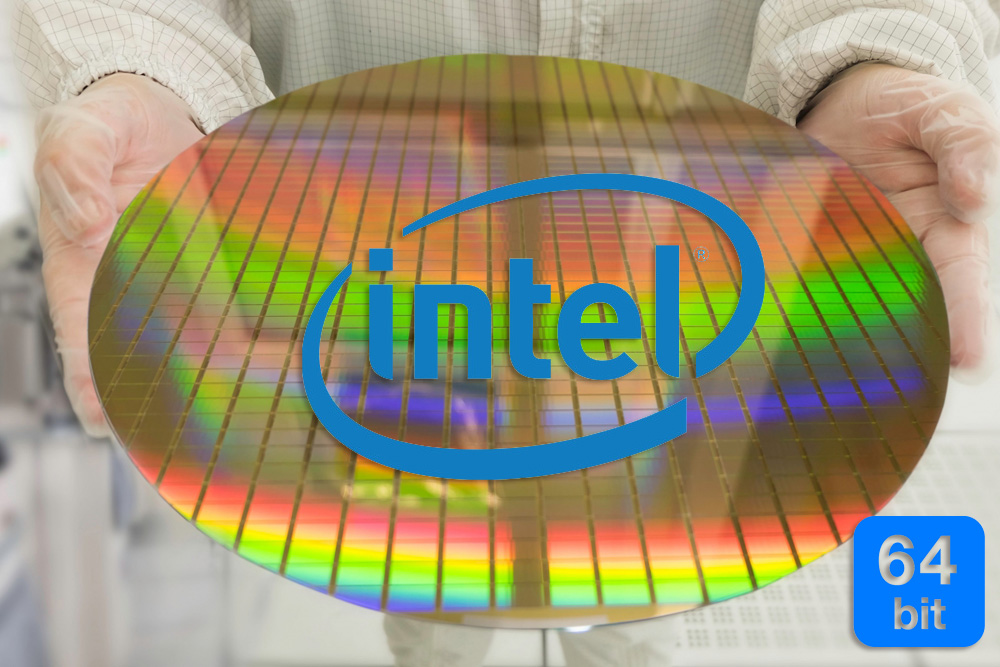
Tuesday, October 1, 2019

The IBM Pentium 4 64-Bit CPU

Introduction

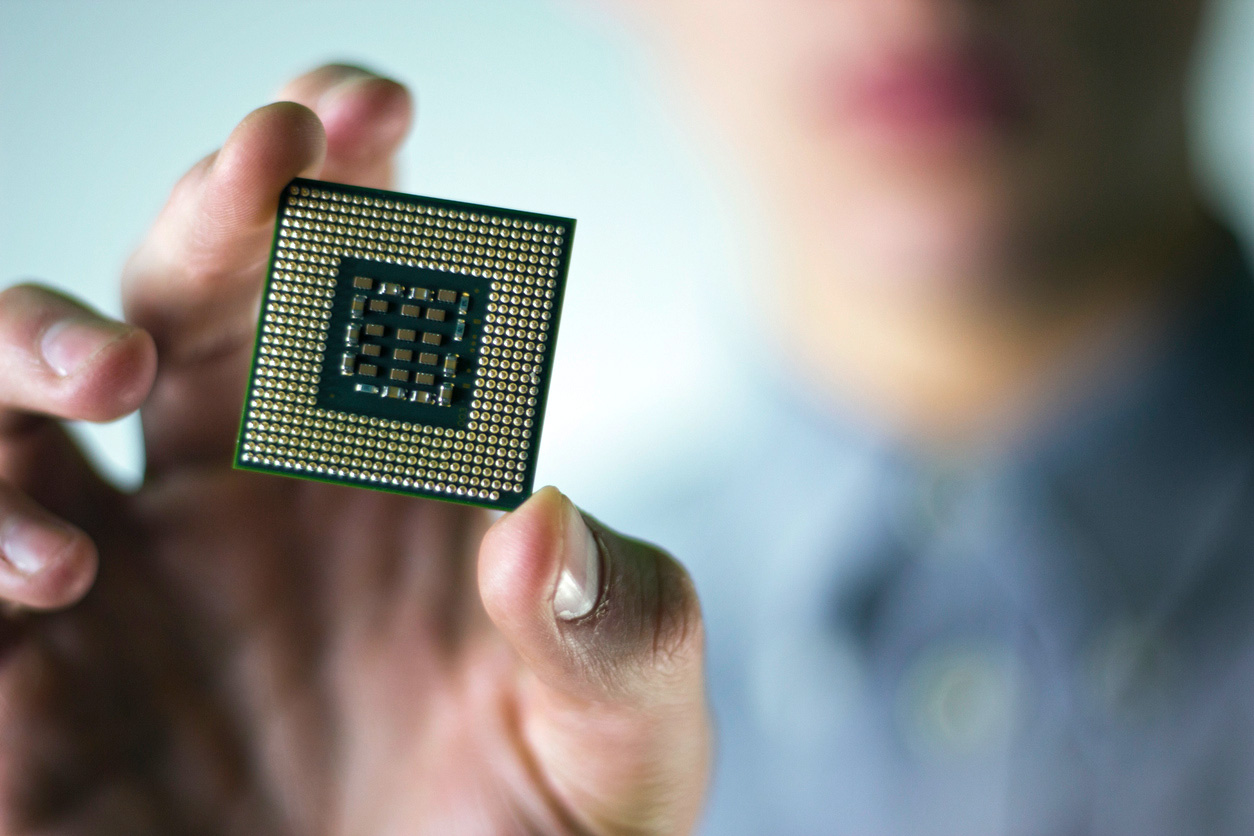
This time we will talk about one unique Intel processor, which did not appear on the retail market and whose reviews you will not find on the Internet. This processor was produced purely by special order for one well-known manufacturer of computer equipment. Also in the framework of this article I will try to assemble one of the most powerful retro-systems with this processor.

From the title of the article, I think many people understand that we will talk about the Socket 478 Intel processor
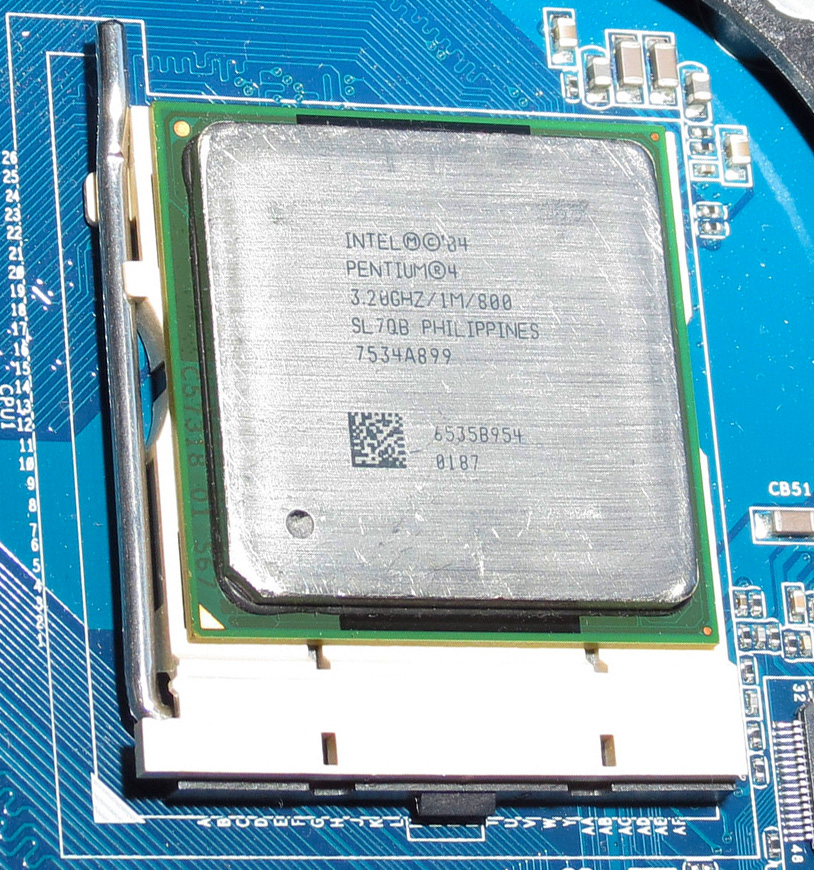
Most people are familiar with the Socket 478 that replaced Socket 370 at the end of 2001 (we omit Socket 423 due to its short lifespan of less then a year) and allowed the use of single-core, and then with Hyper Threading technology “pseudo-dual” processors that can perform two tasks in parallel. All production Intel processors within Socket 478 were 32-bit, even a couple of representatives from the Pentium Extreme Edition server segment on the «Gallatin» core. But as always there are exceptions. And this exception, or to be more precise, two exceptions, were two models of Pentium 4 processors with the Prescott core, which had 64-bit instructions (EM64T) at their disposal.

Intel Pentium 4 SL7QB 3.2GHz: 64-bits on S478

This pair of processors were commissioned by IBM for its eServer xSeries servers. These processors never hit the retail market and their circulation was not very large, so finding them now is very problematic. It is interesting that the fact that if you want and naturally have the right amount of money, or a large enough order, you can count on a special order of the processor that is needed for the specific needs, with characteristics that will be unique and will not be repeated in standard production products. And it should be noted that not a few such processors have been released, in fact, in the 70’s and early 80’s this was the very purpose of the now ubiquitous ‘sspec.’ Chips with an Sspec (Specification #) were chips that had some specification DIFFERENT from the standard part/datasheet.  A chip WITHOUT a sspec was a standard product.  By the late 1980’s all chips began to receive sspecs as a means of tracking things like revisions, steppings, etc.  I will talk about some a little later.
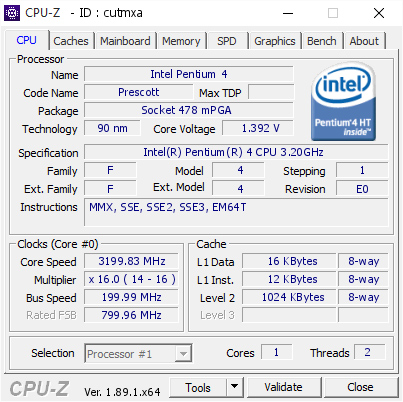
hat’s how the processor looks through the eyes of the CPU-Z utility. In the “Instructions” field after SSE3, the EM64T proudly shows off! Link to popular CPU-Z Validation.

Special processors made for IBM belonged to the Prescott core and were based on E0 stepping with support for 64-bit instructions, which is not typical for Socket 478! The first 64-bit CPUs for “everyone” appeared only with the arrival of the next LGA775 socket, and even then it wasn’t right away; some Pentium 4 models in LGA775 version were 32-bit. I specifically pointed out that the Pentium 4 Socket 478 model with EM64T support belonged to the E0-stepping, although later the more advanced stepping G1 was released, which did not have such innovations. The first model worked at a frequency of 3.2 GHz and had a SPEC code – SL7QB, the second was slightly faster with a frequency of 3.4 GHz and the SPEC code – SL7Q8.

For the rest, these were the usual «Prescott». But the presence of 64-bit instructions made these processors unique, capable of working with 64-bit operating systems and the same applications, allowing them to do what their 32-bit comrades simply could not do.

IBM

Not many companies were able to place their order with Intel, but the «Blue Giant» or IBM could do it, and all in order to defeat HP and Dell in a fierce struggle for the server market share for small and medium-sized businesses. And for one, in order to extend the life of their servers with Socket 478. For these purposes, these two processors were released, capable of executing 64-bit instructions. Another advantage of such processors in conjunction with 64-bit operating systems can be called support for a large amount of RAM, but interestingly, in the age of DDR1 with its small amounts of memory of this standard and chipsets of that time, operating more than four gigabytes of RAM was physically not possible even with 64-bits.

So the whole point of using these processors was precisely in supporting 64-bit operating systems and the same software, behind which IBM saw a promising future, as it once was when changing from 16-bit software to 32-bit back in the days of the i386 . And it should be noted they guessed (correctly), that the sunset is approaching the 32-bit era.

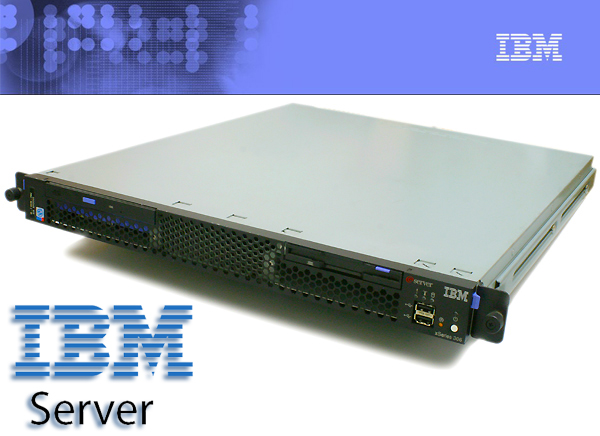
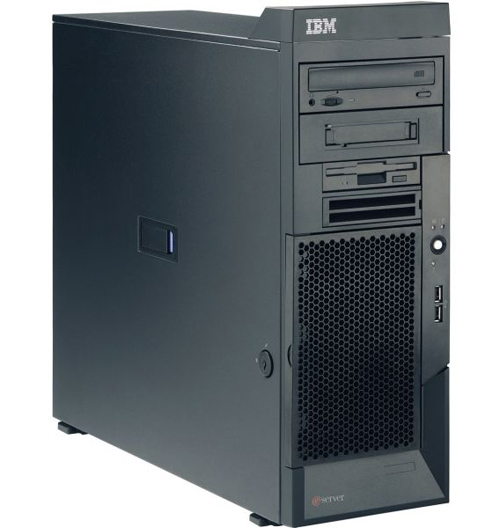
I managed to find a processor running at 3.2 GHz with a SPEC code – SL7QB in Canada, so its journey was not close to me. This processor was part of the IBM eServer xSeries 306 server. This server is a regular single-processor 1U blade server that can be installed in a rack. Inside the server, a single Socket 478 was used to hold the Pentium 4 processor, which had support for up to 4 gigabytes of RAM (and the chipset couldn’t see more RAM), two Gigabit network controllers, a pair of 64-bit / 66 MHz PCI-X expansion slots and the ability to support not very sophisticated RAID arrays from SATA-150 or SCSI drives.
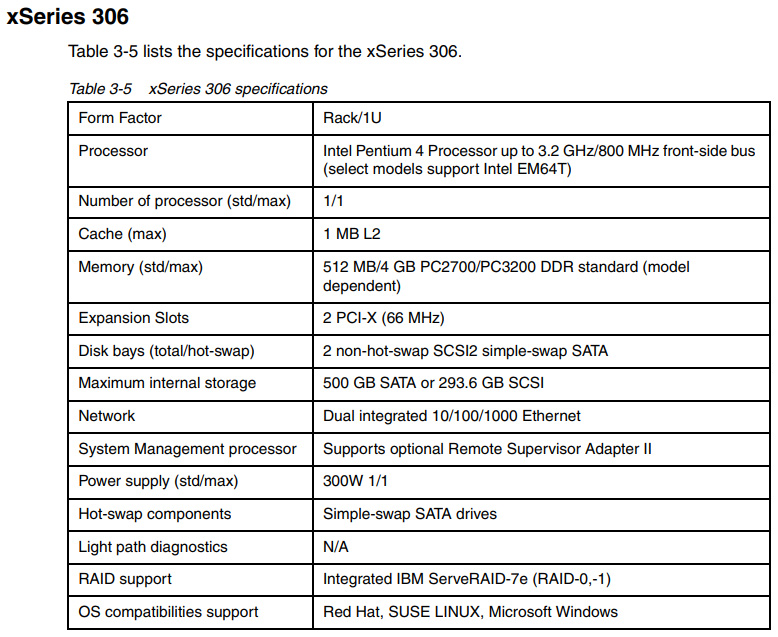
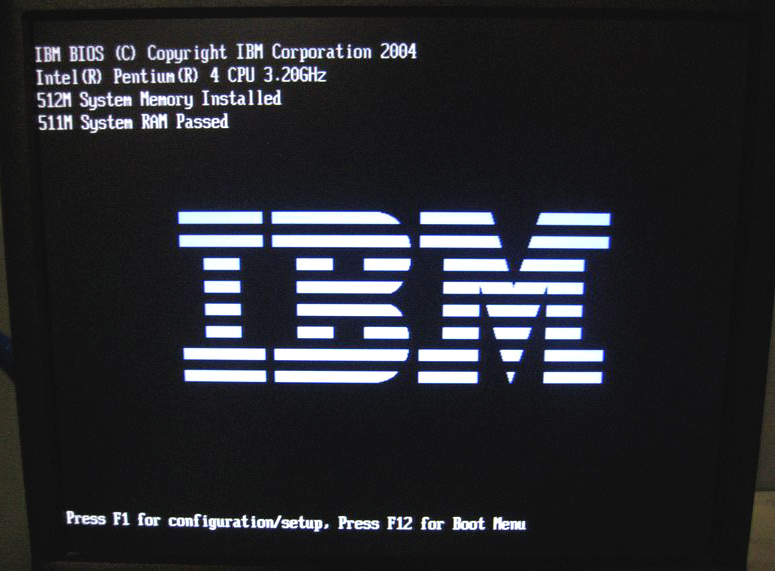
Initially, such IBM servers supported conventional 32-bit Pentium 4 processors with Prescott cores, and then the option of using 64-bit Pentium 4 was added. These processors are listed under the part number 26K8430 for the server models using the IBM spare parts database (FRU) (41x and 45x).
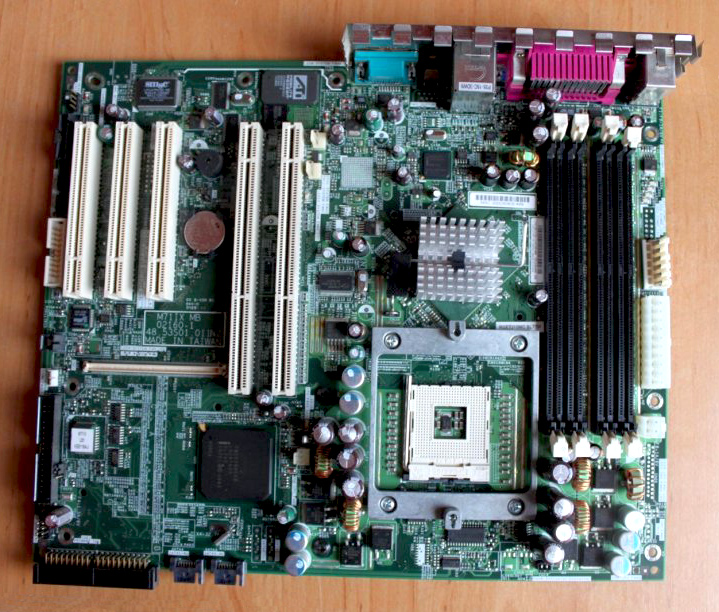
If you look at the motherboard of this server, you can see that it is the simplest solution. In fact, this is dictated by the use of the Intel E7210 chipset, which is a close relative of the desktop Intel 875P, but lacking an AGP port, it uses a pair of PCI-X slots instead.
Windows Server 2003, x64 Edition, or various types of Linux were installed on the IBM eServer xSeries 306 server with a 64-bit Pentium 4. Subsequently, IBM expanded the range of its servers, where it was possible to install SL7QB or SL7Q8, among them were models: x206, x226 and x236.

Thanks to its pricing policy, the cost of new 64-bit servers was very affordable compared to competitors. At the time the updated servers were released (2nd half of 2004), prices for the xSeries 206 model started at $909 for a system with a 3.2 GHz processor and 256 MB of memory, the cost of a more advanced xSeries 306 started at $1,409 for a system with a 3.2 GHz processor and 512 MB of memory.
In the server lineup there are also similar models, but with the letter “m” added to the model name. Do not pay attention to them, as these are completely different machines, which are based on processors in a different – LGA775 version.

Squeeze everything to the last drop.

In assembling such a system, I wanted to squeeze everything out of it possible! and even more. But I ran into a number of problems both hardware and software. My goal was: 8 GB RAM + Windows 10 x64. But here a number of nuances arose.

Let’s start with the hardware problems. 4 GB of RAM are easily supported by all the boards, even with DDR1 you can get 4 GB on four slots with four sticks of one gigabyte each. But it is boring and not interesting. DDR2 opens up much more promising horizons, but here a problem arises, often suitable motherboards offer only 2 memory slots. A simple solution to install 2 strips of 4 GB. But the creator (Intel) introduced its limitations, I will dwell on them a little more in detail.

Often questions arise about installing more than 4 GB of memory on the relatively “recent” Intel chipsets with an external memory controller (Memory Controller Hub, MCH). Here we briefly consider the necessary conditions for this, since it is not always that the maximum possible amount is written in the manual for the board. Perhaps many believe that it is necessary to have an x86 processor with support for 64 bit expansion (EM64T), and a board that, in principle, allows you to install more than 4 GB of memory (supporting a sufficient number of slots and memory densities, this depends not only on the chipset, but also on specific board). And of course, a BIOS that can initialize this memory, correctly configure the mapping of PCI devices, and so on. Not all motherboards have a BIOS capable of doing this, but all because there were no 64bits on Socket 478 and all of the above motherboards from which the choice was made are transitional models, since their chipsets existed in LGA775 as well, and were already familiar with the 64-bit CPU architecture from Intel.

CPU: In fact, for addressing more than 4 GB of memory, a 64-bit x86 processor is generally not required, since starting with Pentium Pro, the ability to expand the physical address (PAE) to 64 GB has been introduced (address lines A32 # – A35 # have been added), but at the same time each task can address no more than 4 GB. However, a processor with 64-bit mode allows you to get the most benefits from RAM over 4 GB, and there will be much less problems with the operating system and drivers than in PAE mode. Note that the width of the address lines for 64-bit processors under LGA775 and even Xeon under LGA771 remained the same (36 bit), that is, they still have a maximum of 64 GB of memory, like Pentium Pro. Isn’t it true that the potential laid down in 1995 is impressive?

Chipset: The chipset must be able to address the address space abroad 4 GB, and this feature is not directly related to the supported DRAM organizations, since memory is understood in the broad sense here – this is all the address space available to the processor, in particular, the memory of PCI devices, BIOS, APIC etc. To do this, you must have at least one additional address line on the chipset. That is, the presence of the HA32 # line will provide addressing up to 8GB, HA33 # up to 16GB, HA34 # up to 32GB, and HA35 # up to 64GB.
And if the server chipsets from Intel (for S603/604/771) have no special problems with addressing, then a study of datasheets for Intel’s desktop chipsets showed that Intel’s first desktop chipset with support for advanced addressing is 955x . Earlier 865, 915, 920, 945 have an older address line HA31 #, that is, physically impossible to install more than 4 GB of RAM in the motherboards on these chipsets.

To summarize, the success of the whole undertaking in the hardware implementation consists of the correct BIOS that “understands” all available RAM + 64-bit Processor + Chipset no older than Intel 955x. But, there is one more nuance, this is the manufacturer of the final motherboard, which, even with a good combination of all circumstances, decided to save money and simply did not route the necessary lines from the chipset, and the lower the cost of the motherboard, the higher the risk. And the boards under consideration are from this lower cost range.

Is there a way out? It seems that there is (but to the end I’m not sure due to the lack of the necessary board) and it lies in Socket 478 motherboards based on the Intel G31 / G41 chipset. There are enough examples of working with 8 GB of RAM on motherboards based on the G31 chipset performed by LGA775, but I haven’t seen Socket 478, but as they say there’s a chance =) I’ll leave this for the near or distant future.

Software problem: As I wrote above, the ultimate task was to launch Windows 10 x64. At the moment, I have not been able to do this, one cannot cope here, but theoretically it is possible. Windows 7 x64 ran with a bang, no problems arose. But already with the installation of Windows 8.1 there were problems, or rather, there was only one problem – the lack of the NX-bit’s processor, and without this «feature» installation of a modern OS is impossible.

The fact is that NX-bit support is very different for x86 in 32-bit mode, x86 in 64-bit mode and PAE mode. For 32-bit mode, the good old PAE and NX bits via CPUID. That is, basically, you just need to change the value returned to EDX after CPUID with EAX = 80000001h (for example, delete the CPUID check and change the value in EDX to the desired one). NX bit functions are not supported in normal 32-bit mode, and you just need to “calm” the OS. There are software PAE patches for the kernel of the OS where everything works, including Windows 8.1 and early builds of Windows 10.

For 64-bit mode, NX bits are already in use and the NX bit value is located in the 64-bit record of page tables and catalogs (PTE and PDE). The difficulty is that even if you manage to trick the OS by deleting its check of NX bits, then the kernel (and all other drivers / programs) will try to switch the NX bit each time instructions are stored in the page table. This will cause the system to crash. I have, so far, found no confirmation of running Windows 10 x64 on the Pentium 4 Socket 478: SL7QB or SL7Q8, possibly due to the specificity of these processors and their low prevalence, but I want to believe that it will still be possible to do it, not for nothing that I tried out dozens of early builds of Windows 10.

We assemble Super Socket 478/x64 PC.

Having such a unique processor at your disposal, it’s absurd not to build a powerful x64-retro system on it. One of the options for using such a system in general can be to build a universal “PC-harvester” that supports all Microsoft operating systems from DOS to Windows 10. And here the most interesting part begins – the selection of components and software. The main component is of course the processor – the heart of the system, it remains to choose a motherboard where it can be installed.

The selection criterion has shifted towards building the fastest system with the fastest interfaces, so there are no AGP slots, only a PCI-Express x16 graphic port, and another PCI-Express x1, and preferably a couple, several PCI, support for DDR2 memory at least, as a variant of DDR3 and the more memory, the better. The list of candidates was as follows:

  • ASUS P4GD1 (Intel 915P/ DDR1 4Гб DDR-400/ PCI-Express x16, 2x PCI-Express x1, 3x PCI)
  • Biostar G31-M4 (Intel G31/ DDR2 4Гб DDR2-800 / PCI-Express x16, 2x PCI)
  • AsRock P4i945GC (Intel 915P/ DDR1 4Гб DDR2 4Гб DDR2-667/ PCI-Express x16, 1x PCI-Express x1, 2x PCI).
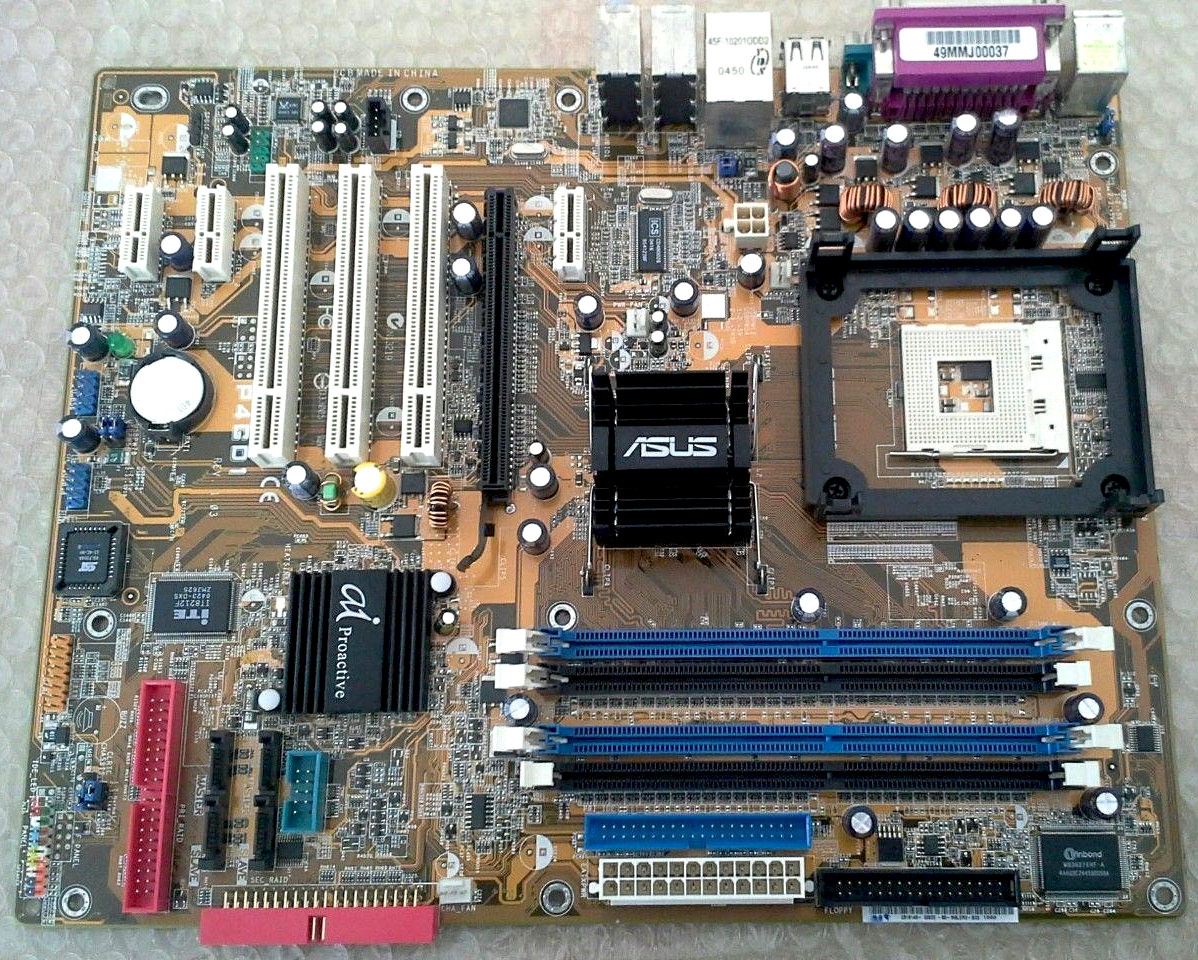
ASUS P4GD1

ASUS P4GD1 looks the best in terms of the number of available PCI-Express connectors and configuration flexibility, there is one drawback – this is the first generation DDR memory, all SATA connectors also support only 150 Mb/s.

Biostar G31-M4

Biostar G31-M4 looks like a winner due to the support of 800MHz DDR2 memory, the presence of 4 300Mb/s SATA2 ports, but the board is completely devoid of PCI-Express x1 ports and, most importantly, processors with 95 Watt TDP Max are supported, and that means goodbye to “Prescott” which needs more then 95W.  This minus crosses out all available advantages, one of which is support for all operating systems, the presence of appropriate drivers up to Windows 10 x64!
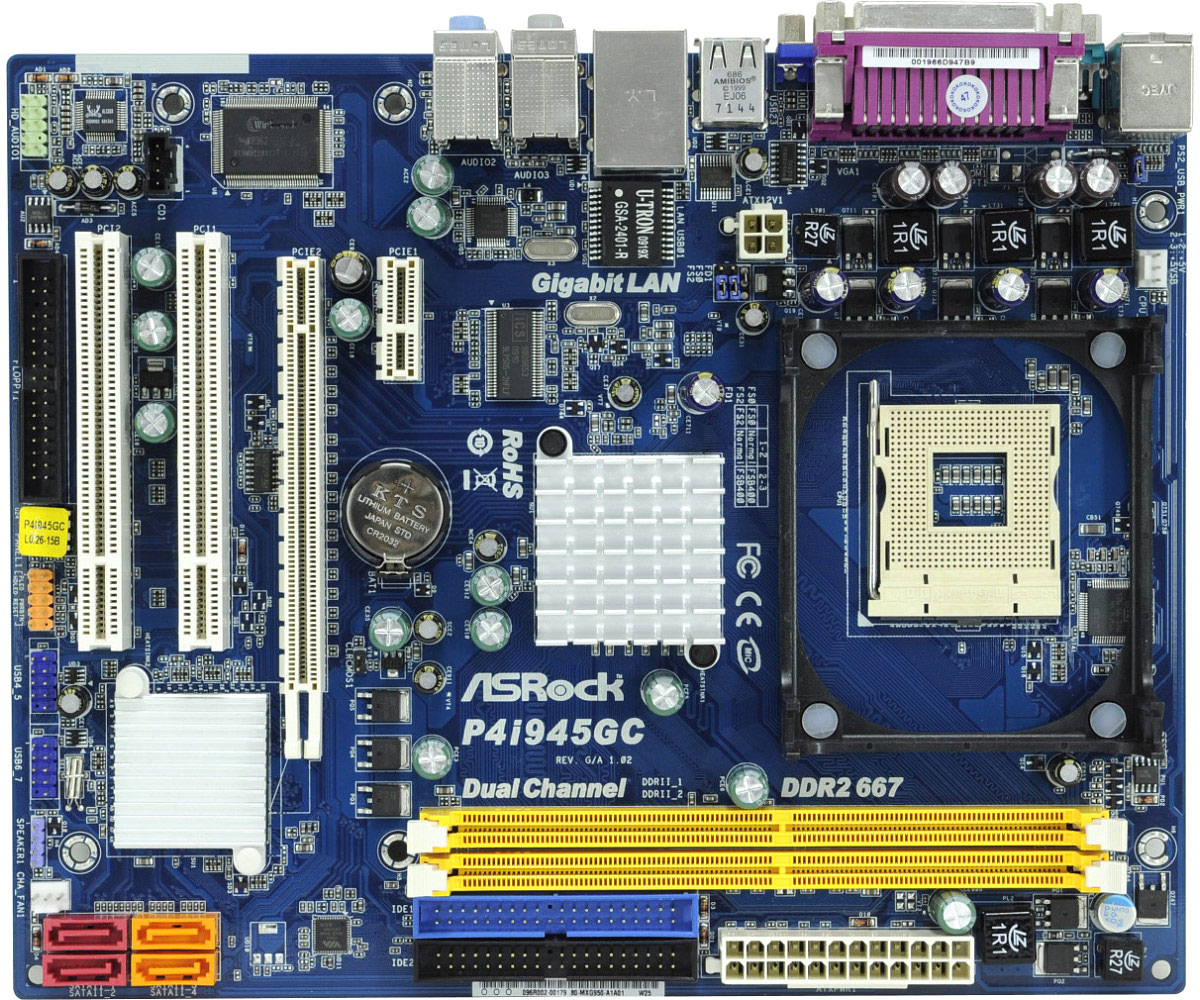
AsRock P4i945GC

AsRock P4i945GC – the best solution, one additional PCI-Express x1 slot, a pair of PCI, four SATA2 ports. Supported DDR2 memory with a frequency of 667 MHz. After weighing the pros and cons, I settled on the AsRock P4i945GC, also due to the fact that it is much easier to find these days on sale, but finding the ASUS P4GD1 is already a problem.
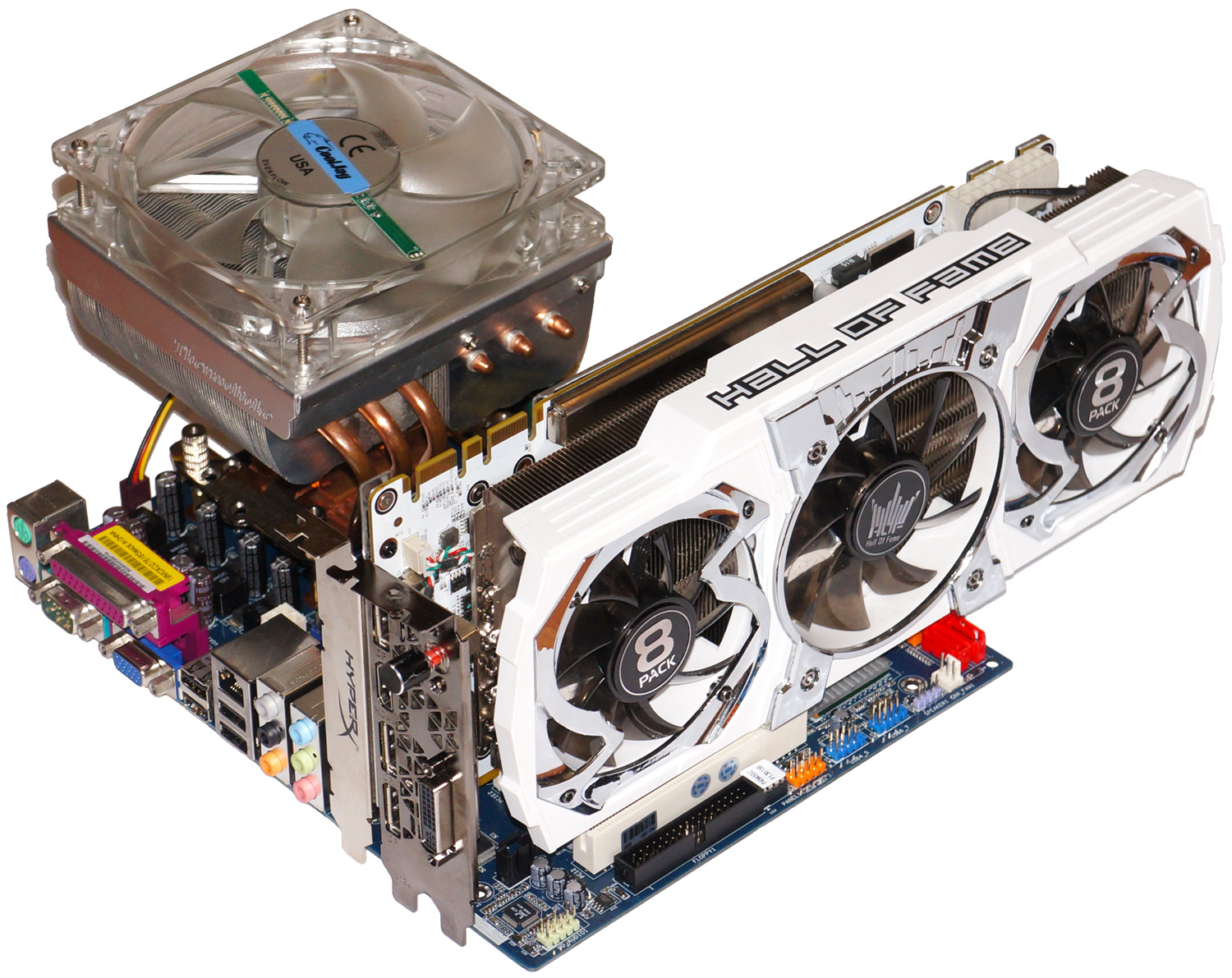
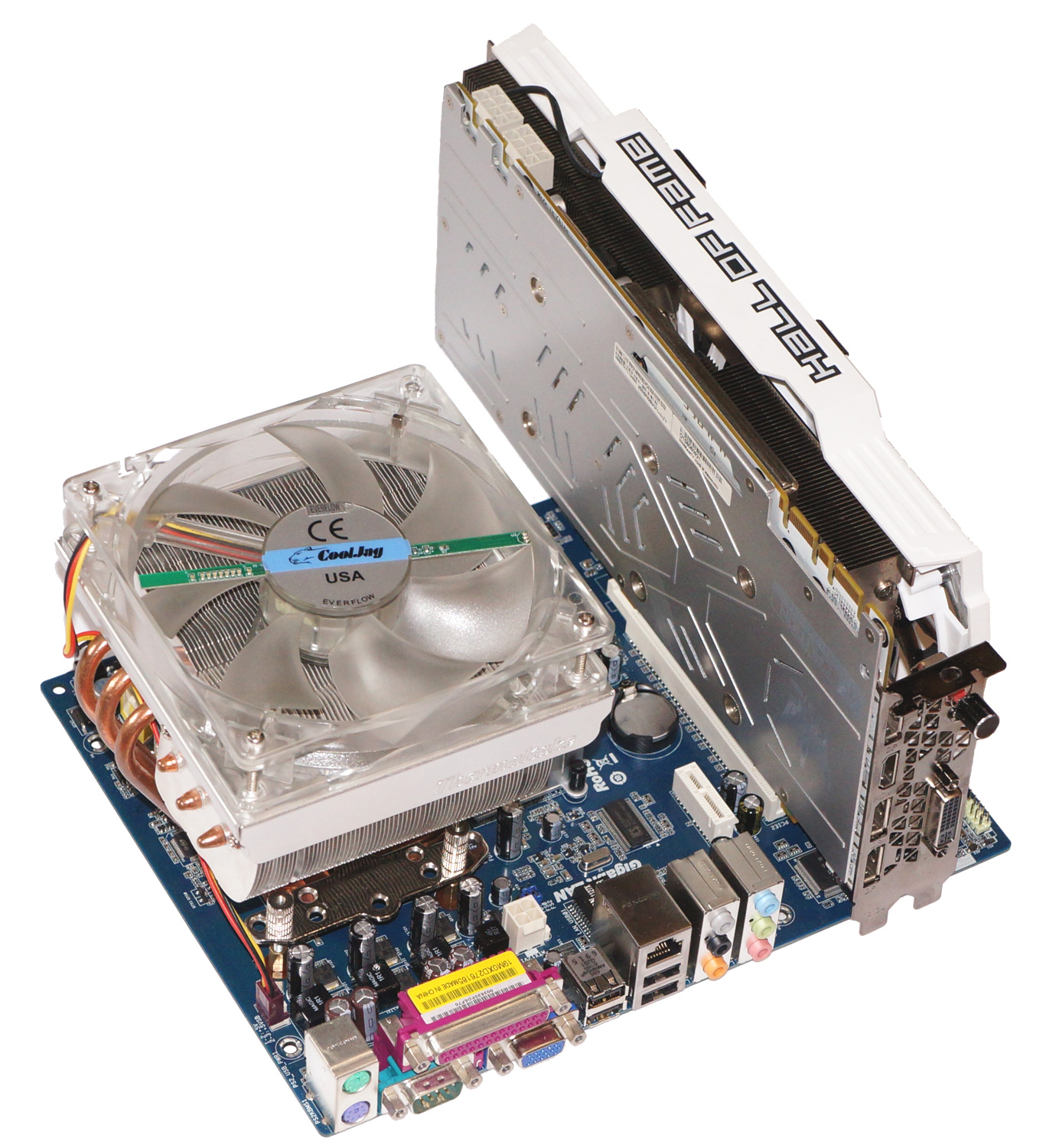
For such a system, the use of an SSD is a prerequisite and it is better that it is installed in a PCI-Express slot. The memory capacity is 4 GB, as a video card I decided to use the  GeForce GTX 980 Ti with 6GB, a memory capacity larger than that of the system itself. In a couple of free slots, you can install a couple of 3Dfx Voodoo 2 in SLi, or something “cool” in the PCI version, for example the same 3Dfx Voodoo 5500. The final assembly I got was as follows:

  •  Intel Pentium 4, 3.2GHz, Socket 478, «Prescott», SL7QB “64-bit Edition”
  • Thermaltake Big Typhoon
  • AsRock P4i945GC, Intel 945GC + ICH7, Socket 478, PCI-Express , DDR2-667 MHz, SATA-2
  • 4 GB (2x 2GB) DDR2 800MHz
  • GeForce GTX 980 Ti, 6GB, KFA2 8Pack Edition
  • SSD HyperX Predator PCIe 240GB
  • Zalman ZM1000-EBT 1000W PSU


To the start, let’s go!

But first, let’s go into the BIOS of the motherboard.
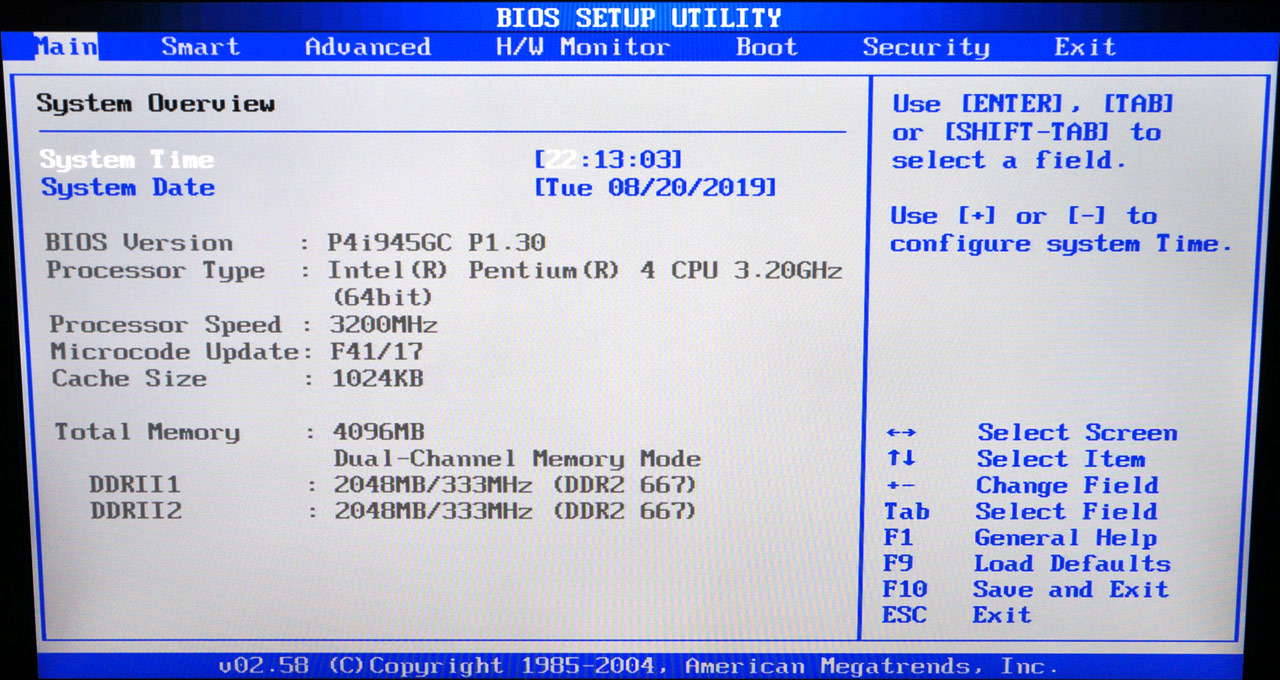
The photo shows that the processor is correctly recognized in the BIOS, indicating its 64-bit capacity. And this is how a 240 GB HyperX Predator PCIe x4 drive installed in the PCI-Express x1 slot is displayed in the BIOS.
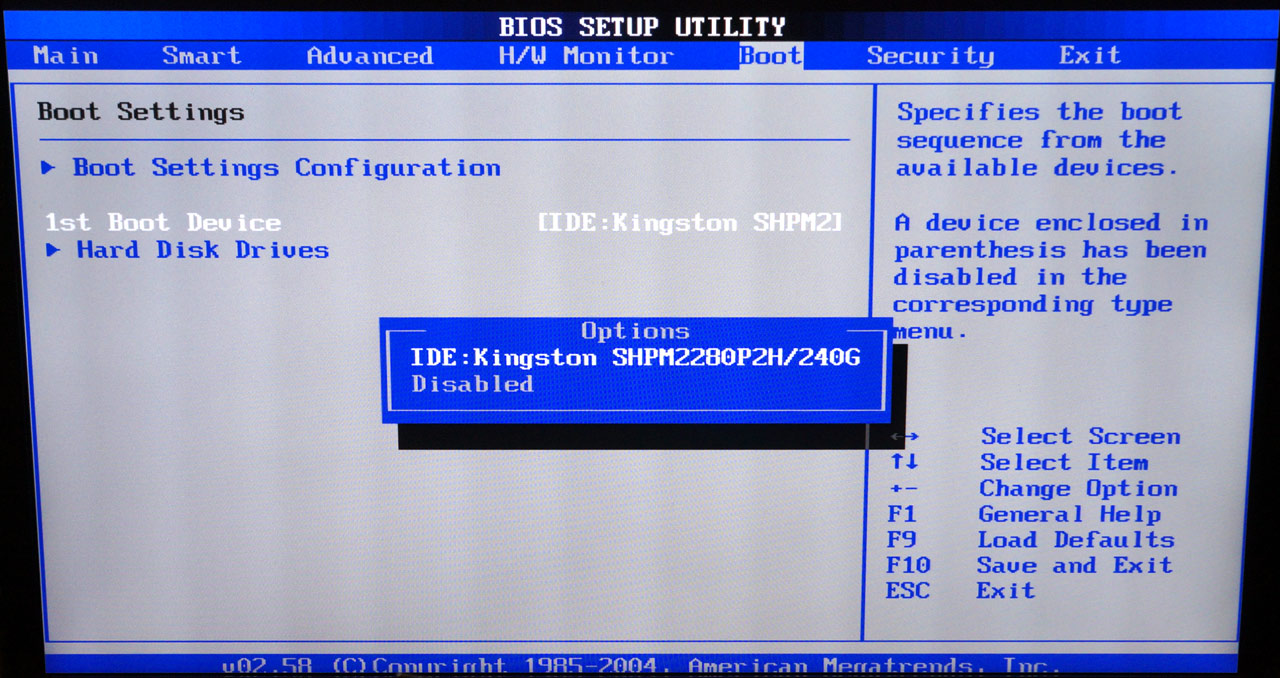
I like this solution more than options with SATA options. cables do not get tangles and the appearance of the system becomes more «serious». Let’s see how using just one, instead of the recommended four lanes, PCI-Express will affect the performance of this SSD.

If this result is considered in relation to modern systems, then it is clearly better than any HDD, but loses to modern SSD. But considering that such numbers are available on Pentium 4 on Socket 478!, you can only rejoice at the old man, the responsiveness of the system turned out at a very high level. But you can still connect it to the PCI-Express x4 slot, though you will have to install either a PCI video card or the video card will work in a PCI-Express x1 slot. Another PCI-Express x4 slot is needed on the motherboard =)
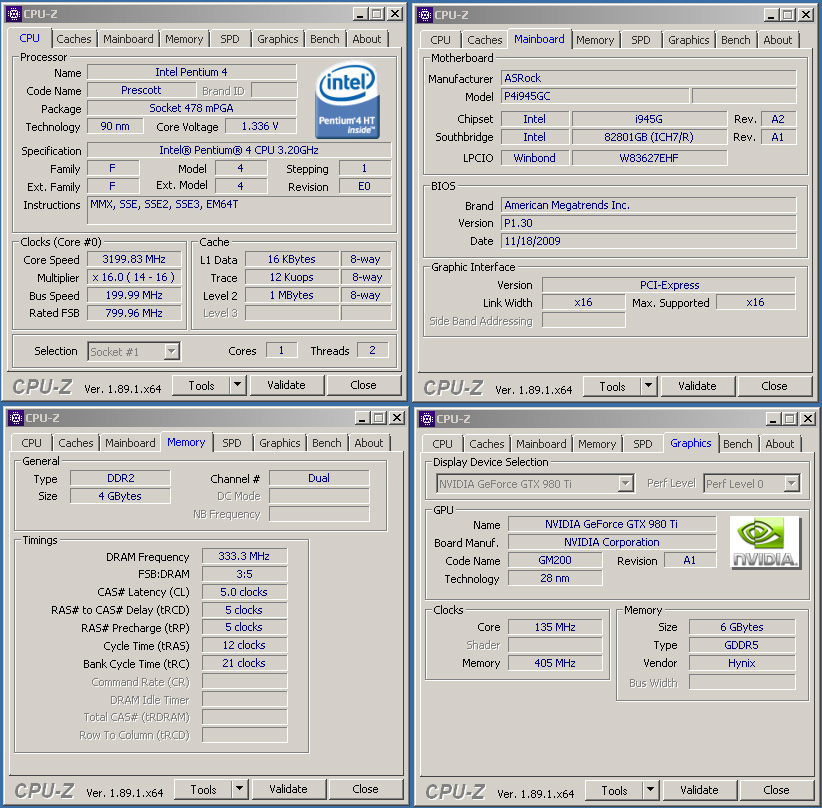
(CPU-Z info – click to enlarge)

I really want to try this monster in practice, but before the test results I will dwell a little on the «not for everyone» processors, this should be interesting.

Not like everyone else.

Before starting the tests, I would like to dwell on some processor models, which, let’s say, appeared due to the «efforts» of other companies, and not at the direct initiative of Intel/AMD. First, look into the distant past.

Let’s start with the a Socket 7 AMD processor, which belongs to the K6-2 line on the «CXT» core. A processor with a non-traditional AMD K6-2 38L3054 model name. This processor operates at a frequency of 337 MHz, which is obtained by multiplying the multiplier 4.5 by the system bus 75 MHz. The solution, to put it mildly, is not standard, if you look at the official AMD datasheet, then for the K6-2 processor line you can see different models,
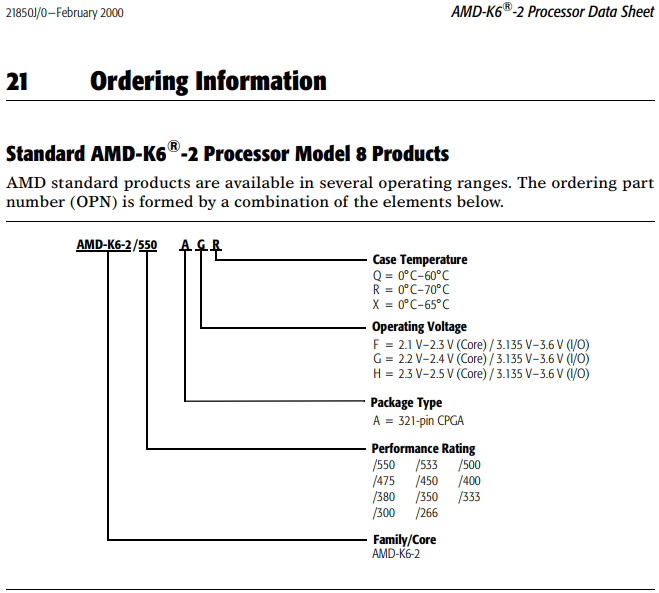
but the 337 MHz model is missing, because it was commissioned by IBM. This is what a processor made for IBM branded PCs looks like:
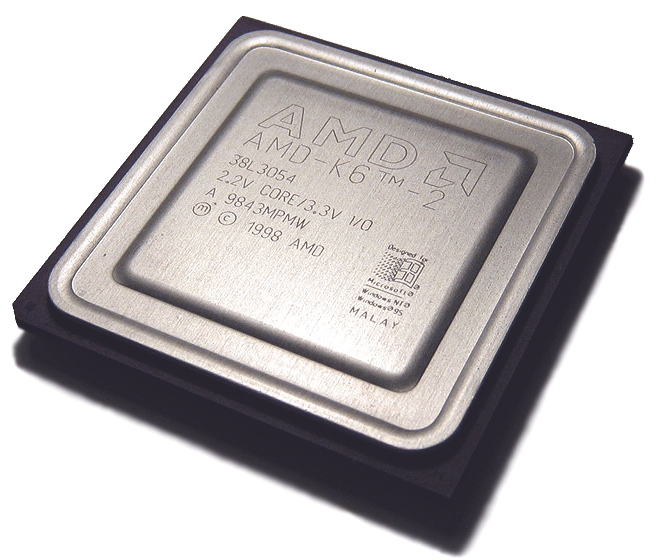
AMD K6-2 38L3054 337MHz

As you can see, there is no clock marking on the processor cover. In place of this information there is a marking AMD K6-2 38L3054 (apparently Part number IBM). Below in the photo is a close AMD K6-2 model with a frequency of 333 MHz (3.5 x 95 MHz).
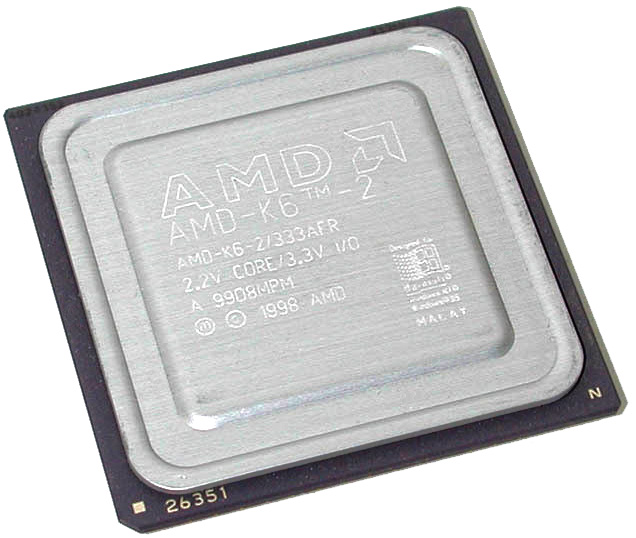
AMD K6-2 333MHz
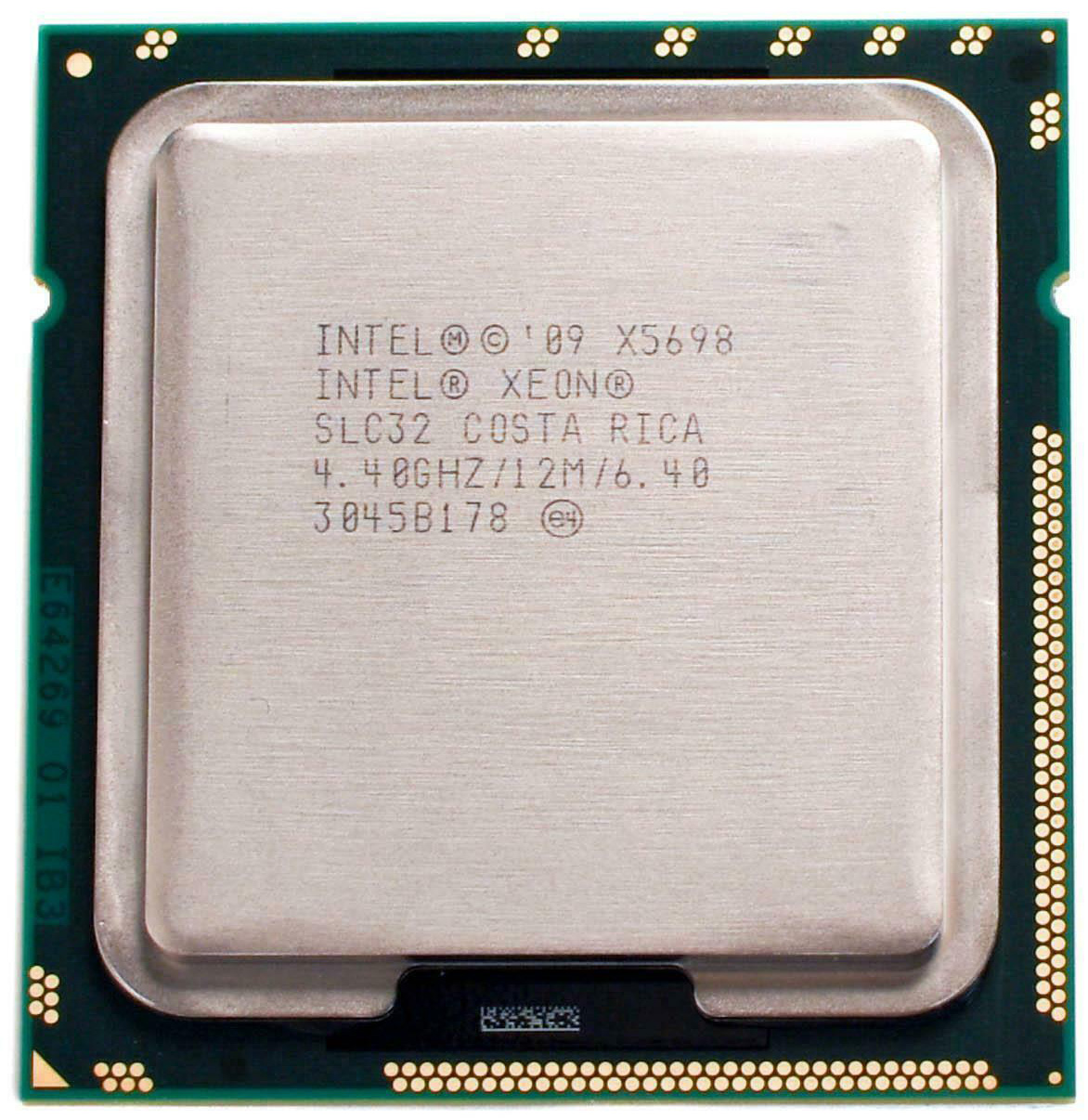
 

Xeon X5698

In this case, everything is in place, including information about the frequency of the model.


The following example applies to the LGA1366 socket. The Intel Xeon processor model with the X5698 index, belonging to the «Westemere» microarchitecture, has at its disposal only two cores, while all the other representatives of this server socket have at least four. But then these two cores work at a record clock frequency of 4.4 GHz! and their speed does not decrease under any circumstances, the processor also retained 12 MB of the third-level memory cache. Intel Xeon X5698 was released on special order in limited quantities.

The processor in fact is a 6-core Xeon model, where 4 cores are disabled, but the remaining two are selected at the production stage and are able to operate at that frequency 24/7 at full load. According to one version, these processors were manufactured for the New York Stock Exchange, where at that time the highest core performance was needed, so that multi-billion dollar banking transactions from Wall Street would instantly reach the addressee. The cost of such a processor was set at $ 20,000 apiece. You can find such a processor now, but the cost of a used version will be at the level of the fastest Ryzen 3 R9.

Intel Black Ops

These processors were installed in pairs, resulting in a workstation with four cores operating at 4.4 GHz, and all this at the beginning of 2011. Each processor had a TDP of 130 watts, and water cooling was clearly assumed. It would be nice to find two of these processors and install them in the EVGA SR-2 motherboard.

Continuing the story of Wall Street, it is worth mentioning an even more interesting processor that replaced the Intel Xeon X5698. A special processor model belonging to the «Ivy Bridge» microarchitecture got its own name, immortalized on the lid of the heat distributor, this is not often seen. The name of this processor is Intel “BLACKOPS”. By special order, Intel has released two “BLACKOPS” models. The first worked at a frequency of 4.4 GHz and had at its disposal 4 cores, but at the same time, all 25 MB of the third-level cache was available.

Finding photos in decent quality of this processor is not so easy. But I managed to find a screenshot of the CPU-Z of this processor. It can be seen below.
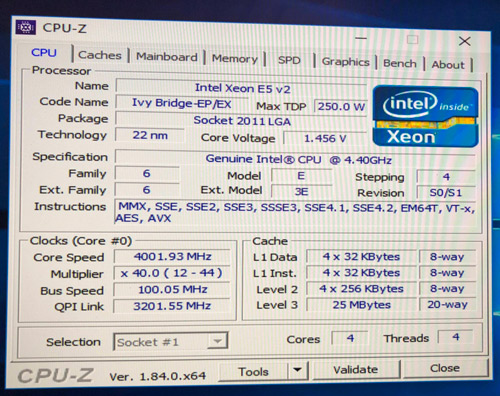
The x44 multiplier, four cores and a TDP of 250 W, not every VRM motherboard can handle such a processor.

The older model worked at a frequency of 4.6 GHz with six active cores and 25 MB of L3 cache. Both processors have disabled Hyper-Threading Technology. The processors were installed in motherboards with an LGA2011 socket and had a TDP of 250 W, which naturally implied the use of a factory-built VRM. The presence of 25 MB of L3 cache  indicates that these processors were selected from the most successful 10 core die. I could not find information about the cost of processors, but I think it is not far from the cost of the Xeon X5698, in any case it was clearly 4-digit. More information about these processors, and others of Intel’s special ‘Everest’ series can be found in the CPU Shack’s Everest article.
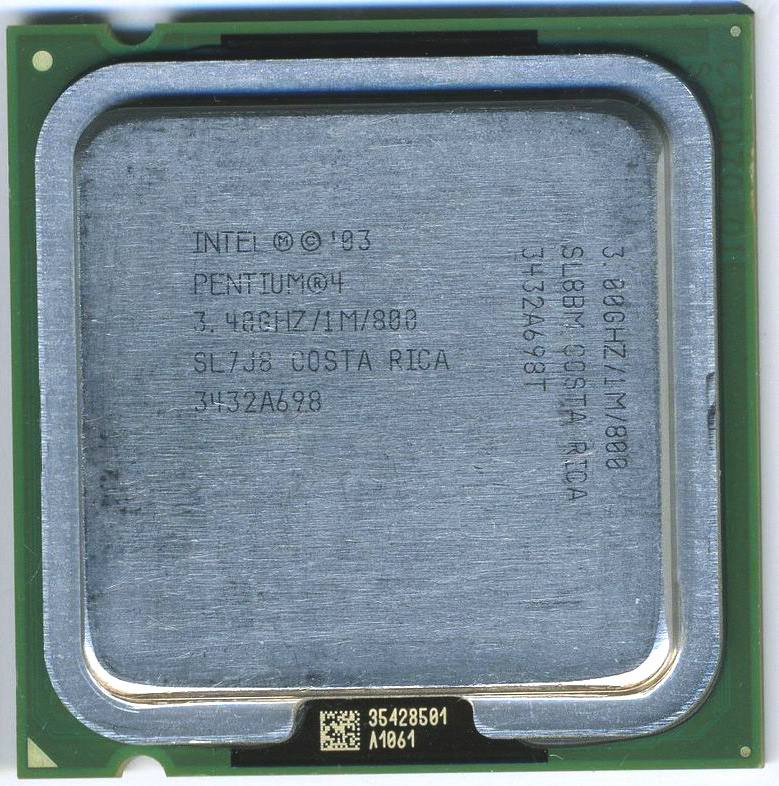
Dual marked Pentium 4 3GHz, or 3.4GHz (one would hope it would also run at 3.2GHz)

At the time of the LGA775 Pentium, Core2 Duo and Quad, Intel made some of its processor models specifically for Dell, IBM, and Apple. Since the Intel Pentium 4 550 model was available for all markets, according to SPEC, the SL8BY and SL8BM variants were intended for Dell. In the first case, the frequency from 3.4 GHz was underestimated to 3.2, in the second to 3.0 GHz. This allowed a single processor to be used in multiple build configurations, simplifying the supply chain and logistics for the builder.

Intel Xeon X5557 SLBFX – Made specifically for Apple for use in the Mac Pro without a heatspreader.

To some extent, the Core 2 Duo E8290 model may be interesting, the model number itself already looks unusual. This 2-core processor operates at a frequency of 2833 MHz and a system bus frequency of 1333 MHz and is based on the Wolfdale core. This processor differs from the usual Intel Core 2 Duo E8300 in the absence of Virtualization technology and Intel Trusted Execution security technology, otherwise they are completely identical. Like its predecessor, the Core 2 Duo E8190 was used in the Apple iMac. This list also includes the Core 2 Quad Q9700 and Core 2 Quad Q9705, which are 167 MHz faster than the well-known Core 2 Quad Q9650, but have only half the level 3 cache, 6 MB instead of 12 for the core 2 Quad Q9650.

i9-9900XE

There are still a lot of other processors that came through OEM channels and which it is practically impossible to meet in retail, the most modern processor of this kind can be considered Intel Core i9-9990XE, which Intel did not even set the selling price, since the circulation obviously does not reach 1000 pieces. (the typical minimum order qty)

After a short digression, it’s time to press the «Power» button and launch the slowest x64 Monster.

Tests

Tests are a good thing, especially when there is something with what to compare. As part of this experiment, I would not want to compare Prescott with Prescott, I just don’t see the point, and it was not for nothing that I installed the GTX 980 Ti. Below I will give the results of those tests that are sharpened by 64 bits, and also try to play modern games.

Testing was conducted in Windows 7 x64 SP1 using the following software:

  • WinRAR x64 v. 5.40
  • WinRAR x32 v. 5.40
  • Cinebench 11.5 x64
  • Cinebench R15
  • Cinebench R20
  • 3DMark 2006 v.1.1.1
  • 3DMark 2011 v.1.0.132.0
  • 3DMark (2013) v.2.9.6631
  • Far Cry
  • Battlefield 4
  • Crysis 3
  • Rise of the Tomb Raider

WinRAR v. 5.40 (32/64-bit version)
Kb/s (more is better)
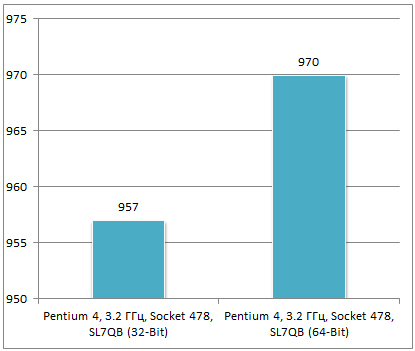
The percentage difference is not significant, only 2% faster, but it is also in favor of the 64-bit version
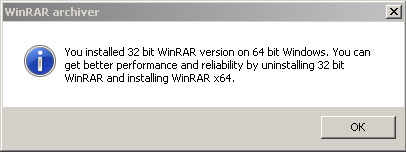
It also gives you a reminder that the 64-bit version is better

Cinebench 11.5 (32/64-bit version);
points (more is better)

Everything here is similar to the previous result, around 2%

Cinebench R15
points (more is better)
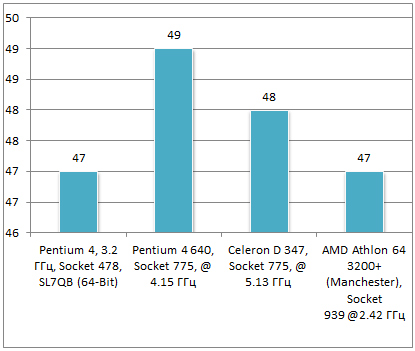
Here it’s already more interesting, since Cinebench R15 exists only in the 64-bit version, so we can say the increase was 100% compared to the usual «Prescott». Therefore, I decided to add some competitors close in importance.  Interesting that the performance rated Athlon 64 3200+ is identical in performance (for once the PR rating is correct it seems)

Cinebench R20
I will not give graphs, I’ll just say that while the test was “spinning”, I managed to drink coffee twice =) I will give only a screenshot with the final result.  This test really rewards multi-core CPUs, so being limited to one core, and a small cache, really hinders it.

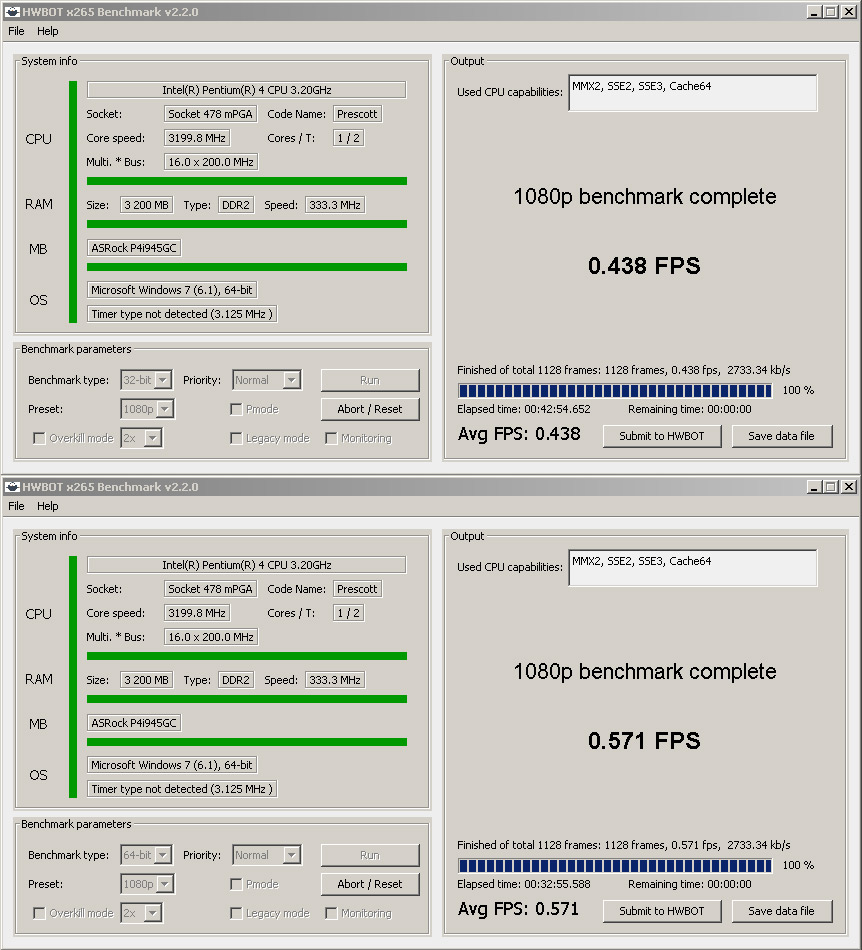
HWBOT x265 Benchmark v.2.2.0 – 1080p
FPS (more is better)
All the difference is visible in the screenshot.
Geekbench 4 v.4.2.3, Single/Multi-Core Score
points (more is better)

We pass now to 3D tests =) Will the giant GeForce GTX 980 Ti be able to help? Between them the difference in age is as much as 11 years. Although during the «honeymoon» month, when they were together in a system of serious quarrels between them, it wasn’t a trifle 😉 It’s scary to think if the GeForce RTX 2080 Ti was installed instead of the GeForce GTX 980 Ti.

3Dmark 2006 v.1.1.1, Score
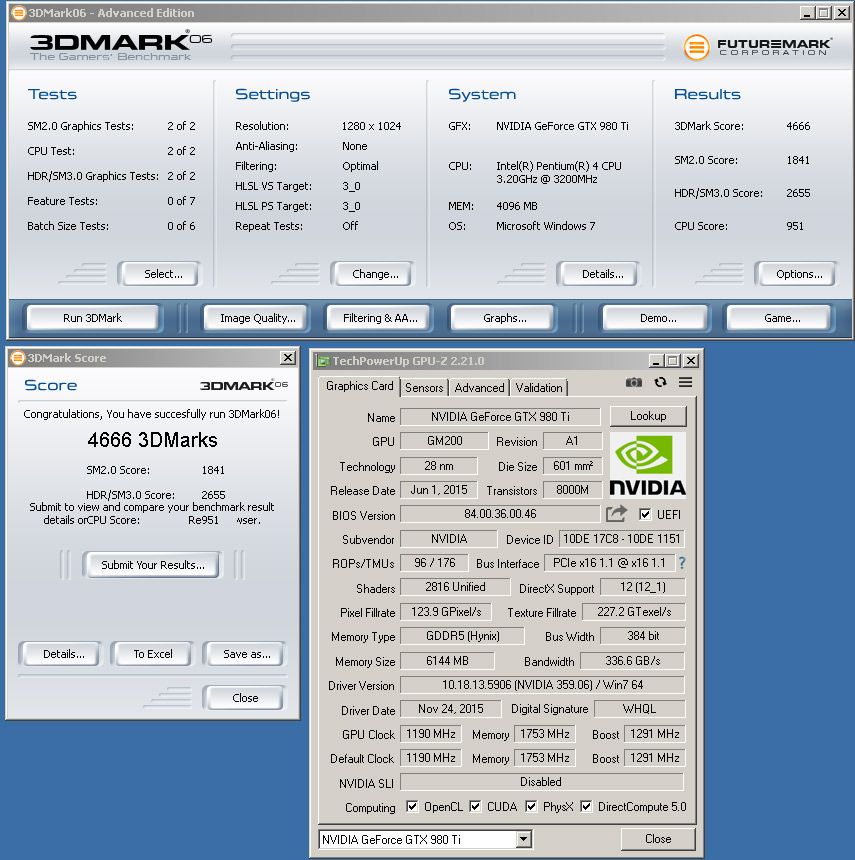
Although the Pentium 4 tried its best, it couldn’t «satisfy» the GeForce GTX 980 Ti. The final result is 4666 3DMarks. In the heart of the HWBOT test I found a similar result on points – 5155, which was obtained on Intel Pentium 4 3.2 GHz Northwood and GeForce GTX 9800GT @ 850/1102 MHz.
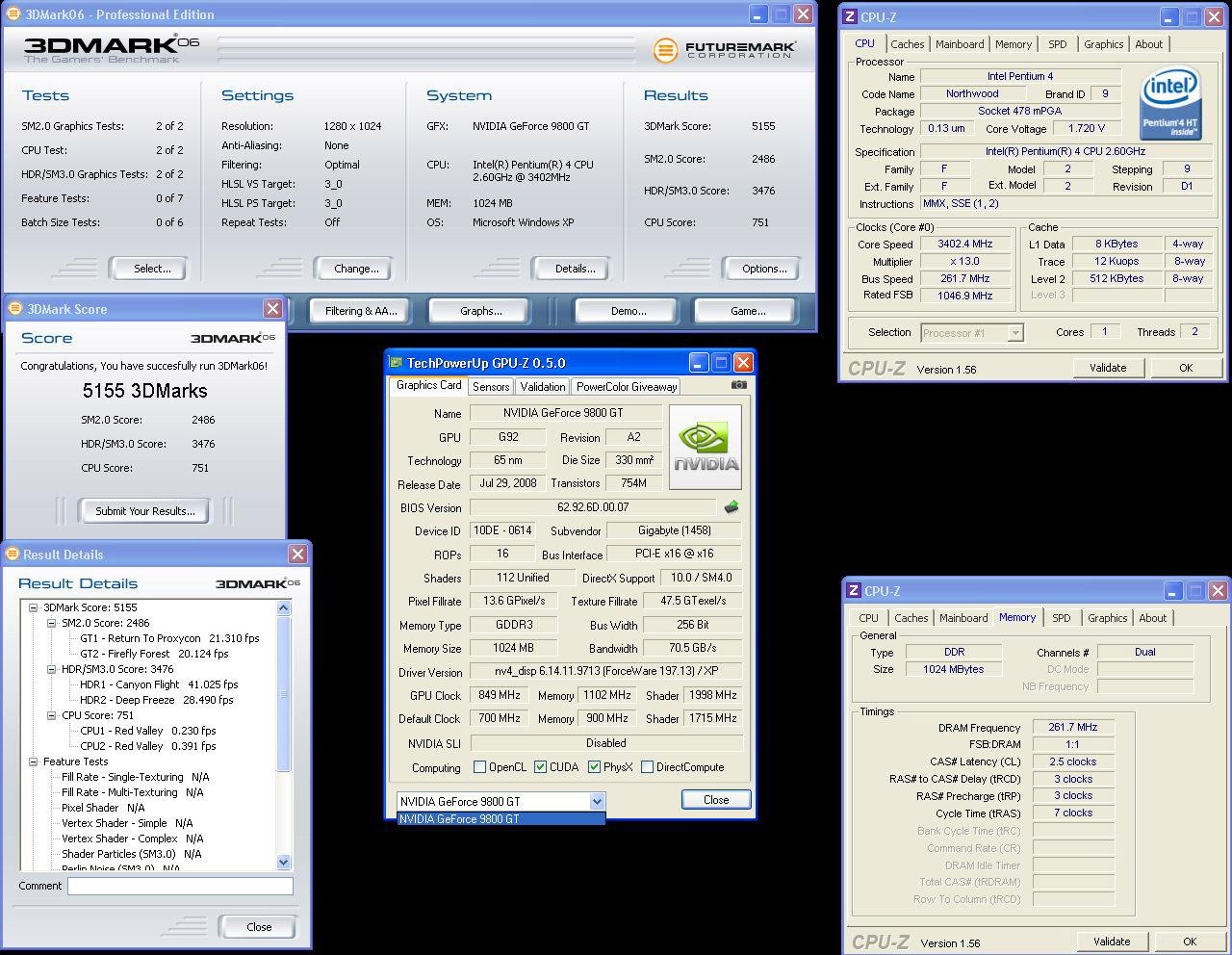
Despite the difference of at least 10 generations, a more powerful video card without processor support could not «pull out» the final result. By the way, the balance of components must be observed under any conditions and at any time, and the GeForce RTX 2080 should not be mixed with four or, God forbid, dual-core CPU.

3DMark 2011 v.1.0.132 – Performance 720p/ Extreme 1080p
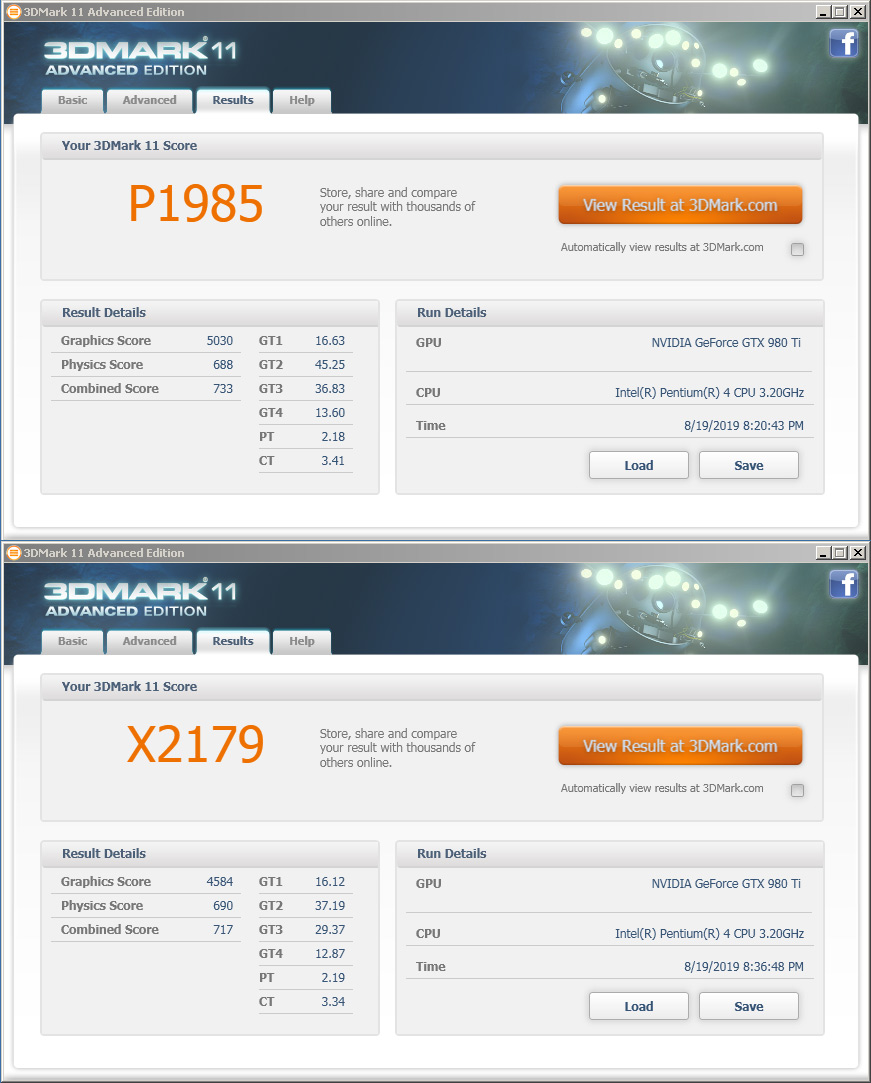
The final numbers of the result have not changed much, and FPS in a number of subtests froze in place, the video card is clearly experiencing processor hunger. Under equal conditions, the GeForce GTX 980 Ti on modern systems is gaining ~ P20123 and X9123. It’s not difficult to calculate the difference.

3DMark (2013) Fire Strike/ Extreme
In fact, I wanted to launch Fire Strike most of all, the very feeling that «this» works already instills pride and confidence in the future.
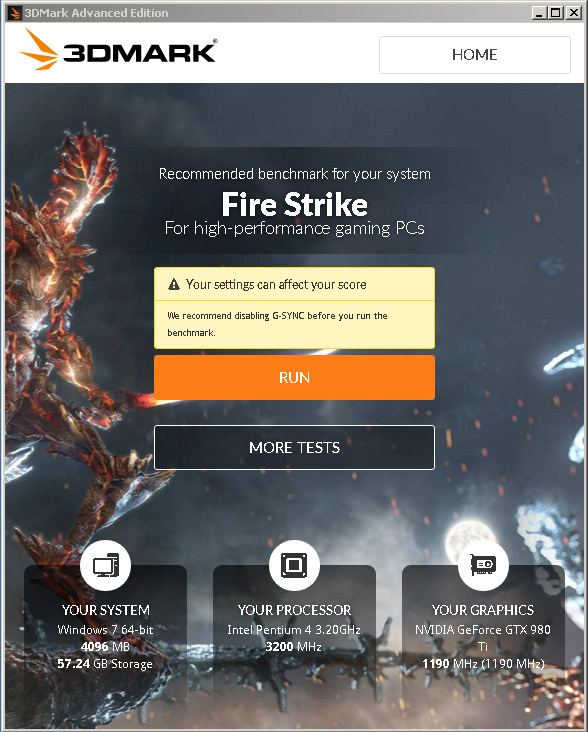
Yes, the result, as in the previous case, is extremely small, but it is still there! I think many more users are armed with the GeForce GTX 980 Ti, so you can check the results with your own and be glad how much your system bypasses mine =)
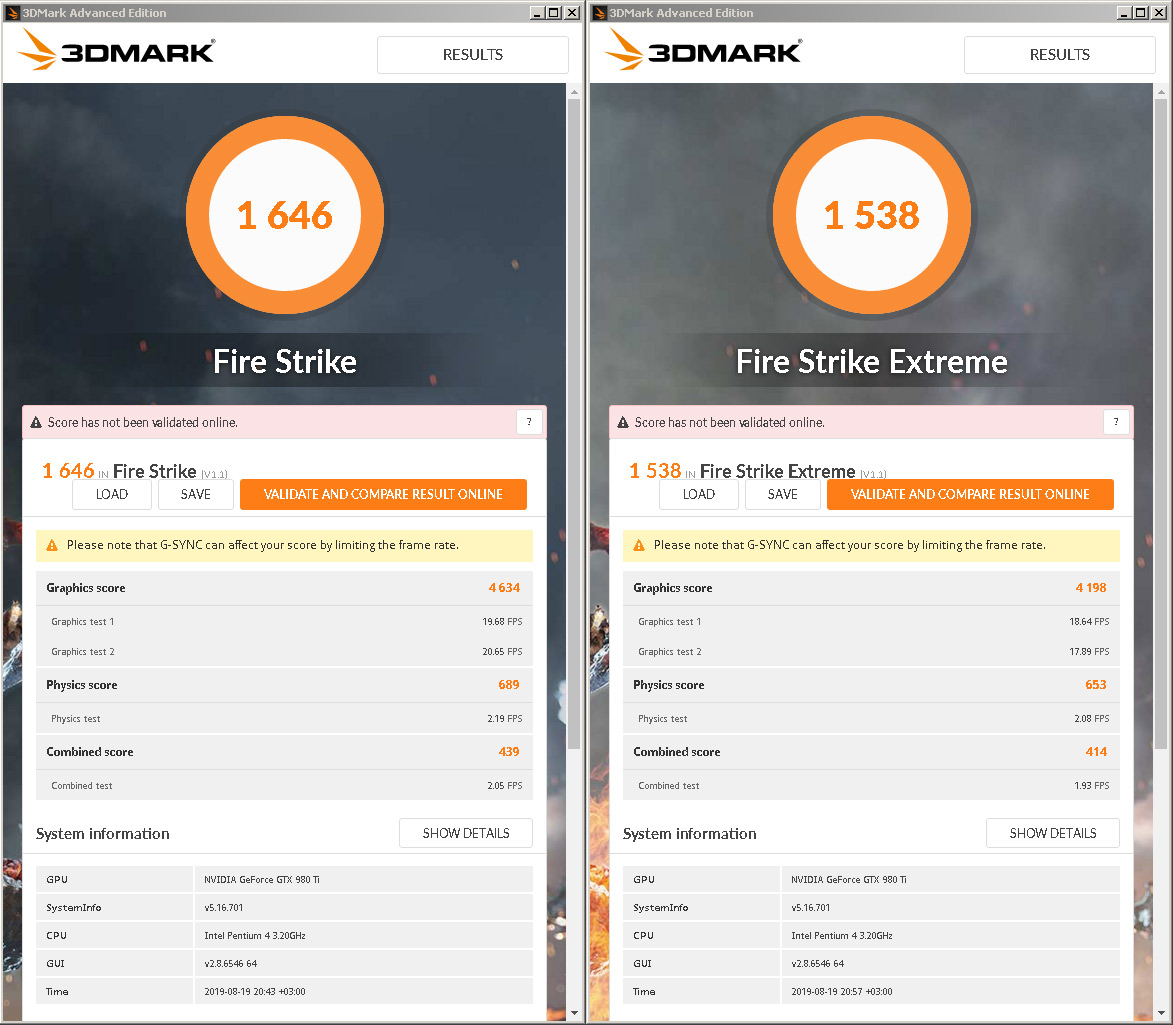
What about the games? Easy, let’s start with the “heavy.”

Battlefield 4 (Tashgar)
Frames/sec (Medium / min / max)
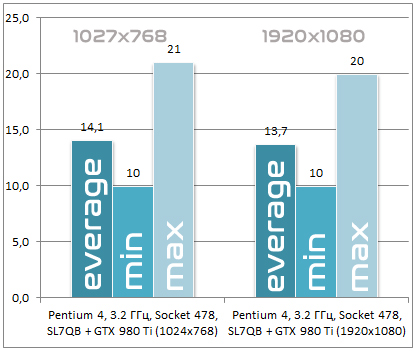
Even despite the high-speed SSD, loading took longer than on a modern PC, but as a result the Tashgar card was chosen, where you can ride a jeep with a breeze. All graphics settings in both resolutions were set to Medium. Although looking at the graph, we can say: Yes, what is the difference 😀 It’s a pity that the FPS did not reach 30 frames per second, I hope that the future overclock will help to reduce the gap.

Rise of the Tomb Raider
An unpleasant surprise awaited me here, the game did not want to start, even despite a couple of reinstallations. After clicking on the shortcut on the desktop, only an error warning appeared What I did not understand the reason for, I can only assume that the launch requires a set of any processor instructions that are not physically available for this processor.

Crysis 3
Here the situation is a little better, it was possible to go to the main menu, select the settings, but they could not advance further the menu, neither the “new” game, nor the loading of existing saves, showed a 3D screen, only a black screen, frozen forever. Why didn’t 3D rendering begin? Perhaps for the same reason as with Rise of the Tomb Raider.

Far Cry (1024×768/1280×1080, Max Quality, demo 3DNews – Research, 2x loop)
Average result, frames/sec

In higher resolution, greater FPS? It’s just that the video card is tired of working in low resolutions =)

What can be summarized by the 3D component? There is a lack of processor power for this video card. From here it does not matter what settings and what resolution is set. You can tighten up the performance by replacing the RAM with a faster one, by setting timings instead of fives – fours, or even all three. It is possible at such a frequency, but miracles cannot be expected from my “Chinese” kit. It’s better to overclock the processor to at least 3.8 GHz, of course, all 4 GHz, but I don’t know how the motherboard will behave, but I have a desire to try it.

By pure processor power, you need to understand that this is an ordinary “Prescott”, albeit with a tremendous zest under the hood.

Conclusion
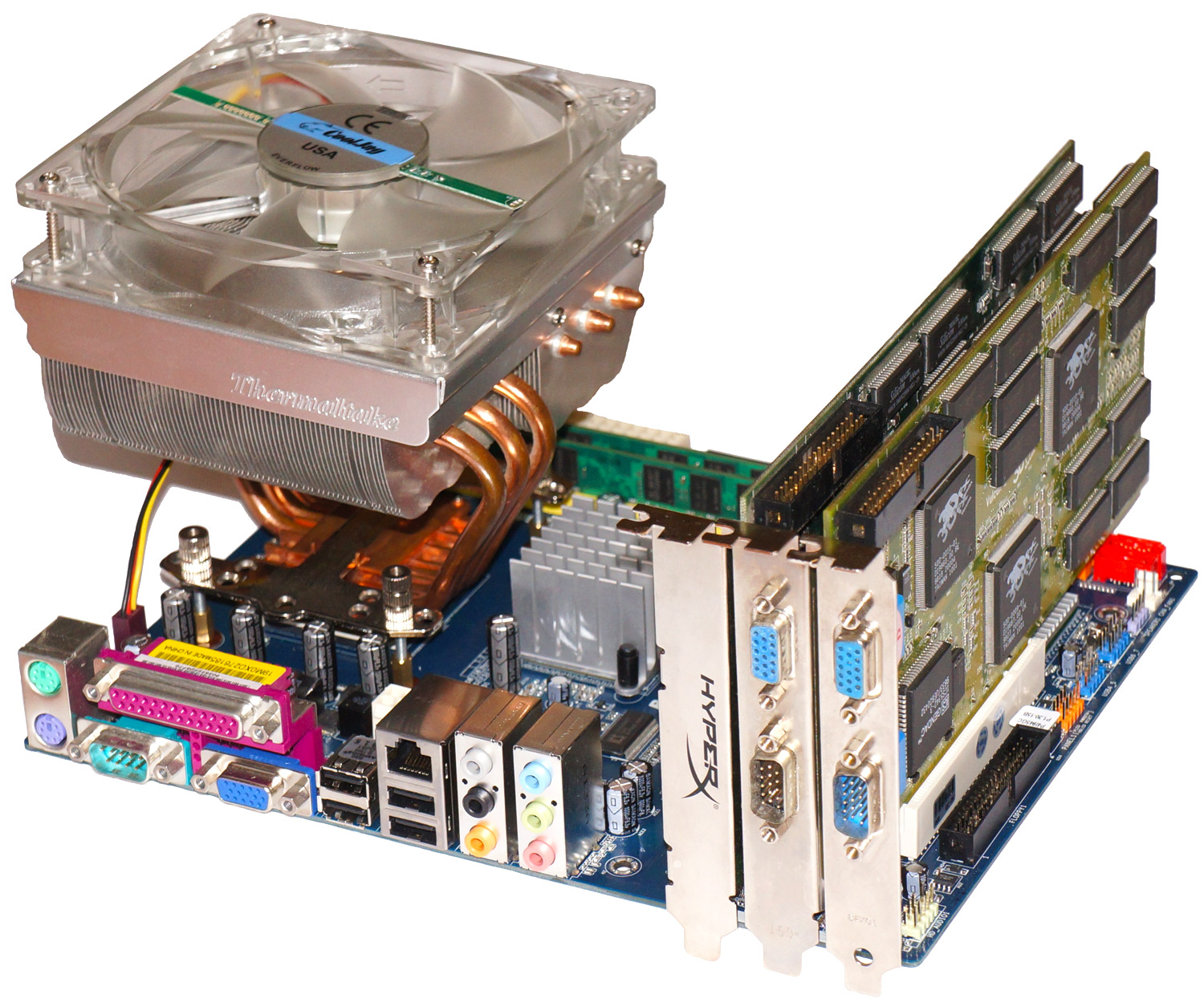
As for the first impressions of the resulting 64-bit system on Socket 478, they are the most positive, even despite the fact that the processor was unable to swing the video card. But as I wrote at the beginning of the article, this assembly claims to be a «for all» role and even for launching DOS games or GLIDE from 3Dfx.

This article is part of The CPU Shack’s continued partnership with guest author max1024, hailing from Belarus. I have provided some minor edits/tweaks in the translation from Belorussian to English.


from Hacker News https://ift.tt/2ojImgE

Visualizing Kubernetes History

sloop - Kubernetes History Visualization

Sloop monitors Kubernetes, recording histories of events and resource state changes and providing visualizations to aid in debugging past events.

Key features:

  1. Allows you to find and inspect resources that no longer exist (example: discover what host the pod from the previous deployment was using).
  2. Provides timeline displays that show rollouts of related resources in updates to Deployments, ReplicaSets, and StatefulSets.
  3. Helps debug transient and intermittent errors.
  4. Allows you to see changes over time in a Kubernetes application.
  5. Is a self-contained service with no dependencies on distributed storage.

Screenshots

Screenshot1

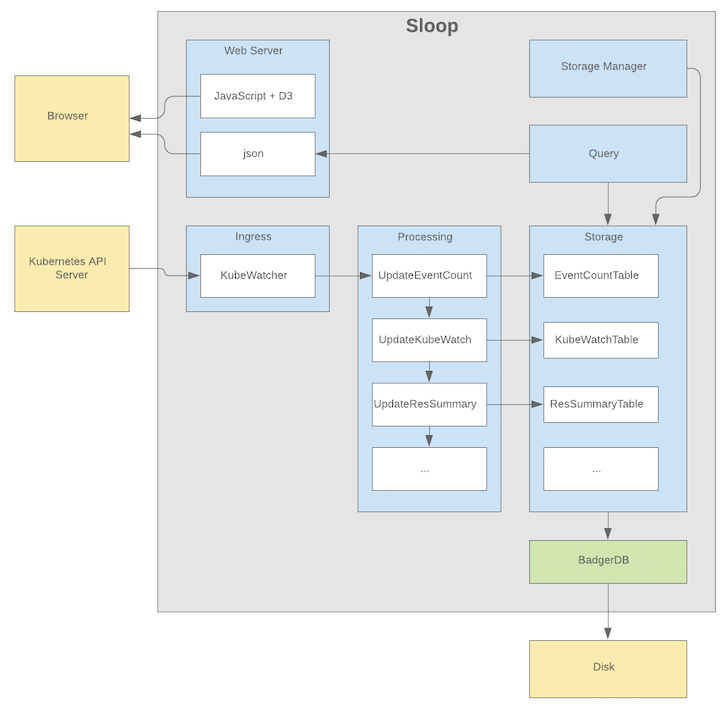
Architecture Overview

Architecture

Install

Sloop can be installed using any of these options:

Precompiled Binaries

DockerHub images coming soon.

Helm Chart

Helm chart coming soon.

Build from Source

Building Sloop from source needs a working Go environment with version 1.13 or greater installed.

Clone the sloop repository and build using make:

$ mkdir -p $GOPATH/src/github.com/salesforce $ cd $GOPATH/src/github.com/salesforce $ git clone https://github.com/salesforce/sloop.git $ cd sloop $ make $ ~/go/bin/sloop

When complete, you should have a running Sloop version accessing the current context from your kubeConfig. Just point your browser at http://localhost:8080/

Other makefile targets:

  • docker: Builds a Docker image.
  • cover: Runs unit tests with code coverage.
  • generate: Updates genny templates for typed table classes.
  • protobuf: Generates protobuf code-gen.

Local Docker Run

To run from Docker you need to host mount your kubeconfig:

$ make docker $ docker run --rm -it -p 8080:8080 -v ~/.kube/:/kube/ -e KUBECONFIG=/kube/config sloop

In this mode, data is written to a memory-backed volume and is discarded after each run. To preserve the data, you can host-mount /data with something like -v /data/:/some_path_on_host/

Contributing

Refer to CONTRIBUTING.md

License

BSD 3-Clause


from Hacker News https://github.com/salesforce/sloop

How Much Money Do We Make?

Hey guys!

I’ve been wanting to write a blog post for an absolute AGE but I’ve been so sick with migraines and so busy, I had to push the blog posts back for a little while. BUT I’M BACK BABY!

You know that Rose and I love to be brutally honest with you guys, sharing our embarrassing confessions and secrets with you like we’re chatting with our best friends. Because, in a way, we kind of are!

So today I wanted to be transparent with you about MONEY. Being a YouTuber is still a fairly new job and I find that there is so much mystery and also confusion surrounding it. And I get it! It IS confusing, even to us! There’s a lot of mixed messages, slanderous articles in the media, and a few really big YouTubers making some seriously questionable mistakes and giving the rest of us a bad name. I’ve seen memes and comments and forums discussing YouTubers and money and their lifestyle and they get it SO wrong!

So I wanted to clear a few things up with you guys today and answer what I imagine are some FAQs.

How Much Money Do We Make?

Not as much as you’d think! Rose and I share three channels between us, the main channel, the vlog channel and the gaming channel. We have a channel parter who is Studio 71 and they take 10% of our YouTube earnings and then pay us, but the money is paid by Google Adsense, if you’re wondering how YouTubers even get paid. The content is free for you to watch, and we put a lot of effort into making our videos entertaining, lighthearted and fun for you. You will probably be shown at least one advert before you watch the video, possibly more, and we earn a small percentage for that view on the advert.

So how much do we get? We get one payment from adsense to share between us per month, and we make less than enough to cover all our mortgage and bills.

Obviously this could change and we usually make a small amount more around Christmas when we put out even more content.  Adsense varies for a myriad of reasons, what the advert was, how many people watched the video, how long they watched it for, where they watched it from etc, so no two YouTubers will earn the same amount, even if they have the same amount of subscribers and produce the same amount of content with the same views. Which is why some Youtubers can live off Google Adsense and others can’t.

But over all, it isn’t enough for us to live off. Which is why Rose and I have to take Ads, which brings me on to my next point….

You Do So Many Ads Now. You’ve Sold Out.

Nope, we haven’t. We are exactly the same people as we started out, only a little older and with more responsibilities. We have bills to pay and we also want to create a tiny human, and that is going to cost us money!

Rose and I literally get emailed about brand deals almost once a day, but we are so so choosy about what we will and won’t advertise. We only want to recommend to our audience products that we genuinely LOVE, use or need. I’m also going to start reaching out to more brands that I love and use a lot, because I think there’s nothing more genuine than that. A favourite brand deal of mine was Instax Mini. I’ve been using Instax since 2014, so I was really happy to promote their newest Instax at the time. I’m a normal person, just like you guys, so there are products I love and products I hate!

So how much do brand deals pay? That totally ranges. Again, it depends who the brand are, what their marketing budget is, what platform the advert is featuring on, etc. I’ve seen smaller YouTubers charge much more than us, and I’ve seen huge YouTubers get ripped off and underpaid. A lawyer once told me it’s like the “Wild West” out there in the influencer marketing world. Sometimes brands get an agency to act as a ‘middle man’ between the brand and the influencer and they obviously need to take a cut of the payment for their time. Some influencers have managers and they take a cut also. But, for example, for an Instagram advert I’ve seen people get paid between £500 to £6,000. It’s interesting actually, someone who would obviously be paid thousands of pounds or more would be Kim Kardashian, right? She’s absolutely huge on Instagram. But her engagement on Insta is shockingly low at 1.57%. The global average engagement is 3%. In fact, loads of celebrities have terrible engagement. and I believe it’s because, even though they are REAL celebs who are ten thousand times more famous than Rose and I… they aren’t as engaged with their audience in real life. Whereas YouTubers who are good at their jobs (in my opinion) will be tweeting their viewers, following them, responding to them, asking them what content they want made. In my opinion, it’s influencers who recognise that this relationship with our audience is special, and a two-way street, that do the best. Again, on Insta there are people who get paid way more than us who are smaller than Rose and I. It’s tricky because people set a price on what they think they are worth and sometimes the brand will pay it and sometimes they won’t. Rose and I were recently advised by a few people to set our prices higher. What I like about that is it does enable us to take less ads and still pay the bills.

For YouTube, prices are constantly changing. There was a time when I felt like everyone else was getting huge, life changing brand deals and Rose and I weren’t. I had a friend make £100,000 in one MONTH. I grew up poor, and never take money for granted. That kind of earning is life changing. Some people were charging £30,000 per ad on YouTube. Rose and I obviously weren’t. There was definitely a time when being out and proud as LGBT on YouTube was hindering us money wise. I remember a brand was going to work with Rose and I on a pride campaign, but then chose someone else, who had just recently come out, but whose channel was not LGBT content. They told us, “yeah your channel is good but XXX’s audience has other interests other than being gay.” Ummm…. our audience has other interests!!!! They just happen to be LGBT. Do you think that’s all they care about??? LGBT people have passions, hobbies and buy products too! It was absurd.

Rose and I NEVER thought that would be an issue. We had just been ourselves online from day 1. We would never have hidden ourselves to earn more money. I’d much rather have the freedom of being myself.

But I have noticed that as time has passed, companies have started treating minority groups much better, and I’ve seen way more people get ads who aren’t just white, straight people. I’ve seen companies run campaigns benefitting just about every person, and it’s great to look back at our journey and see that shift. I feel being LGBT definitely doesn’t affect us anywhere near as much as it used to work-wise, and I’m proud we’ve only ever stayed true to ourselves and never sold out.

Then, there really was this thing called the Ad-pocalypse where loads of brands suddenly recoiled in horror.

They realised that they had just been putting ads in front of random YouTuber’s videos but there hadn’t been much thought or control surrounding it. Their advert could have been placed in front of someone with really horrible opinions, someone brands didn’t want to touch with a barge pole, let alone be associated with. Literally overnight, every YouTuber’s earnings went down. Adsense was affected, and rates of brand deals were affected, our two primary sources on income.

Was it scary? Uh, yeah!

But equally, it had to happen. There are big YouTubers pulling stupid stunts, like Logan Paul and the dead-body-gate. It makes us all look bad. We are not all like that. So at least now brands were thinking about who makes good content? Who is spreading a positive message? And I believe that also helped certain people. It does sadden me that in the media, you usually only hear about big YouTubers doing something stupid, like a girl who shot her husband and accidentally killed him, all because they were trying to film a YouTube prank video. But there you go. The media is a whole other ball game.

Anyway, back to YouTube earnings… I remember having over half a million subscribers, an amazing engagement and doing a really heavy advert for £2,000. I liked the product, but I really didn’t want to do the ad, and felt I was ripped off and that it was too forceful a sell. I did it to make my management happy. A while later, Rose and I left our management. One of the main benefits of this was that we didn’t have to take on any adverts that we didn’t want to. And now we don’t. I’d rather do one big, high quality advert that we absolutely love, than keep putting out content containing loads and loads of small, shit adverts. A personal favourite advert of mine was VIPOO. It absolutely suited us, we got to have fun, and I believe our audience noticed and recognised that, and enjoyed it a lot.

Name Some Spon You’ve Turned Down Then

Sure. Most recently we turned down a well paid ad with Fabletics – Kate Hudson’s activewear business. This one was a difficult one and I’m still unsure if I made the right decision, because although I haven’t tried Fabletics I’ve heard they are AMAZING. I’ve heard they are comfortable, well made, have pockets (!!!) and once people buy them they tend to live in them. BUT I also know that they do an offer which is something like £20 for two pairs of leggings, but when people do that offer they are opted into a monthly charge that people weren’t aware of, and some people are calling it a scam. Although I’m sure I would have loved the leggings and would have appreciated the money made from the ad, I didn’t want my viewers getting trapped in a scam or losing their money, so I turned it down.

Another well paid Ad we turned down fairly recently was with Huawei phones. They wanted us to advertise how amazing their camera on the phone is, and I’ve heard that it’s amazing. We chose not to, because we have been gifted (not paid to advertise) a Google Pixel phone each and we LOVE the camera on this phone. We feel it really makes taking Instagram pics a dream and we are very grateful to Google for gifting us this, as phones can be incredibly expensive. We turned down Huawei because when we find a brand we love, like Google Pixel, why advertise another?

Over the years we’ve turned down tonnes of ads, and there are also plenty of products and brands I DREAM of working with. But I think it’s important not to sell out. If you just advertise any old product to your audience, they will know that there is no genuine passion behind what you’re saying and they will no longer trust your recommendation. Trust is an extremely important factor for us! And of course, even if we aren’t paid to advertise a product, we can still recommend it, and I have a non sponsored skincare blog post coming soon filled with products I love!

Rules and Guidelines

First of all, the rules and guidelines are different in different countries, which is pretty frustrating, as some people don’t have to declare their ads at all. I actually like being transparent with our audience, I don’t want to trick them or lie to them. BUT when something is an advert it tends to get lower likes and views, I guess because people think “Oh, they’re only doing this because they were paid to” but that’s not necessarily true. I remember Rose took an INCREDIBLE photo of me for a Pandora ad on instagram. It got slightly less likes and I was upset because I think if that picture didn’t say ‘ad’ on it, everyone would have loved it. I don’t always understand why that word off-puts people. All content we create is free for you to watch. We HAVE to take ads to enable us to continue. We probably put the most effort into the content that has an ad behind it, so it’s sad when people simply won’t click on it.

The rules are basically; let people know it’s an ad. If the entire video is an ad, people need to know before the click on it, so put ad in the title or thumbnail. If only a tiny segment is an ad (like if you do a 15 minute vlog and 2 minutes of that is an ad) during the video you can let the audience know that what you are saying is now an ad, by either telling them or putting a pop up disclaimer on your video. It’s not that hard, but I see sooo many YouTubers not declaring it, or using some really vague wording “we’ve teamed up with XXX”.

If it doesn’t say ad on my content, then it’s not an ad and I’ve not been paid to promote the product and I’m in no way obligated. I remember one time Rose posted a picture on insta that was an advert for Barclays bank. It said ‘AD’ on it. Then I posted a photo wearing a Barclays T shirt. It did NOT say AD on it. Someone messaged me like “Ummmm declare your ads???” It wasn’t an ad. I wasn’t paid to upload the photo, I wasn’t asked to or required. I took a pic I liked and uploaded it to Insta. If it’s an Ad we will TELL YOU. No one needs to get all private detective on us. We aren’t deceiving you, we always let you know the deal, I promise.

There’s been a shift in the rules lately and one of them I think is REALLY stupid. You have to declare stuff that is gifted. If something is gifted to you, a brand has sent it to you, but has not paid you to promote it and there is no contract. You have no obligation to rave about it. But for example, my Google phone was gifted to us. Should I put #gifted every time I tweet using that phone? Forever? Every time I post an Insta using the phone, or with the phone in shot. Every time I glance at my phone in a video, do I have to declare it was a gift? It’s silly.

I constantly tell people NOT to send us free stuff, I would much rather pay for it. Sometimes brands are cheeky and send you something for free (like a card game or something) and then a few weeks later email like “Hi… are you going to post about it?” No. Not if I think it’s shit. Why would I promote some free gift that I don’t like to my audience? If I like something I will promote it. I genuinely love my Google pixel. It’s my favourite gift I’ve ever had doing YouTube to date. Everything else I usually turn down.

Another silly example is when YouTubers get invited to an event, we now have to declare that as a gift?? Why? It’s an EVENT. We were INVITED not gifted. When celebs go to the Met Gala you don’t see them saying “Thank you SO much #gifted” so why can’t I get invited to something and just go? It’s making something nice like an invite somewhere special look like a manufactured ad. The rules for us are different to rules everywhere else in the same industry. Magazines get gifted tonnes of free clothes and jewellery to put on their models, or makeup and skincare they write articles about but they don’t have to put #gifted. They also get paid to promote certain products and they don’t declare that either. But influencers get threatened with influencer jail. Serving time and serving looks.

Conclusion

So. I hope this post has cleared up a lot of questions you might have. I guess the summary is: YouTube is like any other job. Some people can make it to the top and become millionaires. Most people don’t. It can be extremely rewarding and it can be hard work. There are amazing benefits and huge drawbacks. I love my job, I’m grateful for every day I get to do this. I’m a creative person and have big ideas for the future. YouTube enables me to share my dreams, passions and vision with you all. Thank you for reading this post, and for supporting Rose and I. If you have any other queries that you’d like to know, or if you liked this post, please comment below!

xxx Rosie


from Hacker News https://ift.tt/2o6dIaw

Big ISPs aren’t happy about Google’s plans for encrypted DNS

Why big ISPs aren’t happy about Google’s plans for encrypted DNS

When you visit a new website, your computer probably submits a request to the domain name system (DNS) to translate the domain name (like arstechnica.com) to an IP address. Currently, most DNS queries are unencrypted, which raises privacy and security concerns. Google and Mozilla are trying to address these concerns by adding support in their browsers for sending DNS queries over the encrypted HTTPS protocol.

But major Internet service providers have cried foul. In a September 19 letter to Congress, Big Cable and other telecom industry groups warned that Google's support for DNS over HTTPS (DoH) "could interfere on a mass scale with critical Internet functions, as well as raise data-competition issues."

On Sunday, The Wall Street Journal reported that the House Judiciary Committee is taking these concerns seriously. In a September 13 letter, the Judiciary Committee asked Google for details about its DoH plans—including whether Google plans to use data collected via the new protocol for commercial purposes.

But Google says that these concerns are groundless. Despite insinuations from telecom companies, Google says, the company has no plans to switch Chrome users to its own DNS servers. And while Google didn't mention it, the company has plenty of ways to monitor users' browsing patterns with or without access to their DNS queries.

The telecom industry letter is confusing because it mashes together two different criticisms of Google's DoH plans. One concern is that switching to encrypted DNS would prevent ISPs and others from spying on their users. The other is that, in the process of enabling DoH, Google will switch millions of users over to Google's own DNS servers, leading to a dangerous concentration of control over DNS.

Understanding the debate is easier if we consider each of these concerns separately.

Google says it isn’t planning to switch users to its DNS

Let's start with the second concern: that Google will switch Chrome users to its own DNS servers, giving Google concentrated power over DNS. Google's response here is simple.

"Google has no plans to centralize or change people's DNS providers to Google by default," the company said in an email to Ars Technica. "Any claim that we are trying to become the centralized encrypted DNS provider is inaccurate."

Google laid out its plans in detail in a September 10 blog post. Starting with version 78, Chrome will begin experimenting with the new DoH feature. Under the experiment, Chrome will "check if the user's current DNS provider is among a list of DoH-compatible providers, and upgrade to the equivalent DoH service from the same provider," Google wrote. "If the DNS provider isn't in the list, Chrome will continue to operate as it does today."

One possible reason for confusion on this point is that Mozilla is planning a more aggressive rollout of the technology. The company is planning to gradually shift all of its users to DoH—whether or not their existing DNS provider supports it. The shift will make Cloudflare the default DNS provider for many Firefox users, regardless of the DNS settings of the underlying OS.

Mozilla has more latitude to do this because most surveys show Firefox with single-digit market share—and Firefox isn't a major DNS provider in its own right. So there'd be little basis for antitrust scrutiny if Mozilla shifts its users over to a new DNS provider. The same move could raise antitrust concerns if Google started switching Chrome users over to its own DNS. But Google says it has no plans to do that.

DNS over HTTPS means ISPs can’t spy on their users

Google CEO Sundar Pichai.
Enlarge /

Google CEO Sundar Pichai.

Simon Dawson/Bloomberg via Getty Images

Telecom companies also raised a second concern that applies even if Google doesn't shift anyone to its own DNS servers. Put simply: the lack of DNS encryption is convenient for ISPs.

ISPs sometimes find it useful to monitor their customers' Internet traffic. For example, queries to malware-associated domains can be a signal that a customer's computer is infected with malware. In some cases, ISPs also modify customers' DNS queries in-flight. For example, an easy way to block children from accessing adult materials is with an ISP-level filter that rewrites DNS queries for banned domains. Some public Wi-Fi networks use modified DNS queries as a way to redirect users to a network sign-on page.

Some ISPs also use DNS snooping for more controversial purposes—like ad targeting or policing their networks for copyright infringement.

Widespread adoption of DoH would limit ISPs' ability to both monitor and modify customer queries. It wouldn't necessarily eliminate this ability, since ISPs could still use these techniques for customers who use the ISP's own DNS servers. But if customers switched to third-party DNS servers—either from Google or one of its various competitors—then ISPs would no longer have an easy way to tell which sites customers were accessing.

ISPs could still see which IP addresses a customer had accessed, which would give them some information—this can be an effective way to detect malware infections, for example. But this is a cruder way to monitor Internet traffic. Multiple domains can share a single IP address, and domains can change IP addresses over time. So ISPs would wind up with reduced visibility into their customers' browsing habits.

What would a switch mean?

But a switch to DoH would clearly mean ISPs had less ability to monitor and manipulate their customers' browsing activity. Indeed, for advocates that's the point. They believe users, not their ISPs, should be in charge.

Mozilla, which is pushing DoH more aggressively than Google, has taken steps to avoid creating too much chaos in the process. In July, Mozilla said that it wouldn't enable DoH by default in the UK, where ISPs are planning to use DNS to implement legally mandated porn filtering.

Before enabling DoH, Firefox will check if a computer has parental control software installed. In enterprise settings, Mozilla will try to figure out if a switch to DoH will break corporate Intranet features that depend on using specific DNS servers. Firefox will continue using the existing DNS servers in these cases.

So far, Google is only enabling DOH for a select number of whitelisted DNS providers, so the switch shouldn't cause too many problems. If the company goes beyond that, we can expect it to take measures similar to those Mozilla has taken.

In any event, it's hard to see a policy problem here. ISPs' ability to eavesdrop on their customers' DNS queries is little more than a historical accident. In recent years, websites across the Internet have adopted SSL encryption for the contents of their sites. The encryption of DNS is the natural next step toward a more secure Internet. It may require some painful adjustments by ISPs, but that hardly seems like a reason for policymakers to block the change.


from Hacker News https://ift.tt/2mpwEQR

Unsung Beauty of Analog Devices Datasheets

Unsung Beauty of Analog Devices Datasheets

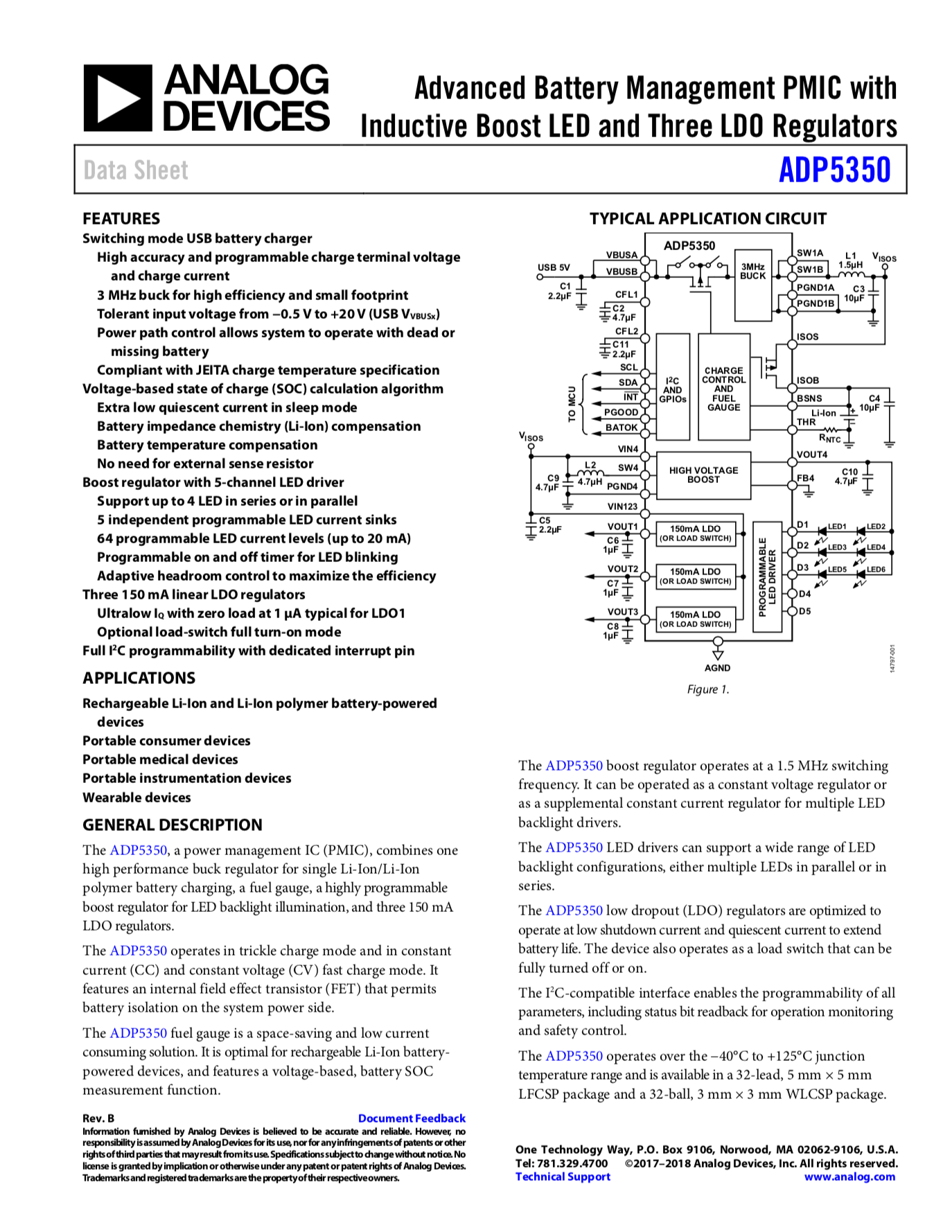
Engineers build stuff. They need to put together complex systems, most often from pieces that others have built. I jokingly talk to my colleagues that software engineering is similar to plumbing - take various pieces of software and link them through an interface (API or in case of real plumbing - connectors, standardized threads and elbow pieces - I am serious about this analogy). The key to building things faster, better and with less errors is to be able to understand the interface between pieces. Companies such as Stripe have doubled down on their documentation - it is gorgeous, check it out: https://stripe.com/docs/api

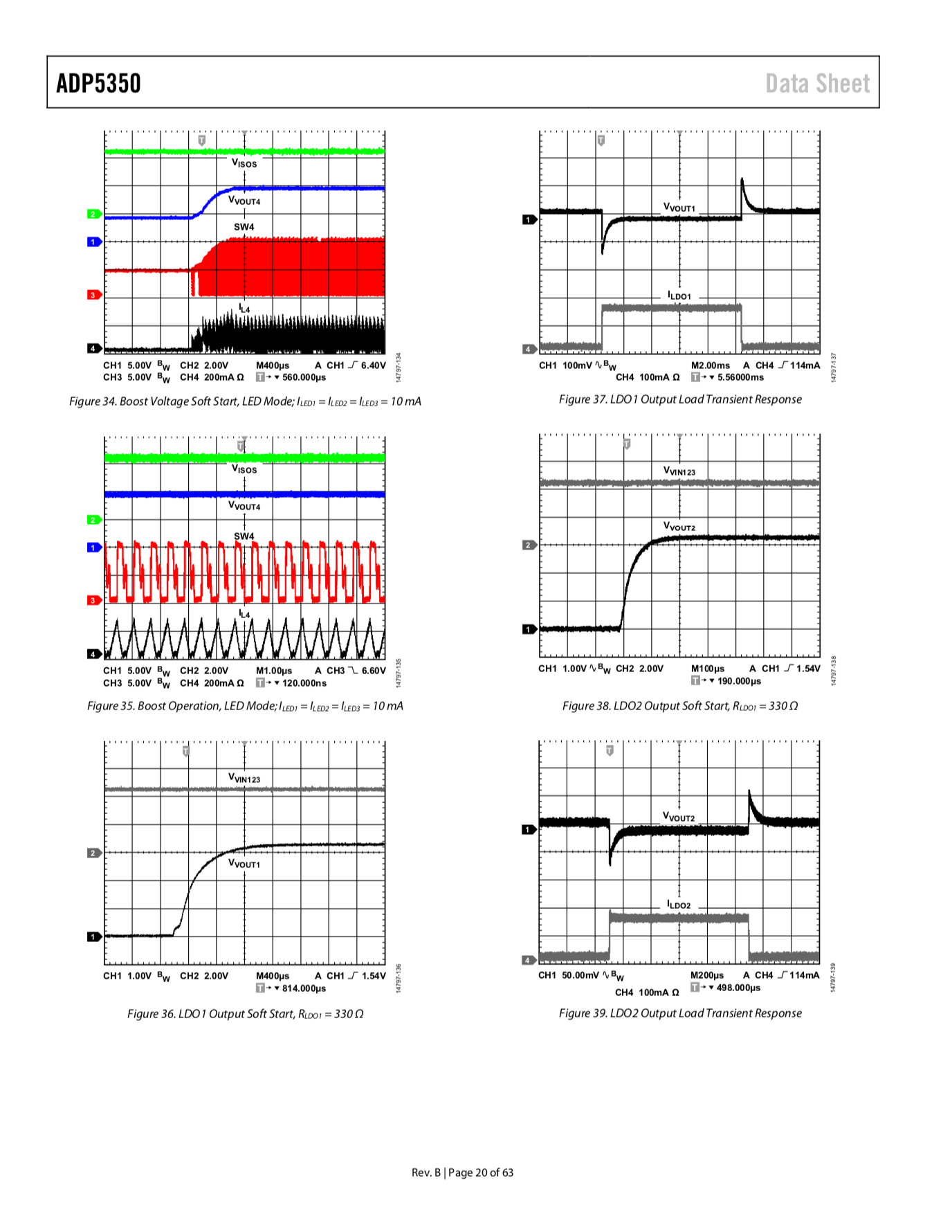
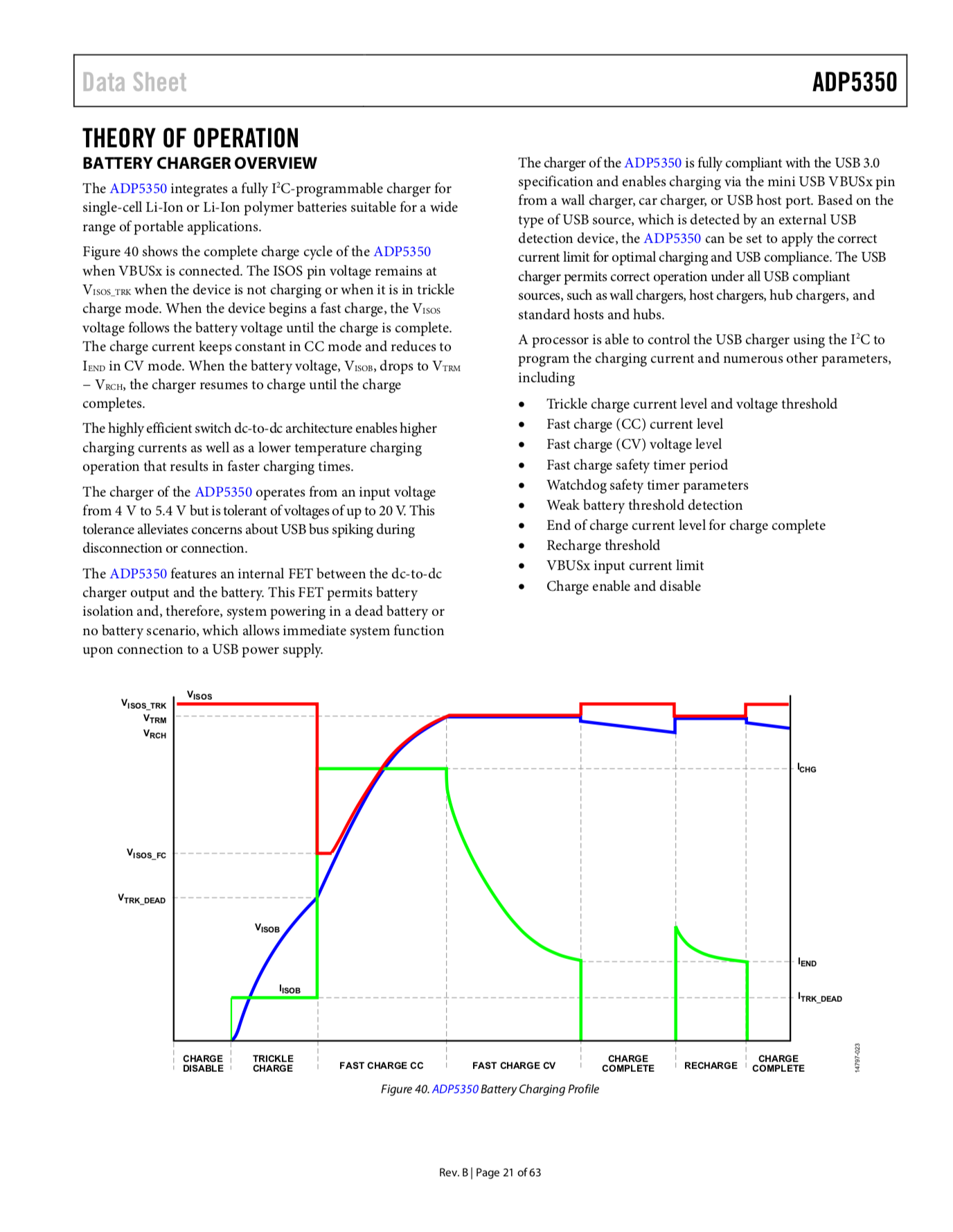
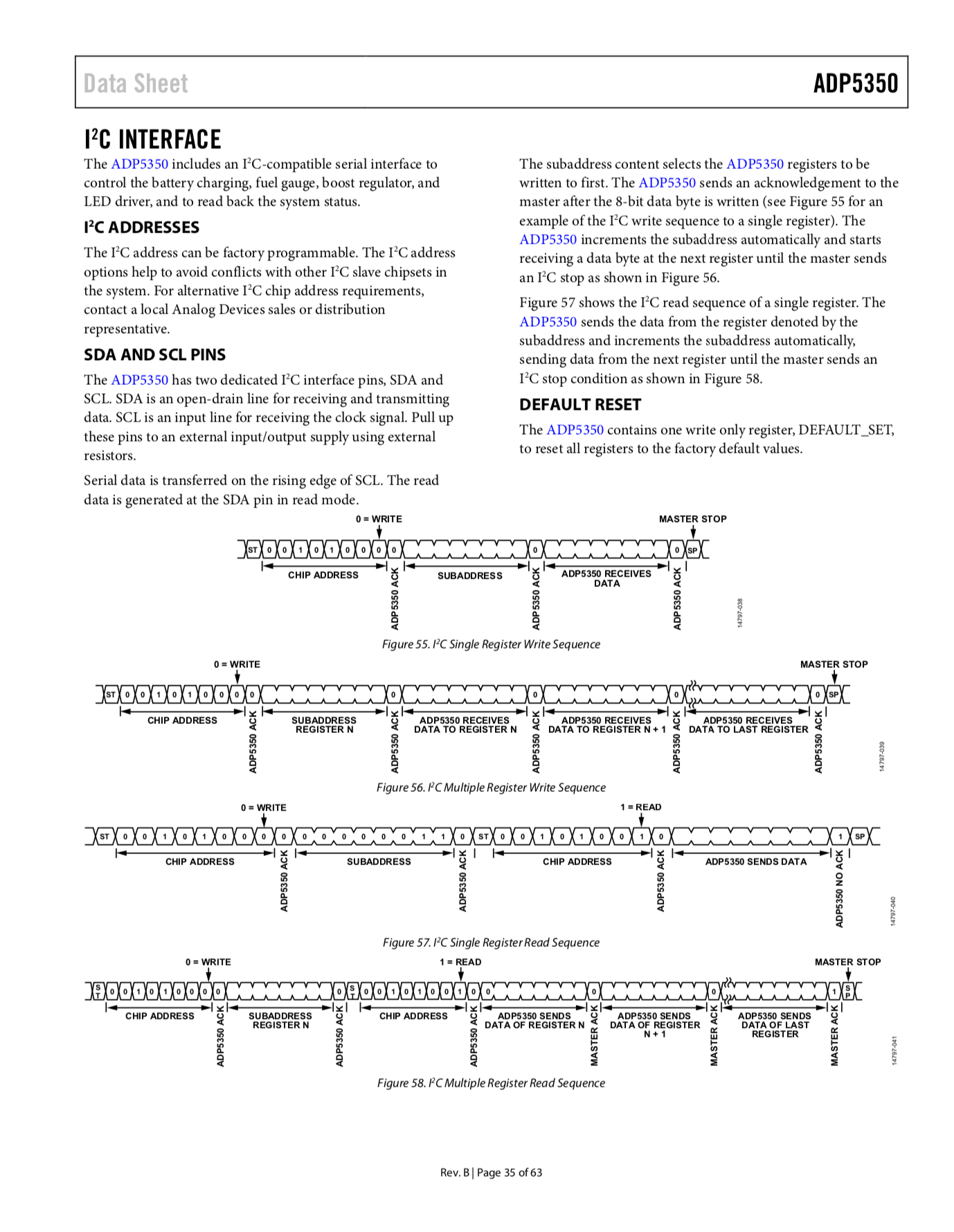
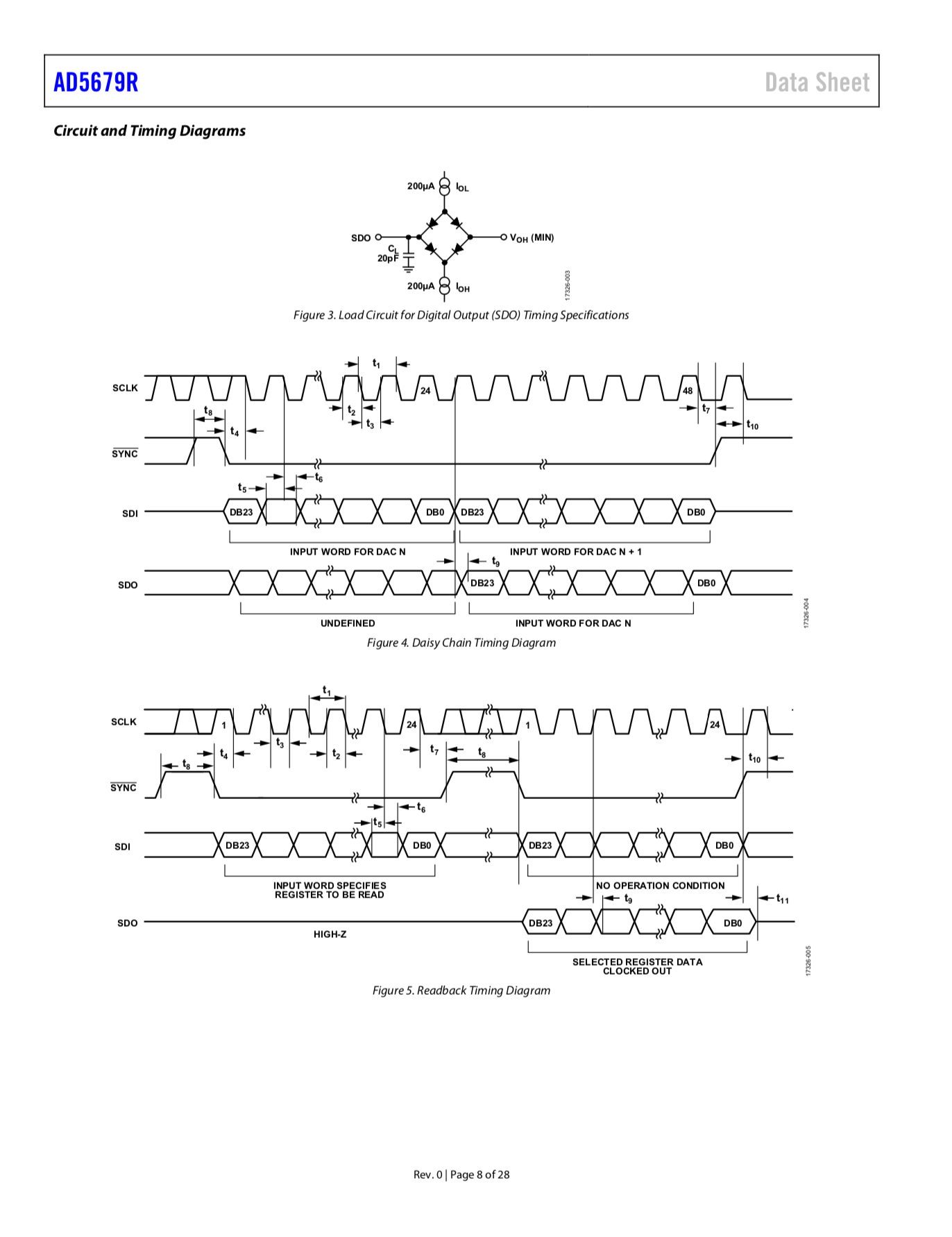
Stripe's design is choke-full of extremely small details - subtle shadows, gradients, little bits of animation and the feeling of "buttery smoothness" as one glides across an enormous amount of information. There is another side of the coin - ultra-functional, straight up unapologetically unadorned, shall we call it - Brutal - in the sense of brutalist functionalism in architecture (and lately web-design), that is the Analog Devices datasheets. They produce one of the most well put together documentation of complex "APIs" ever. Just take a look - for example, their latest D/A convertor, AD5679R, and its datasheet.

Each AD device is carefully analyzed, its performance characterized using sophisticated metrology setup and calibration. They share all this data for engineers to make better decisions, make fewer errors and know the limits of operation. There is much to learn from this. Not only do they provide specifications, but a physical evaluation board (at a cost) and free to use reference designs. They're well-engineered with best practices and provide key insights into the operation of specific AD components. Furthermore, just looking at the reference design is enough to convince the engineer - barring costs (AD components are usually expensive), they make specific circuits extremely easy to implement and have reliable, predictable performance.

I just want to thank the entire team at Analog Devices for paying intense attention to detail in their documentation, make it easy to access - datasheet links are everywhere on their website, a user doesn't even have to go to the product page to download. Moreover, all links are directly to PDFs, there is no need to register. They've ensured absolutely zero impedance (pardon the pun) for their customers to access the most critical piece of information they need - i.e., the almighty datasheet.

Amazing really, and it needs to be known outside of the electrical engineering world. We need to do a better job of documentation anywhere and everywhere we work - no matter what type of job we have.

I've taken a few snaps to share, but plead you to download [pdf] one in its fully glory.

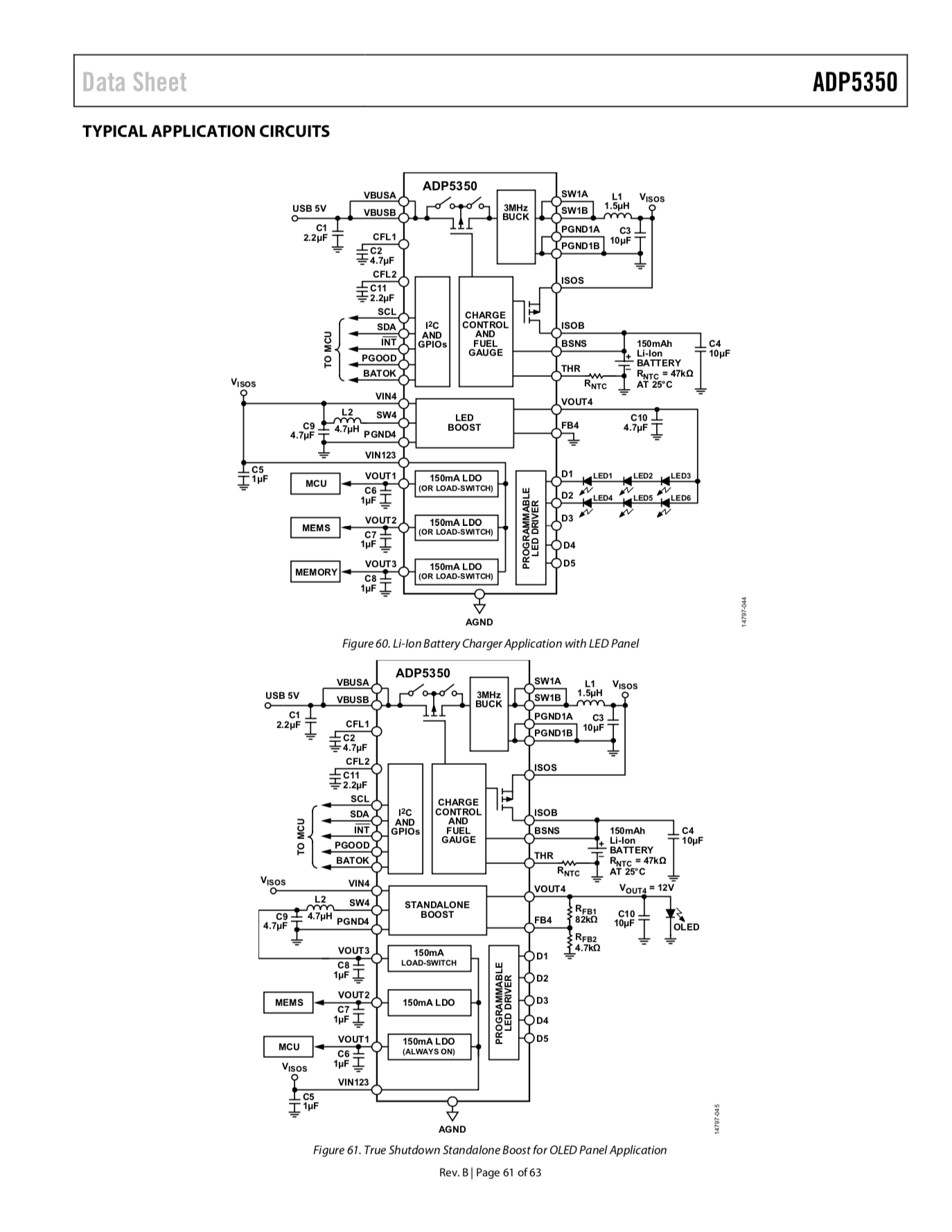
Analog Devices Datasheet for a PMIC (Power management IC)
Device Characterization
Brutalist color palette in plots
I2C Interface
I2C Interface
AD's new low power PMIC, typical application block diagram
AD's new low power PMIC, typical application block diagram 
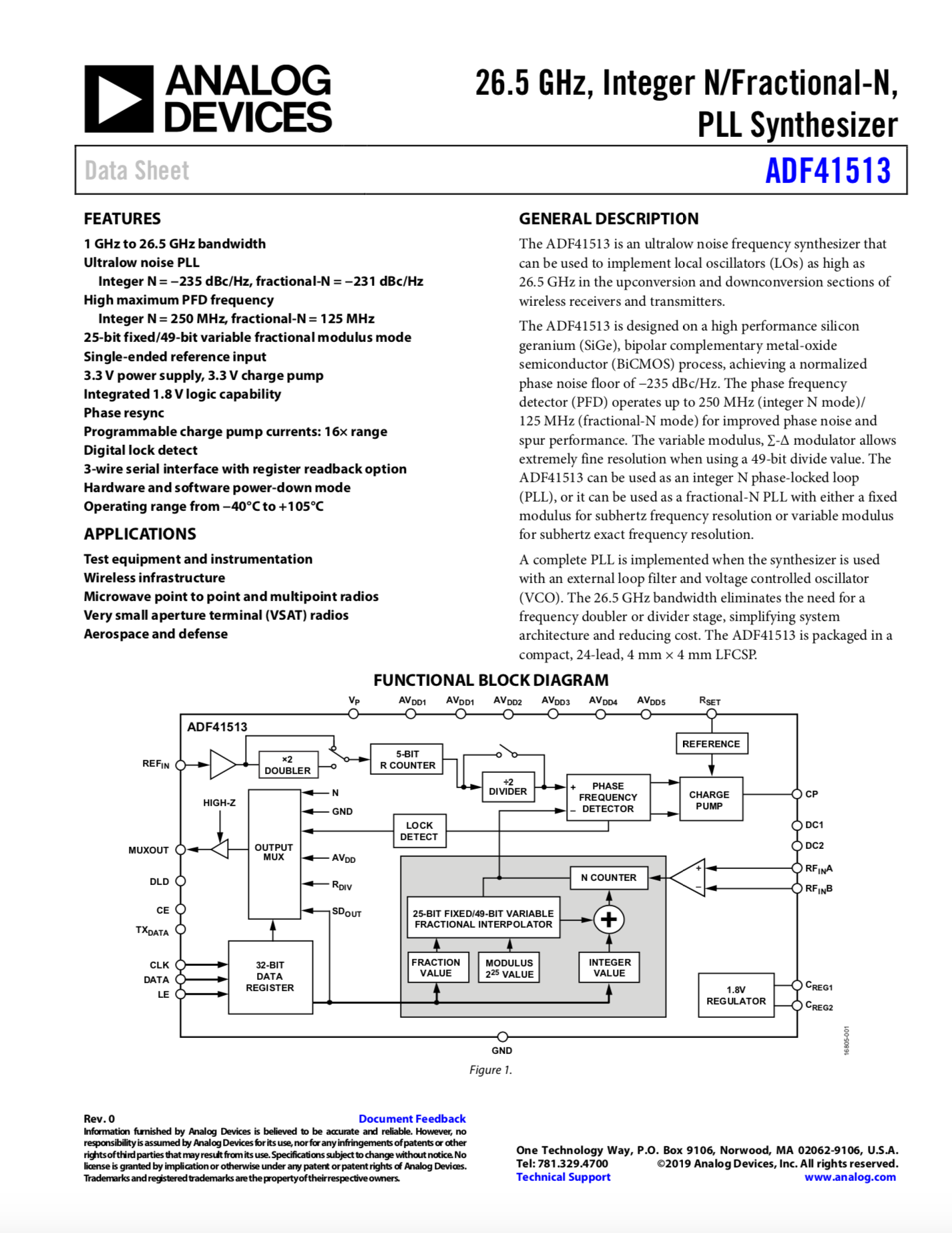
Block Diagram
Block Diagram
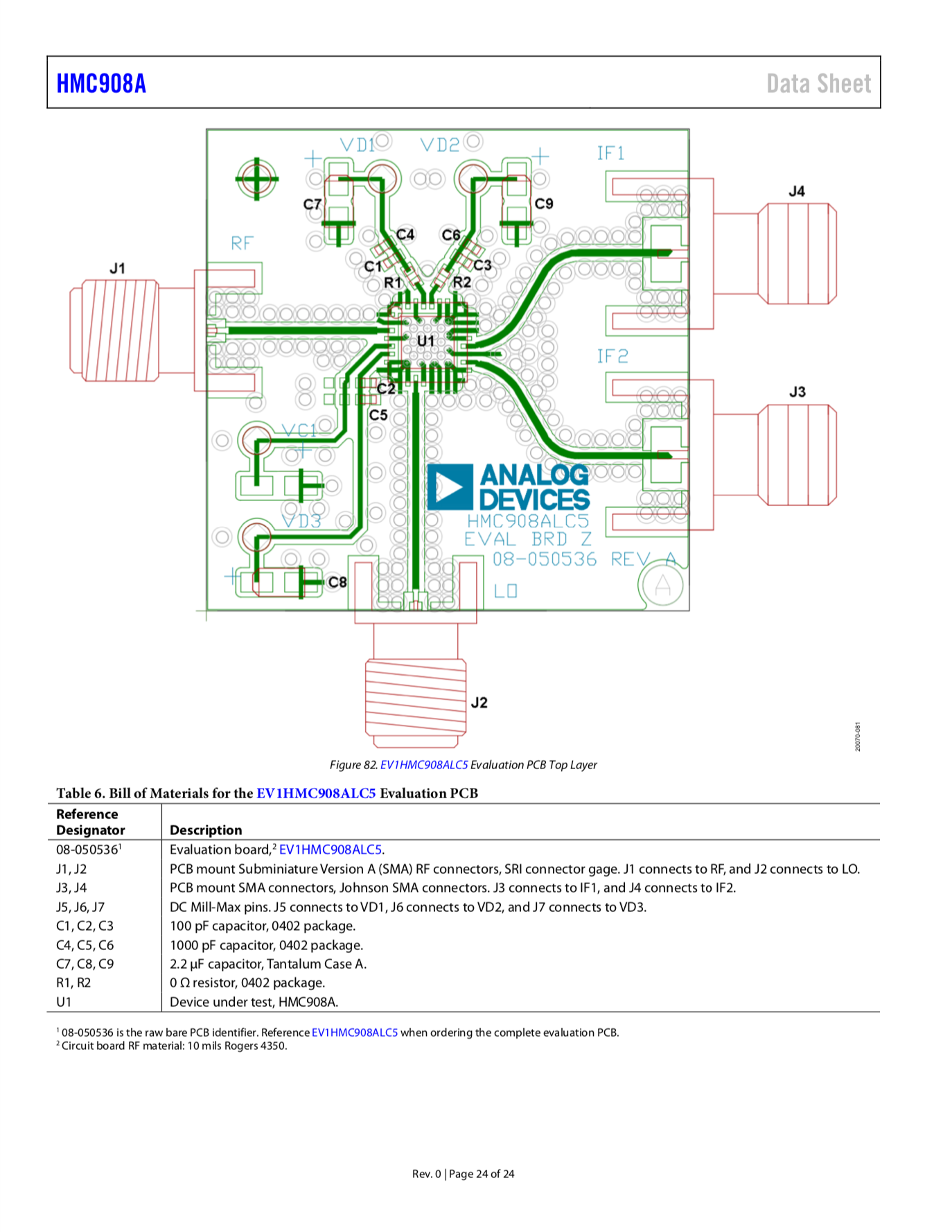
RF Layout
RF Layout
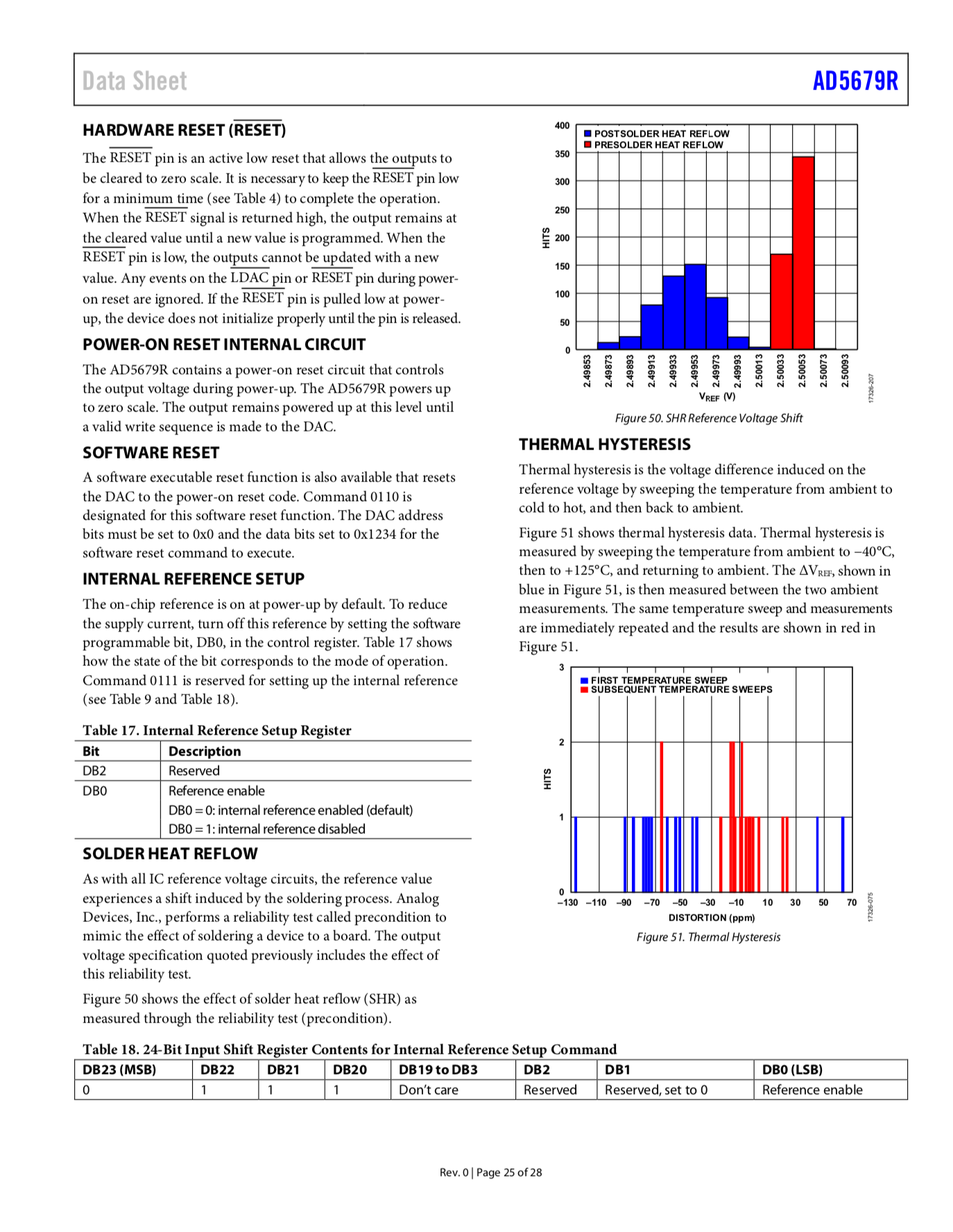
Reflow and Thermal Hysteresis Analysis
Timing Diagram
Timing Diagram


from Hacker News https://ift.tt/2nQ3Ot9